CEAPI endpoint reference
This topic describes the endpoints exposed in the CEAPI.
Note: In all code samples in this topic, tokens and other long strings have been truncated to save space.
activity
POST activity sends chat activity messages into the system. These messages will not be stored in the chat transcript.
| URI | activity |
|---|---|
| HTTP method | POST |
| Content type | application/x-www-form-urlencoded |
Parameters
| Name | Value | Type | Required |
|---|---|---|---|
| customerID | The customerID value returned by the Engagement Request response. | string | yes |
| engagementID | The engagementID value returned by the Engagement Request response. | string |
yes |
|
activityType |
Activity type, currently available: customerStartTyping, customerStopTyping, customerMinimizeWindow, customerRestoreWindow, uploadFile. | string |
yes |
| messageText | Custom text for activity. It's used only for uploadFile activity. | string | for uploadFile only |
HTTP Codes
| Code | Meaning |
|---|---|
| 200 | activity is posted correctly. |
| 400 | Request has incorrect parameters. |
| 401 | Authorization error. |
| 500 | Server error during request. |
Example of sending a message
POST https://{api.nuance.com}/engagementAPI/v1/customer/activityBody:
customerID=111&engagementID=111&activityType=customerStartTypingResponse Example
200 OK
Activity Types
Activity types customerStartTyping and customerStopTyping tell the agent when the customer starts or stops typing. customerStartTyping should only be
repeated if there was a customerStopTyping request. The stop typing activity type should be sent when there is no user input for a timeout period (such as
4 seconds, for example.)
The following pseudocode sketches the algorithm for client to send start and stop typing:
boolean isTyping = false;

Timer stopedTypingTimer = null;

// event handler for user typing event (onKeyPress, onChange or similar event)
function onUserTyping() {
  // reschedule the stoppedTyping timer to the new time = now + 4seconds
  cancelTimerIfNotNull(stoppedTypingTimer);
  stoppedTypingTimer = scheduleTimer(now + 4sec, onStoppedTyping);

  if (!isTyping) {
    POST activity ? activityType = customerStartTyping
      isTyping = true;
  }
}

function onStoppedTyping() {
  isTyping = false;
  POST activity ? activityType = customerStopTyping
}
agentAvailability
GET agentAvailability determines the current agent availability status.
Agent availability status depends on currently active engagements, total agent “slots” (sum of available slots across all agents in the relevant agent group) and queue threshold (configured per agent group). The primary value in the response is agent availability (true or false) which is based on the following algorithm:
(Queue Threshold) * (Total Agent Slots) – ((Total Active Engagements) + (Total Queued Engagements))
If this number is greater than 0, agent availability is true. If it is less than or equal to 0 agent availability is false.
agentAvailability is typically used to decide whether to present an invitation to engage or to determine whether a program is within the hours of operation.
| URI | agentAvailability |
|---|---|
| HTTP Method | GET |
| Response Formats | XML or JSON |
Parameters
| Name | Value | Type | Required |
|---|---|---|---|
| agentAttributes | List of agent attributes used in routing process. Format: attribute1,value1;attribute2,value2 etc. | string | no |
| agentGroupID |
Agent Group ID to check agent availability. This parameter is required only for sites that have agent groups |
string | yes |
| businessUnitID | Business Unit ID to check agent availability and HOP availability | string | yes |
| output | XML or JSON. Default is XML. | string | no |
| siteID | Site ID to check agent availability | string | yes |
| queueThreshold | Queue threshold to check agent availability. | number | no |
Response HTTP Code
| Code | Meaning |
|---|---|
| 200 | Message was accepted by server |
| 400 | Request has incorrect parameters |
| 403 | User hasn't privileges to use api or to see requested site |
| 500 | Server error |
Response Values
|
Name |
Value |
Type |
Description |
|---|---|---|---|
|
availability |
true or false |
boolean |
Based on request content and related program configuration/utilization, is there an agent or queue slot available at the time of the request |
|
inHOP |
true or false |
boolean |
Hours of Operation is defined at the site or Agent Group level. This represents when a program is open or closed. True is returned if the program is open. False is returned if the program is closed. |
|
status |
online, busy, offline |
string |
Indicates whether there are active agents (online), agent logged in but none active (busy) or no agents logged (offline). |
| queueDepth | number | number | Number of people in line |
estimatedWaitTime |
number | number | Estimated wait time in seconds |
Request Example
GET https://{api.nuance.com}/engagementAPI/v1/customer/agentAvailability?siteID=10003715&businessUnitID=13000508&agentGroupID=10004026Note: Business Unit ID parameter is required.
Response Example
200 OK
<?xml version="1.0" encoding="UTF-8"?>
  <message>
    <inHOP>true</inHOP>
    <status>online</status>
    <availability>true</availability>
    <queueDepth>0</queueDepth>
    <estimatedWaitTime>0</estimatedWaitTime>
  </message>
Note: If all chat slots are taken up and the agent gets another chat request then the status will be busy and availability will be false.
Here is an example:
<?xml version="1.0" encoding="UTF-8"?>
<message>
<inHOP>true</inHOP>
<status>busy</status>
<availability>False</availability>
<queueDepth>0</queueDepth>
<estimatedWaitTime>0</estimatedWaitTime>
</message>
assisted
POST assisted allows applications to indicate when the criteria has been met for assisting a customer using an engagement.
| URI | event/assisted |
|---|---|
| HTTP Method | POST |
| Formats | JSON |
Parameters
| Name | Description | Required | Data Constraints |
|---|---|---|---|
| attributes | List of any modifiable name/value attributes that you want to associate to this customer, engagement or session |
No |
N/A |
| attributes:action | Action to be performed on this attribute | No | Must be one of append, set or remove, default is append |
| attributes:attributeType | Type of attribute that we are setting or modifying | Yes | Must be one of engagementAttribute, visitorAttribute, or applicationAttribute |
| attributes:externalCustomerID |
Can be used only for visitor attributes , If this visitor attribute can be used as a unique identifier for this user, please indicate it using a yes value in this field |
No | Must be either yes or no, default is no |
| attributes:name | Name of this attribute | Yes | String |
| attributes:value | Value of this attribute. Can be multi-valued | Yes | String |
| agentGroupID | Id of current agent group provided by Nuance to use on the Nuance platform. Must be the same like this engagement had on /engagement call. Default value is agentGroupID from /engagement request.This parameter the same as businessUnitID parameter is used only to determinate hours of operations in call moment. Priority to get hours of operations in case when both agentGroupID and businessUnitID are set is next: get this data by agentGroupID value first and after by businessUnitID parameter. If both business unit level and agent group level settings are configured then only agent group level settings are used. Hours of operation is always true if this field is absent and businessUnitID is also not set. | No | Integer |
| businessRuleID |
Business rule ID is used to tie this engagement to a business rule for reporting purposes. This field must have the same value like the engagement had on /engagement call. Default value is businessRuleID from /engagement request |
Yes | String, possible values are: [a-z], [A-Z], [0-9], [-], [_] |
| businessUnitID | Id of current business unit provided by Nuance to use on the Nuance platform. Must be the same like this engagement had on /engagement call. Default value is businessUnitID from /engagement request. This parameter the same as agentGroupID parameter is used only to determinate hours of operations in call moment. Priority to get hours of operations in case when both agentGroupID and businessUnitID are set is next: get this data by agentGroupID value first and after by businessUnitID parameter. If both business unit level and agent group level settings are configured then only agent group level settings are used. Hours of operation is always true if this field is absent and agentGroupID is also not set. | No | Integer |
| customVariables | Can be used to store information that can be used for targeting |
No |
N/A |
| customVariables:action | Action to be performed on this custom variable | No | Must be one of append, set, remove, default is append |
| customVariables:name | Name of this custom variable | Yes | String |
| customVariables:persistence | Recommended persistence lifespan | No | Must be either volatile or persistent, default is persistent |
| customVariables:value | Value of this custom variable. Can be multi-valued | Yes | String |
| engagementID | Id of engagement provided by the Nuance platform. This parameter is used to log into customAttribute record with attribute type engagementAttribute |
Yes |
Integer |
| sessionID | Id of current session. Must be the same like this engagement had on /engagement call. Required if request contains applicationAttributes . This parameter is used to log into customAttribute record with attribute type application | No | String, possible values are: [a-z], [A-Z], [0-9], [-], [_] |
| siteID | Id of site provided by Nuance and will be a static value for client application.Must be the same like this engagement had in engagement call | Yes | Integer |
| tcCustomerID |
customerID provided by the Nuance Customer Engagement API when the /engagement endpoint is called or by the Nuance Data Collection API when the /startSession endpoint is called. Must be the same like this engagement had on /engagement call in customerID parameter. Also this parameter is used to do correct balancing. |
Yes | String, possible values are: [a-z], [A-Z], [0-9], [-], [_] |
| viewID | Identifier for the current content displayed (or otherwise provided) to the customer | No | String |
Response HTTP Code
| Code | Meaning |
|---|---|
| 200 | Message was accepted by server |
| 400 | Request has incorrect parameters |
| 403 | User hasn't privileges to use api or to see requested site |
| 500 | Server error |
Request Example
POST https://{api.nuance.com}/engagementAPI/v1/customer/event/assistedPOST body:
{
		 "tcCustomerID": "465657113802851330",
		 "siteID": 306,
		 "businessUnitID": 22,
		 "agentGroupID": 10004091,
		 "viewID": "6789231234",
		"sessionID": "55552456234234",
		"engagementID": 123433332111,
		"businessRuleID":"12351dsf123213",
		"customVariables": [
		{
		"name": "attributeName@&^",
		"value": "attributeValue",
		"persistence": "persistent",
		"action": "append"    }
		],
		"attributes": [
		{
		"name": "visAttr 1",
		"value": "visAttr Value11",
		"attributeType": "visitorAttribute",
		"externalCustomerID": "Yes",
		"action": "set"    },
		{
		"name": "attr1",
		"value": "visAttrValue22 !$>",
		"attributeType": "applicationAttribute",
		"action": "set"    },
		{
		"name": "attr2",
		"value": "visAttrValue22 !$>",
		"attributeType": "engagementAttribute",
		"action": "remove"    }
		]
		}
Response Example
200 OK
ETL logs example:
1495206882128-customer.customAttribute?attributeType=visitor&customerID=465657113802851330&siteID=306&attr=visAttr+1,visAttr+Value11,set&pageName=6789231234&externalCustomerIDs=visAttr+1
1495206882128-customer.customAttribute?attributeType=application&customerID=465657113802851330&siteID=306&sessionID=55552456234234&attr=attr1,visAttrValue22+%21%24%3E,set&pageName=6789231234...
Note: ETS logs example has been truncated for brevity.
Request Example 2
POST https://{api.nuance.com}/engagementAPI/v1/customer/event/assisted
POST body:
{
"tcCustomerID": "465657113802851330",
"siteID": 306,
"engagementID": 123433332111,
"businessRuleID":"asdfasdasd4111"}
Response Example
200 OK
ETL log example:
1495206995659-conversionFunnel.assisted?incAssignmentID=465657113802851330&businessRuleID=asdfasdasd4111&chatID=123433332111&customerID=465657113802851330&siteID=306&sessionID=465657113802851330&type=APIchat&inHOP=1dataPass
POST dataPass sends the agent the context of the user or their experience. dataPass can occur during an engagement and displayed to the agent or agents within the agent interface transcript panel.
Examples of information you can send to an agent are email ID, a client-provided customer identifier, and customer demographics.
Note: You can mark sensitive data values for masking as well.
| URI | dataPass |
|---|---|
| HTTP Method | POST |
Parameters
| Name | Value | Type | Required |
|---|---|---|---|
| agentID | Agent which will see dataPass. | string | yes |
| <attributeName1> | <attributeValue1> Any POST parameter except reserved names. | string | yes* |
| <attributeName2> | <attributeValue2> | string | no |
| engagementID | ID passed for this engagement by the engagement API response | string | yes |
Note: * At least one attribute parameter is required.
Response HTTP Code
| Code | Meaning |
|---|---|
| 200 | Message was accepted by server |
| 400 | Request has incorrect parameters |
| 401 | There is no such chat on server, chat should be started anew. |
| 403 | User hasn't privileges to use api or to see requested site |
| 500 | Server error |
Masking
You can use the following syntax to mark attribute values for masking:
((masked{['myDataString']}masked))Request Example 1
POST https://{api.nuance.com}/engagementAPI/v1/customer/dataPassPOST Body:
engagementID=86448213037320856&agentID=2123411123&key1=value1&key2=value2&key3=value3Request Example 2
POST https://{api.nuance.com}/engagementAPI/v1/customer/dataPassPOST Body:
engagementID=86448213037320856&agentID=2123411123&key1=((masked{['value1']}masked))&key2=value2&key3=value3Response Example
200 OK
emailTranscript
POST emailTranscript sends a chat customer a transcript of the chat content via email. When you call this method, the client may flag an open engagement to be sent to the customer's email address after you complete the engagement.
Note: The engagement is considered as complete only when the session has timed out or the client uses the API to end the chat using the 'stateChange=closed' parameter.
When the engagement is complete, the email containing the transcript will be queued up to be sent by email.
| URI | emailTranscript |
|---|---|
| HTTP Method | POST |
| Formats | XML or JSON |
Parameters
| Name | Value | Type | Required |
|---|---|---|---|
| customerID | The customerID value returned by the Engagement Request response. | string | yes |
| customerName | Default = You if a customer name is not specified. | string | no |
| engagementID | The engagementID value returned by the Engagement Request response. | string | yes |
| emailAddress | Must match a valid email address. | string | yes |
| emailSpecID | The email specification ID that describes the email criteria defined in TouchPortal. In case of a missing or invalid emailSpecID, the default site emailSpec will be used. | string | no |
| output | The accept header value is ignored. The default value is XML. | string | no |
| siteID | Matches the siteID. Missing or invalid siteID will generate a 403 error. | string | yes |
Request Headers
| Name | Value | Type | Required |
|---|---|---|---|
| X-Protection-Id | The ProtectionId value returned by the Engagement Request response. | string | no |
Request Example
POST https://{api.nuance.com}/engagementAPI/v1/customer/emailTranscriptPOST body:
customerID=12334112&engagementID=39747223223&emailAddress=janesmith@gmail.com&siteID=402Response Example
200 OK
engagement
GET engagement requests the initiation of an engagement (chat session). Whether or not the engagement is initiated depends on agent availability. Agent availability is based on the following algorithm:
The primary return value is status, which indicates whether the request was immediately assigned to an agent (accepted), placed in a queue (queued), or refused (denied).
Note: Try not to call an engagement request until there is truly a need to assign/reserve an agent slot for a customer. For example, you should avoid an engagement request call before presenting a click to chat or proactive invitation.
You may call an engagement request when the customer engages in chat by sending the first message.
| URI | engagement |
|---|---|
| HTTP Method | GET, POST |
| Request Content Type | application/x-www-form-urlencoded |
| Response Formats | XML or JSON |
Note: According to this Content-Type, values in all key-value pairs must be URL encoded.
Parameters
| Name | Value | Type | Required | ||||||||||||||||||||
|---|---|---|---|---|---|---|---|---|---|---|---|---|---|---|---|---|---|---|---|---|---|---|---|
| agentAttributes |
List of agent attributes used in the routing process. Format: attribute1,value1;attribute2,value2;attribute3,value3 Example: location,SD;location,AH;timezone,pst Note: Agent attributes are used to specify the attributes used for routing (sometimes called routing attributes). If set, this parameter will include the named attributes when checking availability or requesting an engagement. This call will look for an agent who possesses all of the listed skills. |
string | no | ||||||||||||||||||||
|
agentGroupID |
Agent Group ID to check agent availability. This parameter is required only for sites that have agent groups. |
string |
Yes for sites where Agent Group functionality is enabled. No for sites where Agent Group functionality is not enabled. |
||||||||||||||||||||
| agentMessageEndpointId |
Engagement’s agent message to be posted to the customer specified endpoint instead of long polling.Based on agentMessageEndpointId provided, specific endpoint URL is fetched from DB along with authentication parameters. Endpoint data for the site can be configured through Portal UI. Please refer for more details: NDEP CEAPI POST Service Functionality (CEAPI callback functionality) |
No | Integer | ||||||||||||||||||||
| agentMessageEndpointDynamicUrl |
Dynamically provided Callback URL to POST agent messages to client. If dynamic URL is provided, instead of polling for agent messages CEAPI will post the agent messages to callback URL whenever the agent replies. In order to enable this feature callback URL should satisfy at least one Regexp. Regexp can be configured on portal for a particular Site. Please refer for more details: NDEP CEAPI POST Service Functionality (CEAPI callback functionality) |
No | String | ||||||||||||||||||||
| asyncSurveySpecID | ID of specification to be used to schedule post chat survey for asynchronous chats when conversation resolved or expired. | string | no | ||||||||||||||||||||
| automatonFields | Extension for automaton content which is used for automaton initialization. | string | no | ||||||||||||||||||||
|
automatonID |
Associated automation ID with this engagement request. Currently used for virtual agent integration. Virtual agent automaton ID must be pre-defined in the configuration for this parameter. |
number |
no |
||||||||||||||||||||
| automatonDataMap | Automaton parameters that will be pass to AI automaton and integration automaton. Format of this field is simple JSON object string. Ex: {"tGuardToken":"ePzER6z76Stll7HV1gl7", "field2":"value2", ...} | string | no | ||||||||||||||||||||
| browserType | Customer's browser type |
string |
no |
||||||||||||||||||||
| browserVersion | Customer's browser version |
string |
no |
||||||||||||||||||||
| businessRuleAttributes | List of business rule attributes used for ETL logging. Format: attribute1, value1; attribute2, value2. (Used to log Facebook or Twitter account name, message type and start keyword (if it is not empty). Facebook message types: post, comment, reply. Twitter message type: message. | string | no | ||||||||||||||||||||
|
businessRuleID |
Name of business rule. Parameter is used to tie this engagement to a business rule for reporting purposes. |
string |
no |
||||||||||||||||||||
|
businessUnitID |
Business Unit ID is used to tie this engagement to a business unit for reporting purposes |
string |
yes |
||||||||||||||||||||
|
conversationChannel |
|
string | no | ||||||||||||||||||||
| conversationId |
The parameter is only required when conversationChannel values are equal to SMS_TWILIO, FACEBOOK, TWITTER, APPLE_BUSINESS_CHAT, NINA_WEB_API_PROXY, SMS_NUANCE. It is private parameter. Possible values are: [a-z], [A-Z], [0-9], [-], [_] |
string | no | ||||||||||||||||||||
| createNewConversation | If the value is true, than always created new conversation for new engagement. This parameter makes sense only for asynchronous engagement (isAsyncEngagement=true). | boolean | no | ||||||||||||||||||||
|
customerID |
If the application has a customerID from a prior request to this API, then it should be passed here. If this field is left blank, a new customerID will be created and returned. |
string |
no |
||||||||||||||||||||
| customerName | Custom name of customer to show in Agent Interface | string | no | ||||||||||||||||||||
| deviceType | Device type which customer uses to start this engagement. Default value is CEAPI on reporting side and EAPI in AI application | string | no | ||||||||||||||||||||
| fakeEngage | This flag is set to true in to create a chatroom without routing to an agent. Used to add a customer message to a conversation transcript. | boolean |
no |
||||||||||||||||||||
| followUpAgentId | Follow Up agent ID uses to start follow up chat for follow up mode = TIMEOUT | string | no | ||||||||||||||||||||
| followUpMode |
Follow Up Mode indicates how the follow up chat was started. followUpMode - etlValue
|
string | no | ||||||||||||||||||||
|
initialCustomerID |
Customer ID used to continue a conversation when the client changes conversation channel and the current customer ID (customerID parameter) is different from the initial conversation. |
string | no | ||||||||||||||||||||
|
InitialMessage |
Initial message sent by customer |
string |
yes |
||||||||||||||||||||
| initialMessageReply | Reply to client with initial message (text from InitialMessage parameter) in one of next GET /message responses. Default is true. | boolean | no | ||||||||||||||||||||
| intactAutomatonAnswer | If the value is true, message from VA is NOT wrapped in div automaton. If 'false': "<div onclick=\"" + CI_ON_CLICK_HANDLER + "\" >" + agentAnswer + "</div>". | boolean | no | ||||||||||||||||||||
| isAsyncEngagement | If the value is true, the engagement is asynchronous. | boolean | no | ||||||||||||||||||||
| launchPageMarker | Name of the page where the engagement invites are launched. Default value is EAPI. | string | no | ||||||||||||||||||||
|
launchType |
launchType is displayed in the Agent Interface to notify the Agent which type of device or experience that the customer is in. To set the Agent Interface background color, use these launchType values in all CAPS.
|
string |
no |
||||||||||||||||||||
|
opener |
Opener message that will be added to transcript upon agent assign. |
string |
no |
||||||||||||||||||||
| operatingSystemType | Customer's operating system | string | no | ||||||||||||||||||||
|
output |
XML or JSON. Default is XML. |
string |
no |
||||||||||||||||||||
| pageID | Page Marker ID where an engagement starts. This parameter should be pre-defined in Portal. | number | no | ||||||||||||||||||||
|
persistentCustomerId |
Persistent (unique) customer ID. |
string |
no |
||||||||||||||||||||
|
phoneNumber |
If this engagement is to be a call engagement, use this field to pass the customer’s phone number to the agent. |
number |
no |
||||||||||||||||||||
|
priority |
Initial engagement priority of the engagement request. A higher number indicates a higher priority in the queue. |
number |
no |
||||||||||||||||||||
| pushNotificationDeviceID | Device ID for push notification functionality. The previous deviceID value should be retained in cases where the deviceID is not provided in the engagement request call. | string | no | ||||||||||||||||||||
| queueMessagingSpecID | The ID of the queue messaging spec as identified in TouchPortal. If the queue messaging spec is valid, it will pull the proper queue message and display it as message text when the API caller calls the Get message API call. | number | no | ||||||||||||||||||||
|
queueThreshold |
Queue threshold value for engagement. Used to calculate whether this engagement goes into the queue in cases where agent slots are not available. |
number |
no |
||||||||||||||||||||
|
scriptId |
Script tree ID |
string |
no |
||||||||||||||||||||
| sessionID | Id of current session. Default value is tcCustomerID value from this request. Possible values are: [a-z], [A-Z], [0-9], [-], [_] | string | no | ||||||||||||||||||||
|
siteID |
Site ID to check agent availability. |
string |
yes |
||||||||||||||||||||
| isTopicsEnabled |
This parameter makes sense only for asynchronous engagement (isAsyncEngagement=true). See isAsyncEngagement parameter. The main idea of topic functionality is to support customers being able to have several active conversations at a time and be able to restart a conversation from the past. If the value is true, the engagement supports topic functionality. If the value is false (by default), all engagements for the customer will be in the scope of one default topic according to channel type. |
boolean | no | ||||||||||||||||||||
| topicID |
Topic ID in which the customer wants to continue engagement in case of isTopicsEnabled=true. If the parameter is omitted in case of isTopicsEnabled=true, then new topicID is generated. For the case isTopicsEnabled=false, all engagements will be in the scope of one default topic according to channel type. For example, channel type - topicID:
|
string | no | ||||||||||||||||||||
| topicName |
Name of the topic of case isTopicsEnabled=true. For case isTopicsEnabled=false, all engagements will be in scope of one default topic according to channel type. The name of topic is according to channel type. For example, channel type - topicName:
|
string | no | ||||||||||||||||||||
| protectionModeEnabled | If value is true, it is possible to send own protectionId in header, or get protectionId generated via system. | boolean | no | ||||||||||||||||||||
| virtualAgent.NinaVars | Allows the customer to pass data to the virtual assistant. NinaVars (datapass to Nina) variables should be sent in a JSON string in the URL parameter. This will override automatonFields properly i.e, if virtualAgent.ninaVars is present, only that is sent to the VA. | string | no | ||||||||||||||||||||
| virtualAgent.* |
`*` is a keys sequence that represent the path in TalkAgentRequest where the specified data should be inserted. Both value and TalkAgentRequest are JSON objects. The last item in the keys sequence should be the same as the first key in value Please refer to next specification for more details: Nina Web over CEAPI |
string |
no |
||||||||||||||||||||
| visitorAttributes |
List of visitor attributes used for reporting purpose. Format: attribute1,value1;attribute2,value2;attribute3,value3 Example: location,SD;location,AH;timezone,pst |
string | no | ||||||||||||||||||||
| specificAgentID |
ID of preferred agent to start conversation with. Note: If you use this parameter, in most requests response will be 200 (accepted), but real status of the chat you will get in GET /message (it can be 2nd-5th message). If you get chat.accepted, just continue the chat. If you get chat.denied, please send /exitChat request. |
string | no | ||||||||||||||||||||
| authenticatedUser | parameter used by async chats for c3 validation, current implementation support only JSON value | JSON | no |
Request Headers
| Name | Value | Type | Required |
|---|---|---|---|
| X-Protection-Id | Custom protectionId value which will be used if protection mode is enabled. Parameter is not allowed when protection mode is not enabled. | string | no |
Response HTTP Code
| Code | Meaning |
|---|---|
| 200 | Message was accepted by server |
| 400 | Request has incorrect parameters |
| 401 | Chat can not be created |
| 403 | User hasn't privileges to use api or to see requested site |
| 500 | Server error |
Response Values
|
Name |
Value |
Type |
Description |
|---|---|---|---|
|
customerID |
New customerID is provided if a customerID is not passed with this request |
string |
A RightTouch provided customer identifier. Set the first time an engagement request is made for a unique customer. Should be persisted in the client application and included with all subsequent requests. |
|
engagementID |
ID given to this specific engagement |
string |
A unique identifier for a chat session. It is set and returned with this response. Must be sent by client with each subsequent request during a chat session. |
| status |
accepted | queued | denied |
string |
Indicates whether the request is assigned, placed in queue or refused. Denied could be returned in case of no availability or out of HOP or wrong parameters e.g non-existing queueMessagingSpecId. For Async chats: denied status could be returned in case of wrong parameters, in case of no agent availability or out of HOP it will NOT return denied. For example: non-existing queueMessagingSpecId or wrong configuration of conversation settings in DB. NOTE: Also for async chat users it returns status only according to agent availability for passed queue key (agentGroupID+businessUnitID) but it does not calculate preferredAgent or possibly exisitng chatroom in conversation, so this status could be false. |
| protectionID | protectionID generated via system, or from header from request | string | A unique id for additional protection of the chat. It can be generated via system or customer can send own protectionId via engagement request header. |
Request Example 1
GET https://{api.nuance.com}/engagementAPI/v1/customer/engagement?siteID=306&businessUnitID=22&InitialMessage=I%20need%20some%20helpResponse Example 2:
200 OK
<?xml version="1.0"encoding="UTF-8"standalone="yes"?><message><status>accepted</status><customerID>7657620078025131029</customerID><engagementID>7657620078025405816</engagementID></message>Request Example 2
POST https://{api.nuance.com}/engagementAPI/v1/customer/engagementPOST body:
siteID=306&businessUnitID=22&InitialMessage=I%20need%20some%20helpResponse Example 2:
200 OK
<?xml version="1.0" encoding="UTF-8" standalone="yes"?<message>
<status>accepted</status>
<customerID>7657620078025131029</customerID>
<engagementID>7657620078025405816</engagementID>
</message>Example Virtual Agent Datapass / Automaton Fields
GET https://{api.nuance.com}/engagementAPI/v2/customer/engagement?siteID=306&businessUnitID=22&Initial &virtualAgent.NinaVars={"key1":"ABC","key2":"123"}
https://{api.nuance.com}/engagementAPI/v1/customer/engagement?siteID=10000000&businessUnitID=19001192&automatonFields={%22datapass%22:{ "key1":"ABC","key2":"123"}
exitChat
POST exitChat shows an exit from an engagement that is closed by the customer. This action closes the chat for all actions from the customer’s side.
| URI | exitChat |
|---|---|
| HTTP Method | POST |
Parameters
| Name | Value | Type | Required |
|---|---|---|---|
| customerID | The customerID value returned by the Engagement Request response. | string | yes |
| engagementID | The engagementID value returned by the Engagement Request response. | string | yes |
Request Example
URL https://{api.nuance.com}/engagementAPI/v1/customer/exitChatPOST body:
customerID=566534534634534&engagementID=52362345623453Response Example
200 OK
message (GET)
GET message is used to monitor the status of the engagement and retrieve agent messages. The client application should endeavor to have a GET request pending at all times. A GET message should be called immediately following a successful GET engagement call and each GET request-response for which state is not closed. If GET message is not called within the 60-second timeout, the server connection closes the engagement.
GET message also supports callback functionality in which engagement details are pushed to a customer endpoint. The callback response values are a subset of the Message GET response value superset. Callback parameters are indicated in the Response Values table.
Examples of the information returned by GET message:
- Nothing pending (In this case the server will delay the response for several seconds waiting to see if a status change occurs). If a status change occurs, a response is sent immediately with the new status, such as a new message from the agent. If no status change has occurred for 30 seconds, a 204 HTTP status code is returned.
- Queue status – Callback functionality supported
- A new agent message – Callback functionality supported
- Agent is typing – Callback functionality supported
| URI | message |
|---|---|
| HTTP Method | GET |
| Formats | XML or JSON |
Parameters
| Name | Value | Type | Required |
|---|---|---|---|
| customerID | customerID value returned in GET engagement call. Parameter is required for correct balancing. |
string | yes |
| engagementID | engagementID value returned in GET engagement call. |
string | yes |
| instantResponse | true or false. If true, then return response immediately without waiting. | boolean | no |
| output | XML or JSON. Default is XML. | string | no |
| requestEntireTranscript | true or false. If false, then one message from transcripts will be returned; if true, the entire transcript, which was returned previously in single messages, will be returned in a single response. | boolean | no |
Request Headers
| Name | Value | Type | Required |
|---|---|---|---|
| X-Protection-Id | The ProtectionIdvalue returned by the engagement response. |
string | no |
Response HTTP Code
| Code | Meaning |
|---|---|
| 200 | Message was accepted by server. If a status change occurs, a response is sent immediately with the new status, such as a new message from the agent. |
| 204 | Nothing pending. The server will delay the response for several seconds waiting to see if a status change occurs, if no status change has occurred for 30 seconds. |
| 400 | Request has incorrect parameters. |
| 401 | There is no such chat on server. Chat should be started anew. |
| 403 | User lacks privileges to use API or to see requested site. |
| 500 | Server error. |
Response Values
| Name | Value | Type | Description |
|---|---|---|---|
|
agentName |
Name of agent assigned to this engagement. |
string |
Agent name |
|
agentID |
Numeric ID of the agent assigned. |
string |
The unique identifier of the agent (same as agent login ID). |
|
agentAttributes |
URL Encoded agent attributes. |
string |
The value maybe available only when state=assigned. The value can be used as the availableAgentAttributes parameter to /showSurvey for logging automaton.started keySurvey post chat survey. |
|
command |
pushURL |
string |
A pushURL command is sent. |
| conversationResolved | true/false | boolean |
true : Conversation was resolved. false: Conversation was closed. |
|
engagementID |
Unique numeric ID of current chat. |
string |
The unique identifier of the current chat. |
|
escalate |
true/false |
boolean |
Indicated that chat has been escalated. |
|
from |
Message sender. |
string |
This field contains the recommended customer facing agent name (typically presented something like “Jim: How can I help you?”, where Jim is the agent name presented to the customer. |
|
message |
Tag to wrap the content of each message. |
string |
Indicates a new agent message is included |
| messageData | String format used to pass rich content to the customer, such as jsonString, jsonObject, and HTML tags. | string | Use for rich content only. For simple strings, use messageText instead. |
|
messageText |
Chat line text. |
string |
Use for simple strings only. |
|
messageType |
chatLine | command | stateChange | chatroom.member_connected | chatroom.member_lost |
string |
Type of message that is being returned. When the |
|
ninaResponse.extended:alternateText:text |
Plain text. |
string |
Extended Nina response (optional) which could be shown to end user as alternative to default Nina response. |
|
ninaResponse.extended:alternateText2:text |
Plain text. |
string |
Extended Nina response (optional) which could be shown to end user as alternative to default Nina response. Suitable to be converted to audio and played on end user side. |
|
queueDepth |
Number of customers ahead of you in queue. |
number |
Queue depth is provided when state is queued. |
|
sequenceNumber |
Sequence number of this message. |
number |
The client application can use the sequence number to ensure that messages are displayed in the correct order. |
|
state |
queued | assigned | closed | agentIsTyping| transfer | conference |
string |
The current status of the engagement. This field presents only if |
|
url |
URL of page sent. |
string |
When |
|
waitTime |
Estimated wait time in milliseconds. |
number |
Estimated wait time is provided when state is queued. |
| Internal properties |
Do not use. May change without notice. |
|
|
|
agent.alias |
Alias of the agent. |
string |
Alias of the agent. |
|
business_unit.id |
Numeric ID of assigned to chat business unit. |
string |
Numeric ID of assigned to chat business unit. |
|
chat.receiver_id |
Numeric ID of the message receiver. |
string |
The unique ID of the message receiver. |
|
chatroom.chat_id |
Unique numeric ID of current chat. |
string |
The unique identifier of the current chat. |
|
chatroom.member.id |
Numeric ID of member from state change action. |
string |
Numeric ID of member from state change action. |
|
chatroom.member.name |
Name of member from state change action. |
string |
Name of member from state change action. |
|
chatroom.member.type |
Type of member who send this message. |
string |
Type of member who send this message. |
|
client.display.text |
Text with chat details about state change action for client. |
string |
Text with chat details about state change action for client. |
|
cobrowse.enabled |
true/false |
boolean |
Shows whether cobrowse functionality is enabled for current chat. |
|
display.text |
Text with chat details about state change action. |
string |
Text with chat details about state change action. |
|
reason |
Reason of state change message. |
string |
Reason of state change message. |
|
screening |
true/false |
boolean |
Shows conference mode: screening or full. |
|
tc.mode |
transfer | conference |
string |
Shows transfer mode: transfer, conference. |
|
user.id |
Numeric ID of the message sender. |
string |
Unique ID of the message sender. |
Request Example
GET https://{api.nuance.com}/engagementAPI/v1/customer/message?engagementID=1234567890&customerID=9876543210Response Examples
Chat-line example:
200 OK
<?xml version="1.0" encoding="UTF-8"
standalone="yes"?><messages><message><agentID>1</agentID><agent.alias>
Nuance</agent.alias><messageText>Hello</messageText>
<messageType>chatLine</messageType>
<engagementID>11352335599561178</engagementID></message></messages>
Command example:
200 OK
<?xml version="1.0" encoding="UTF-8"
standalone="yes"?><messages><message>
<messageType> command </ messageType >
<engagementID> lj2ga6rl5v4ejpmp2hsjw </ engagementID >
<initiator.id > jhildebrant_poc_test </ initiator.id >
<url>http://www.google.com <url><time>1234567890</time>
</message></messages>
State change example when engagement is assigned to agent:
200 OK
<?xml version="1.0" encoding="UTF-8" standalone="yes"?><messages><message>
<state>assigned</state>
<agentID>2</agentID>
<agent.alias>Agent</agent.alias>
<messageType>stateChange</messageType><engagementID>7657620082316703106</engagementID><host.node.id>192.168.0.20</host.node.id><business_unit.id>22</business_unit.id>
<cobrowse.enabled>true</cobrowse.enabled>
<chatrouter.address>192.168.0.20</chatrouter.address><event.agent_last_name>User Last Name</event.agent_last_name><event.agent_first_name>User First Name</event.agentfirstname><msg.originalrequest.id>5722840234794661</msg.originalrequest.id></message></messages>State change example when chat is closed by the agent: 200 OK <?xml version="1.0" encoding="UTF-standalone="yes"><messages><message><state>closed</state><escalate>false</escalate>
<messageType>stateChange</messageType><display.text>Agent '2' exitchat</display.text><engagementID>7657620082327188868</engagementID></message></messages>
message (POST)
POST message sends a new message from the customer to the agent. This call can also be used to end the engagement.
| URI | message |
|---|---|
| HTTP Method | POST |
| Request Content Type | application/x-www-form-urlencoded |
Note: According to this Content-Type, values in all key-value pairs must be URL encoded. For example, messageText=I%20need%20some%20help
Parameters
| Name | Value | Type | Required |
|---|---|---|---|
| engagementID | engagementID value returned in engagement request API call. |
string | yes |
| customerID | customerID value returned in engagement request API call. Parameter is required for correct balancing. |
string | yes |
| messageData |
{"key":"value"} for rich data to be passed back to agent. Note: The string should be encoded in the request e.g. %7B%22key%22%3A%22value%22%7D |
string | no |
| messageText | Text from customer. | string | no |
| messageType | Specifies the type of the message. Possible values: stateChange, (default) chatLine. |
string | no |
| state | Possible values: closed. |
string | no |
| virtualAgent.* |
`*` is a keys sequence that represent the path in TalkAgentRequest where the specified data should be inserted. Both value and TalkAgentRequest are JSON objects. The last item in the keys sequence should be the same as the first key in value. Please refer to next specification for more details: Nina Web over CEAPI. |
string | no |
Request Headers
| Name | Value | Type | Required |
|---|---|---|---|
| X-Protection-Id | The ProtectionId value returned by GET engagement. |
string | no |
Response HTTP Code
| Code | Meaning |
|---|---|
| 200 | Message was accepted by server. |
| 400 | Request has incorrect parameters. |
| 401 | No such chat on server. Chat should be started anew. |
| 403 | User lacks privileges to use API or to see requested site. |
| 500 | Server error . |
Example of sending a message
POST https://{api.nuance.com}/engagementAPI/v1/customer/messagePOST body:
customerID=9876543210&engagementID=123456789&messageText=I%20need%20some%20helpResponse Example
200 OK
Example of closing an engagement
POST https://{api.nuance.com}/engagementAPI/v1/customer/messagePOST body:
customerID=9876543210&engagementID=123456789&messageType=stateChange&state=closedResponse Example
200 OK
surveyUrl
GET surveyUrl allows clients to launch a post-chat survey from an application that uses the engagement API.
This endpoint operates in two modes:
-
It allows user to pass in the
engagementIDandcustomerIDof an active engagement and will return the base URL and parameters for launching the native post-chat survey configured for the site's agent group. - It allows the user to pass a
surveySpecIDand will return the base URL for the survey configured for the givensurveySpecID.
| URI | surveyUrl |
|---|---|
| HTTP Method | GET |
| Formats | XML or JSON |
Parameters for native post-chat survey URL of an active engagement
| Name | Value | Type | Required |
|---|---|---|---|
| output | XML or JSON. Default is XML. | string | no |
| siteID | Checks that siteID corresponded to surveySpecID. |
string | yes |
| engagementID | engagementID value returned in engagement request API call. |
string | yes |
| customerID | customerID value returned in engagement request API call. |
string | yes |
| asyncSurveySpecID | Used to schedule post-chat survey for asynchronous chats when conversation resolved or expired. | string | no |
Parameters for post-chat survey URL from KeySurvey with SurveySpecID
| Name | Value | Type | Required |
|---|---|---|---|
| output | XML or JSON. Default is XML. | string | no |
| siteID | Checks that siteID corresponded to surveySpecID. |
string | yes |
| surveySpecID | Gets parameters for survey. | string | yes |
Response HTTP Code
| Code | Meaning |
|---|---|
| 200 | Message was accepted by server. |
| 400 | Request has incorrect parameters. |
| 403 | User lacks privileges to use API or to see requested site. |
| 500 | Server error. |
Implementing a post-chat survey
Once you complete the preparations, the client is ready to implement the post-chat survey functionality from their CEAPI app.
During an active engagement, the app should request the post-chat survey URL from the Customer Engagement API. This is done by submitting a GET request to the /surveyUrl endpoint. The siteId, engagementId, and customerId must also be specified.
Here is an example call:
https://{api.nuance.com}/engagementAPI/v1/customer/surveyUrl?siteID=10003715&customerID=-4489709243015478260&engagementID=-4489709243015203473&output=jsonThis call will return a URL and a string of parameters similar to the following:
{"surveyUrl": "https://bestbrands.inq.com/tagserver/surveys/launchNativePostChatSurvey","surveyLaunchData": "engagementID=-4489709243015203473&customerID=-4489709243015478260&siteID=10003715&surveyID=2022&agentGroupID=10004026&businessUnitID=13000508&agentID=achung_a"}You can launch the survey by loading a web browser and by using a GET or a POST request. To use a GET request, load the page at the survey URL specifying the launch data as a query string. Here is an example to show the loaded URL:
https://bestbrands.inq.com/tagserver/surveys/...
Note: Example (loaded URL) has been truncated for brevity.
The resulting page will launch the post-chat survey within a browser window.
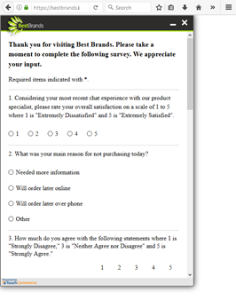
To integrate this experience within the scope of a native app, we recommend opening the post-chat survey via web view client.
Note: Generally, a web view window does not display the address bar, which contains engagement-specific information.
Alternately, the post-chat survey URL will also accept a POST command with the same parameters. This approach is recommended if there are concerns about the engagement details in the address bar.
surveyURL
The surveyURL that is returned by the /surveyUrl request will generally remain constant. However, apps should not hard-code this URL, and instead should use the URL that is returned. This prevents future changes to the survey URL from interrupting post-chat survey functionality.
Chat Themes for Post-Chat Surveys
The chat themes that house the post-chat surveys are set within Nuance Portal and set per device type. The correct theme is loaded automatically when the browser loads the URL. This means that the URL will not change for apps that run on desktop, table, or mobile devices.
Note: If clients need to deploy new apps, they must notify their CSM so Nuance can ensure that a device-appropriate theme is available for the new app's post-chat survey.
Request Example
https://{api.nuance.com}/engagementAPI/v1/customer/surveyUrl?siteID=10003715&customerID=-1655537766535707460&engagementID=-1655537766535432673&output=jsonExample, KeySurvey post-chat survey URL
GET https://{api.nuance.com}/engagementAPI/v1/customer/surveyUrl?siteID=306&surveySpecID=2&output=xmlResponse Example
200 OK
<message><survey.url>http://www.keysurvey.com/survey/267053/e7f8/?LQID=1&&surveyID=267053</survey.url></message>customerSurvey
POST customerSurvey posts the survey response into the system to enhance the user experience. You can view the response of the survey under the Survey Reporting and Survey tabs in the Portal.
Note: This new endpoint for CEAPI is available for v2 only.
POST customerSurvey accepts the survey information and transforms request payload, such as surveyID, siteID, and customerID, in the tag server.
Here is the payload format used by the CEAPI endpoint to submit the survey.
| URI | customerSurvey |
|---|---|
| HTTP Method | POST |
| Format | JSON |
| Endpoint | /engagementAPI/v2/customer/survey |
Request Headers
Content-type=application/json, AuthorizationRequest Payload
{
"siteID": "306",
"engagementID": "2000",
"customerID": "10000",
"surveyID": "1023",
"surveyData": [{
"question": "How would you rate your experience on a scale of 1 to 5?",
"answer": "5"
}, {
"question": "What feature do you like most?",
"answer": "the quality"
}
]
}
Response Example
200 OK
updateDeviceId
POST updateDeviceId updates device IDs for push notification functionality for conversation, in case of absent active engagement.
| URI | updateDeviceId |
|---|---|
| HTTP Method | POST |
| Content Type | application/x-www-form-urlencoded |
Parameters
| Name | Value | Type | Required |
|---|---|---|---|
| customerID | customerID that is required for correct balancing. |
string | yes |
| siteID | Checks that siteID corresponds to user. |
string | yes |
| businessUnitID | Business Unit ID. | string | no |
| pushNotificationDeviceID | For push notification functionality. To remove pushNotificationDeviceId, use empty pushNotificationDeviceId. |
string | yes |
HTTP Codes
| Code | Meaning |
|---|---|
| 200 | Device id for push notification was updated successfully. |
| 400 | Request has incorrect parameters. |
| 401 | Authorization error, client has no access to transcript. |
| 500 | Server error or device id for push notification wasn't updated. |
Note: If client uses OAuth authorization then valid access token should be set in "Authorization" header otherwise client should login in API as engagement API user.
Example of sending a message
POST https://{api.nuance.com}/engagementAPI/v2/customer/updateDeviceIdPOST body:
customerID=-7599162224901667826&businessUnitID=22&pushNotificationDeviceID=1&siteID=306Response Example
200 OK
conversationTranscript
GET conversationTranscript is gets the transcript of the last or all conversations to show the customer by customerID or persistentCustomerID. The persistentCustomerID parameter is in JSON format and includes private customer data, such as an email address, phone number, or account ID.
Data is returned according to the filter template in conversation_filter_settings.
For example:
-
if filter is
"${phone}" IN persistentCustomerID.phone, then if we do not passpersistentCustomerID, it returns nothing. -
if filter is
"${email}" IN persistentCustomerID.email OR customerID = "${customerID}"and if we do not passpcID, then it returns data only bycustomerID.
Note: If there is no record for site in the conversation_filter_settings then it will use customerID for filtering. Please get in touch with the Nuance Dev team to set up conversation_filter_settings.
It is used only for asynchronous chats users and cannot be used for non-async chats to get transcript.
This returns a list of messages for the last conversation or messages for each conversationID (all mode.) It also returns initialCustomerID (customerID started conversation) in response cross-device or cross-browser support.
| URI | conversationTranscript |
|---|---|
| HTTP Method | GET |
| Formats | XML or JSON |
Parameters
| Name | Value | Type | Required |
|---|---|---|---|
| output | XML or JSON. Default is XML. | string | no |
| siteID | Site ID to check that Site ID is corresponded for user | string | yes |
| customerID | CustomerID value returned in engagement request API call
|
string | yes |
| businessUnitID | Initial Business Unit of current conversation | string | no |
| persistentCustomerID |
Private customer identifier from client side in JSON format Ex: NOTE: if any value in JSON key-value pair is empty then request will be failed. Following example of invalid persistentCustomerID: {"email":"", "phone":"111-11-11"}
If conversation filter setting is not specified then filtering by customerID is used. IMPORTANT: When client use conversation filter by persistent customer ID it is important to set unique persistentCustomerID per real client (usually when customer logs in set any specific data like ID). Potential consequence of using the same persistent customer ID for different customer is possibility to see historic transcript of another customer with the same persistent customer ID even on another device and another customerID. Example: Bad persistentCustomerID: persistentCustomerID={"name":"John"}
In this case every customer with the name John will be able to see transcripts of each other. Best practice to use unique ID of customer based on login data: persistentCustomerID={"id":"12345..."}
|
string | no |
| mode | Accepts values: all and last. last is default | string | no |
| days |
Number of days for which conversation trancript is requested. It's used only with mode=ALL. |
string | no |
|
conversationTokenID |
tokenId generated by token-service for third-party channel conversation and passed in landing page url to continue conversation. Must be passed in pair with conversationObjectID. If mode is LAST, then conversation attached to token will be fetched for verified token, if token is not valid, then last customer conversation will be fetched. If mode is ALL, then all customer conversations along with conversation linked to token will be returned. |
string | no |
|
conversationObjectID |
objectId returned by token-service after token verification call, used to fetch conversation data. Must be passed in pair with conversationTokenID. | string | no |
HTTP Codes
| Code | Meaning |
|---|---|
| 200 | Transcript was requested successfully. |
| 400 | Request has incorrect parameters. |
| 401 | Authorization error, client has no access to transcript. |
| 500 | Server error. |
Note: If client uses OAuth authorization, then valid access token should be set in "Authorization" header otherwise client should log in as an engagement API user.
Example of sending a message
GET https://{api.nuance.com}/engagementAPI/v1/customer/conversationTranscript?siteID=306&customerID=1111111&businessUnitID=22&output=json&persistentCustomerID={%27email%27:%20%27aa@aa.aa%27}Response Example
200 OK
Body: "messages":[{"messageText":"I need some help","messageType":"chatLine"},{"messageText":"hi","agentID":"agt@tc.com","messageType":"chatLine","agent.alias":"agt@tc.com"},{"messageText":"bye","agentID":"agt@tc.com","messageType":"chatLine","agent.alias":"agt@tc.com"},{"messageText":"I need some help","messageType":"chatLine"},{"messageText":"hello!","agentID":"agt@tc.com","messageType":"chatLine","agent.alias":"agt@tc.com"},{"messageText":"bye!","agentID":"agt@tc.com","messageType":"chatLine","agent.alias":"agt@tc.com"}]}topicList
GET topicList gets a list of all topics for the current customer. Filtering is by customerID or persistentCustomerID. This call is available for asynchronous chats only. It cannot be used for non-asynchronous chats.
| URI | topicList |
|---|---|
| HTTP Method | GET |
| Formats | XML or JSON |
Parameters
| Name | Value | Type | Required |
|---|---|---|---|
| customerID | CustomerID value returned in engagement request API call. | string | yes |
| siteID | Site ID to check that Site ID is corresponded for user. | string | yes |
| businessUnitID | Business Unit ID. | string | no |
| persistentCustomerID |
Private customer identifier from client side in JSON format Ex: NOTE: if any value in JSON key-value pair is empty then request will be failed. Following example of invalid persistentCustomerID: {"email":"", "phone":"111-11-11"}
If conversation filter setting is not specified then filtering by customerID is used. IMPORTANT: When client use conversation filter by persistent customer ID it is important to set unique persistentCustomerID per real client (usually when customer logs in set any specific data like ID). Potential consequence of using the same persistent customer ID for different customer is possibility to see data of another customer with the same persistent customer ID even on another device and another customerID. Example: Bad persistentCustomerID: persistentCustomerID={"name":"John"}
In this case every customer with the name John will be able to see data other. Best practice to use unique ID of customer based on login data: persistentCustomerID={"id":"12345..."}
|
string | no |
| output | JSON or XML. XML is default. | string | no |
|
conversationTokenID |
tokenId generated by token-service for third-party channel conversation and passed in landing page url to continue conversation. Must be passed in pair with All customer conversations topics along with conversation linked to token are returned. |
string | no |
|
conversationObjectID |
objectId returned by token-service after token verification call, used to fetch conversation data. Must be passed in pair with conversationTokenID. |
string | no |
HTTP Codes
| Code | Meaning |
|---|---|
| 200 | Topic list is returned successfully. |
| 400 | Request has incorrect parameters. |
| 401 | Authorization error, client has no access to transcript data. |
| 500 | Server error during request. |
Example of sending a message
GET https://{api.nuance.com}/engagementAPI/v1/customer/topicList?siteID=306&customerID=1111111&businessUnitID=22&output=json&persistentCustomerID={%27email%27:%20%27aa@aa.aa%27}Response Example
200 OK
Body: {"topics":[{"topicID":"","topicName":""},{"topicID":"1","topicName":"qa"}]},{"topicID":"2","topicName":"2qa"}]}customerStatus
GET customerStatus checks pending messages for the current customer. Filtering is by persistent CustomerID. This call checks whether agent offline pending messages exist for customer.
It is only for asynchronous chats users.
| URI | customerStatus |
|---|---|
| HTTP Method | GET |
| Formats | XML or JSON |
Query parameters
| Name | Value | Type | Required |
|---|---|---|---|
| siteID | Site ID to check that Site ID is corresponded for user. | string | yes |
| customerID | customer ID from chat session. | string | no |
| persistentCustomerID |
Private customer identifier from client side in JSON format Ex: NOTE: if any value in JSON key-value pair is empty then request will be failed. Following example of invalid {"email":"", "phone":"111-11-11"}
If conversation filter setting is not specified then filtering by customerID is used. IMPORTANT: When client use conversation filter by persistent customer ID it is important to set unique persistentCustomerID per real client (usually when customer logs in set any specific data like ID). Potential consequence of using the same persistent customer ID for different customer is possibility to see data of another customer with the same persistent customer ID even on another device and another Example: Bad persistentCustomerID={"name":"John"}
In this case every customer with the name John will be able to see data other. Best practice to use unique ID of customer based on login data: persistentCustomerID={"id":"12345..."}
|
string | no |
| Alias for "persistentCustomerID". Shouldn't be passed together. persistentCustomerID is preferable. | |||
| output | JSON or XML. XML is default. | string | no |
| conversationTokenID |
All customer pending conversations messages data along with conversation linked to token will be returned. |
string | no |
|
conversationObjectID |
objectId returned by token-service after token verification call, used to fetch conversation data. Must be passed in pair with conversationTokenID. |
string | no |
HTTP Codes
| Code | Meaning |
|---|---|
| 200 | hasPendingMessages is returned successfully. |
| 400 | Request has incorrect parameters. |
| 401 | Authorization error, client has no access to transcript data. |
| 500 | Server error during request. |
Request example
GET https://{api.nuance.com}/engagementAPI/v1/customer/customerStatus?siteID=306&output=json&persistentCustomerID={%27email%27:%20%27aa@aa.aa%27}Response Example
200 OK
Body:{"hasPendingMessages": true}setAuthenticatedUser
POST setAuthenticatedUser can be called after an engagement has started. It indicates that the user has authenticated and updates the persistentCustomerID of the engagement. The client should use this call to update NDEP when a user authenticates on the client mobile app and a chat is currently active.
| URI | setAuthenticatedUser |
|---|---|
| HTTP Method | POST |
| Formats | JSON |
Parameters
| Name | Value | Type | Required |
|---|---|---|---|
| engagementID | The engagementID value returned by Engagement Request response. | string | yes |
| customerID | The customerID value returned by Engagement Request response. | string | yes |
| conversationChannel | Channel via wich the conversation was engaged. | string | yes |
| authenticatedUser | Authenticated user data in JSON format. | JSON | yes |
HTTP Codes
| Code | Message |
|---|---|
| 200 | Request was accepted by server |
| 400 | Request has incorrect parameters |
| 401 |
Validation failed/Authorization error.
|
| 403 | User does not have access to this API |
| 500 | Server error |
Example
POST https://{api.nuance.com}/engagementAPI/v1/customer/setAuthenticatedUser?customerID=123&engagementID=123&authenticatedUser={"test": "123", "email": "aaa@test.com"}&conversationChannel=CEAPIResponse Example
200 OK
customerActiveConversations
GET customerActiveConversations checks if there are active conversations and returns conversationIDs and additional data without a transcript.
This is only for asynchronous chat users.
| URI | customerActiveConversations |
|---|---|
| HTTP Method | GET, POST |
| Formats | JSON |
Query parameters
| Name | Value | Type | Required |
|---|---|---|---|
| siteID | Site ID to check that Site ID is corresponded for user | string | yes |
|
persistentCustomerID |
Private customer identifier from client side in JSON format Ex: NOTE: if any value in JSON key-value pair is empty then request will be failed. Following example of invalid {"email":"", "phone":"111-11-11"}
Used for filtering. Passed to template from conversation filter setting. If conversation filter setting is not specified then filtering by IMPORTANT: When client use conversation filter by persistent customer ID it is important to set unique Example: Bad persistentCustomerID={"name":"John"}
In this case every customer with the name John will be able to see data other. Best practice to use unique ID of customer based on login data: persistentCustomerID={"id":"12345..."}
|
string | no |
| customerID | CustomerID value returned in engagement request API call. If conversation filter setting is present, then pattern from setting will be used, otherwise data will be filtered by customerID, If it is not passed in this case, no data will is returned.
|
string | no |
| businessUnitID | Business Unit ID of conversation, if not passed, settings will be requested by siteID | string | no |
|
conversationTokenID |
tokenId generated by token-service for third-party channel conversation and passed in landing page url to continue conversation. Must be passed in pair with All customer conversations along with conversation linked to token will be returned. |
string | no |
|
conversationObjectID |
objectId returned by token-service after token verification call, used to fetch conversation data. Must be passed in pair with conversationTokenID. |
string | no |
HTTP Codes
| Code | Meaning |
|---|---|
| 200 | Returned successfully |
| 400 | Request has incorrect parameters |
| 401 | Authorization error, client has no access to transcript data |
| 500 | Server error during request |
Example of sending a message
GET https://{api.nuance.com}/engagementAPI/v1/customer/customerActiveConversations?siteID=306&customerID=1234567&persistentCustomerID={%27email%27:%20%27aa@aa.aa%27}Response Example
200 OK
Body:
{
"customerID": "1234567",
"conversations": [{
"topicID": "5",
"conversationID": "8",
"topicName": "topicName"
}]
}
verifyToken
GET verifyToken verifies the conversation token generated for cross-channel chats by agent and returns the conversationObjectID and the token in JSON.
This is only for asynchronous chat users.
| URI | verifyToken |
|---|---|
| HTTP Method | GET, POST |
| Formats | JSON, XML |
Query parameters
| Name | Value | Type | Required |
|---|---|---|---|
| siteID | Checks that siteID corresponds to user. |
string | yes |
| customerID | CustomerID value returned in engagement request API call. |
string | yes |
| conversationTokenID | tokenID passed from chat landing page for cross channel hopping. |
string | yes |
| output | JSON or XML, XML is by default. | string | no |
HTTP Codes
| Code | Meaning |
|---|---|
| 200 | Returned successfully. |
| 400 | Request has incorrect parameters. |
| 401 | Authorization error, client has no access to transcript data. |
| 500 | Server error during request. |
Example of sending a message
GET https://{api.nuance.com}/engagementAPI/v1/customer/verifyToken?siteID=306&customerID=1234567& conversationTokenID=1232134324Response Example
200 OK
Body:{"conversationTokenID": "1232134324","conversationObjectID": "a634mf7f9a9" }