Agent Coach
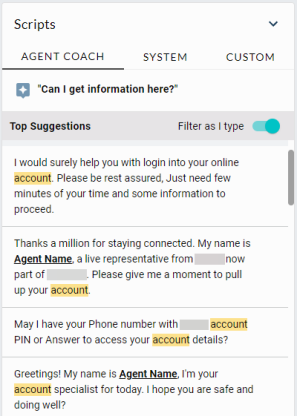
An Agent Coach tab displays in the Agent Desktop Scripts pane when Agent Coach is enabled for the receiving agent. If the agent belongs to multiple Agent Groups, the Agent Coach tab will only be active for engagements coming in for the Agent Groups with Agent Coach enabled (unless that specific agent has opted out.)
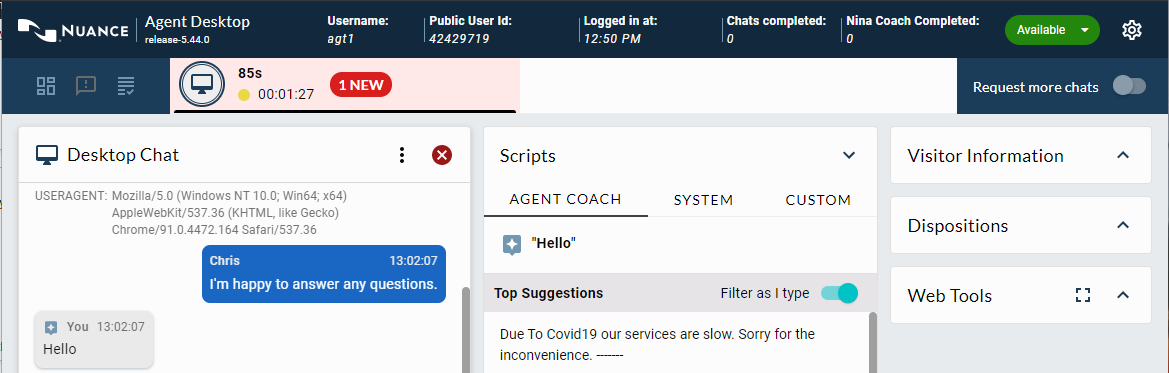
When the customer sends a message, the software fetches a list of recommended scripts and displays them under the Top Suggestions heading.
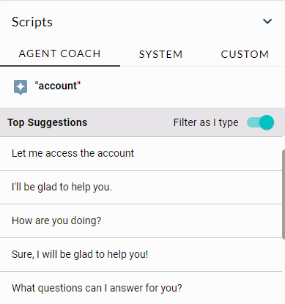
The scripts can be used as answers to the customer’s questions and comments. Hundreds of scripts can be shown by Agent Coach. Scripts for the top recommendations are ranked by confidence score.
Every time the customer sends a new response to the agent, the Top Suggestions are updated. The recommendations are based on the last 200 words of the chat including the agent’s response.
Agent Coach workflow
Agent Desktop has several features that help agents select the best response from the list of top suggestions and to keep track of which scripts have been used in a chat.
Filter as I type
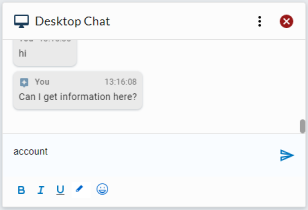
The agent can type a word or phrase into the Desktop Chat field to filter the script suggestions.
For Example: The agent types the word "account" into the Desktop Chat field.
The Agent Coach top recommendations are filtered to display the scripts that contain the word “account” and highlights them for easy visibility. These recommended scripts are listed and ranked by confidence score.