Recommendations Curation
For a specific model, Agent Coach facilitates the creation of contextually relevant responses based on a context sample or from a predefined list created during the model training.
Note: During the training of the Agent Coach model, Nuance utilizes language models like ChatGPT to correct grammatical errors, thereby enhancing the response pool. However, this process may modify the original utterance by adding extra words. Therefore, it is important to review the responses carefully before deploying the model.
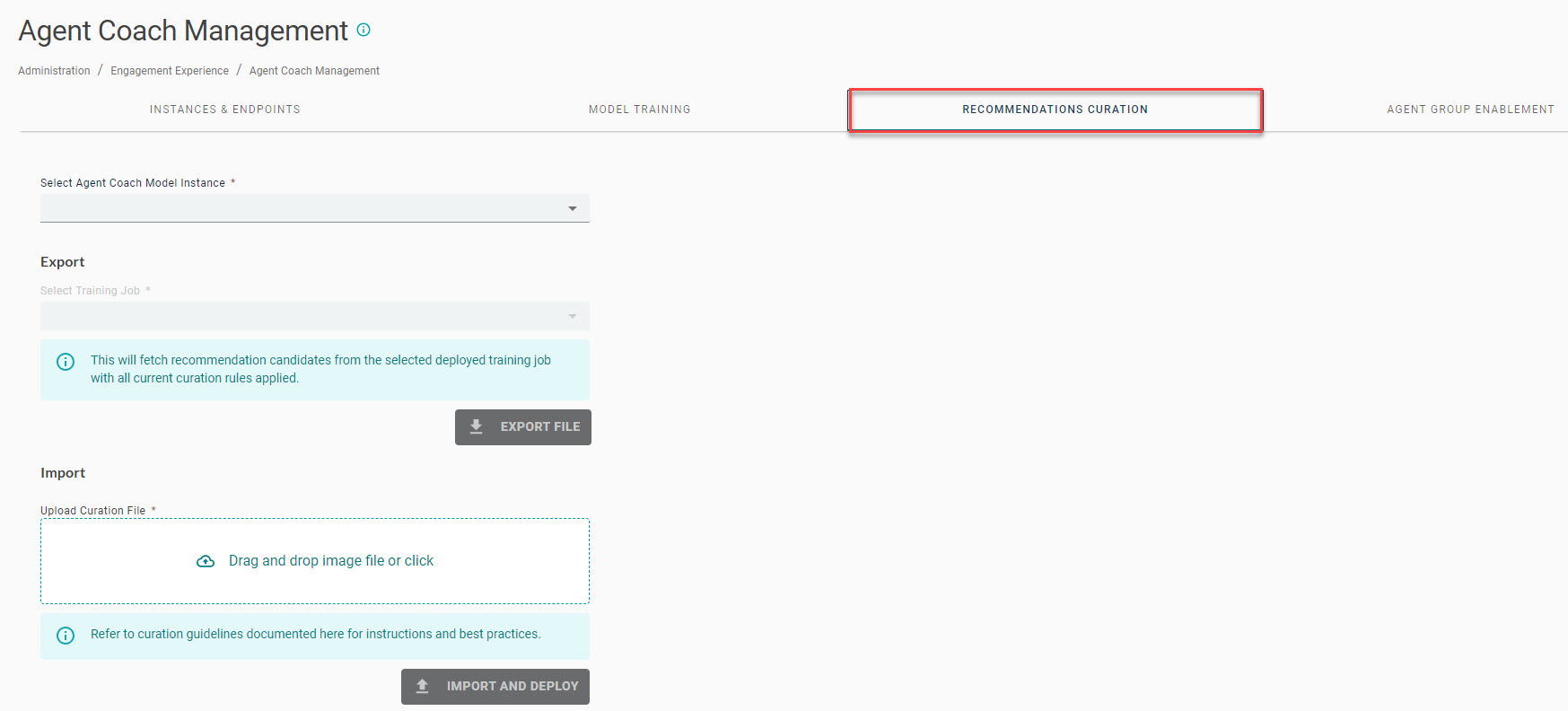
The administrator can review the list of responses to ensure clarity and customize them as needed. The following steps outline the process for accessing and reviewing responses in the Agent Coach Management system.
-
Navigate to the Agent Coach Management tab and select the specific Agent Coach Model Instance from the drop-down list.
-
Select the Training Job, and click the Export File button to export the list of recommendations from the chosen training job.
Tip: The administrator must specify the appropriate instance and training job (Model ID) for exporting the new response pool for review. Also, make sure to apply all curation rules to the exported file.
-
After carefully reviewing the list of recommendations, the administrator can upload the curated file by clicking the Import and Deploy button.
Note: When an administrator creates and trains a new model (or training job) to accommodate more Agent Groups (or expansion of the data pool) and to cover a different time period (or update), the response pool undergoes changes. Therefore, administrators must review the new recommendations before deploying the model in Pre-production or Production environments.
Curation process
As part of the Agent Coach training capabilities, Nuance provides support for customers who want to manually curate the recommendation candidates created by the Agent Coach machine learning model. This process involves direct API calls to the backend services.
This table outlines the key steps and responsibilities included in the curation process:
| Step | Responsibility | Description |
|---|---|---|
| 1 | Train the Agent Coach model | The initial step involves training the Agent Coach model. Perform this task to optimize the model performance. |
| 2 | Extract recommendations | Extract the recommendations from the trained model. The list comprises all recommendations surfaced during the model training process. |
| 3 | Curate recommendations | Utilize the Agent Coach Training API to curate and edit the answer pool. Customers can make necessary corrections using a predefined format. |
| 4 | Inject curations into the model | Convert the curated recommendations into a JSON payload and inject them into the model. Following this process, any replacements specified in the curation file are displayed at runtime, replacing the original recommendations. |
Curation file example
To facilitate the curation process, you can extract the complete list of recommendations created during the model training from the Agent Coach instance.
Note: The list of recommendations must remain in its original format.
| Cluster ID | Agent Groups | Count | Verified | Original Recommendation | Replacement | Ops | Comments |
|---|---|---|---|---|---|---|---|
| 0 | AG_A | 8400 | GH_20220913 | Thank you | KEEP | Recommendation verified with no corrections needed; it is presented as is to the agent. | |
| 0 | AG_B | 2000 | MB_20220914 | Thank you so much | Thank you | REPLACE | Recommendation is verified, and a correction is made. The resulting replacement is identical to another recommendation in the cluster, and you can merge these identical recommendations at runtime. |
| 0 | AG_A | 65 | GH_20220913 | Tx… | Thank you | REPLACE | Recommendation is verified, and a correction is made. The resulting replacement is identical to another recommendation in the cluster, and you can merge these identical recommendations at runtime. |
| 1 | AG_C | 5 | MB_20220914 | or?! | X | DELETE | Recommendation has been verified and marked to be deleted. This recommendation is never displayed to the agent. |
| 2 | AG_A | 700 | JR_20220911 | Yes that's correct | Yes, that is correct. | REPLACE | Recommendation is verified, and a correction is made. The resulting replacement is displayed to the agent. |
| 2 | AG_A | 580 | JR_20220911 | That's correct | That is correct. | REPLACE | Recommendation is verified, and a correction is made. The resulting replacement is displayed to the agent. |
| 2 | AG_A | 412 | That is correct. | NOOP | A new recommendation with no prior review or operations. |
Column legend
-
Cluster ID—A unique identifier that categorizes recommendations based on the semantic meaning. This information is displayed during the extraction step and is available in read-only mode.
-
Agent Groups (optional)—Agent Group recommendation is based on the original transcript metadata. This information is displayed during the extraction step and is available in read-only mode.
-
Count—Number of times the agent utterance is detected by the Agent Coach machine learning model from the transcript corpus. This information is provided as part of the extraction step and is available in read-only mode.
-
Verified—An input field to indicate whether the recommendation has been reviewed, validated, replaced, or removed. Any type of string is accepted.
Note: Nuance recommends using a simple naming convention, such as
initials_datein the template. This information is provided by the customer.
-
Original Recommendation—The recommended utterances displayed in the Agent Coach tab at runtime are extracted from a transcript corpus, which is used to train the Agent Coach machine learning model. This information is provided as part of the extraction step and is available in read-only mode.
-
Replacement—An input field for the replacement utterance of the recommendation generated by the Agent Coach machine learning model. You can use the character X to indicate that the recommendation can never be displayed to agents at runtime. This information is provided by the customer.
-
Ops—This describes the type of operation performed by the curation API.
Operation Description NOOP No rule exists against this candidate. REPLACE Replace the candidate with a new utterance. DELETE Delete the candidate and never display at runtime. KEEP The candidate has been verified and should remain unchanged. -
Comments (not displayed in actual file)—Used for reference.
Curation guidelines
The Agent Coach machine learning model creates a recommendation pool according to various business requirements. Manually curating these recommendations may lead to unintended consequences. To prevent such problems, the following guidelines have been set:
-
Clusters and count
-
Basic corrections
-
Advanced corrections
Clusters and count
The curation file contains a comprehensive list of recommendations displayed to any given agent at runtime, along with additional information that is useful for the curation process. This information includes the count associated with each recommendation surfaced by the model and a semantic clustering of the recommendations.
The recommendations are grouped into semantic clusters and, within each cluster, they are ordered based on their respective counts. The count refers to the number of times the Machine Learning model encountered the exact same utterance in the original transcript corpus. The semantic clustering is performed automatically as part of the training post-process.
-
Count—This information provides an indication of the probability that a recommendation is displayed to an agent based on a relevant conversation context. It is essential for prioritizing the curation work. Given the high volume of recommendations generated after each model training session, curators need to understand where to focus their efforts, primarily on the 'high runners'.
-
Clusters—These groupings assist curators in comparing recommendations with similar or identical semantic meanings. This comparison enables curators to make informed decisions about necessary corrections. By grouping semantically identical recommendations, curators can efficiently reduce redundancy using the proposed pruning method.
Basic corrections
For recommendations that do not meet the expected spelling, syntax, or styling standards, they can be corrected using the Replacement column in the curation file.
-
In the Replacement column, the corrected utterance must be fully spelled out to meet the standard.
-
The original utterance in the Recommendation column should remain unchanged.
For example, the following table provides details of the original and replaced recommendations.
| Cluster ID | Agent Groups | Count | Verified | Original Recommendation | Replacement | Ops |
|---|---|---|---|---|---|---|
| 1 | AG_A | 9185 | GH_20220913 | Your Welcome! | You're welcome. | REPLACE |
| 2 | AG_A | 552 | GH_20220913 | What is the alternative contact number registered? | Could you please share the registered alternate contact number in this chat? | REPLACE |
Advanced corrections
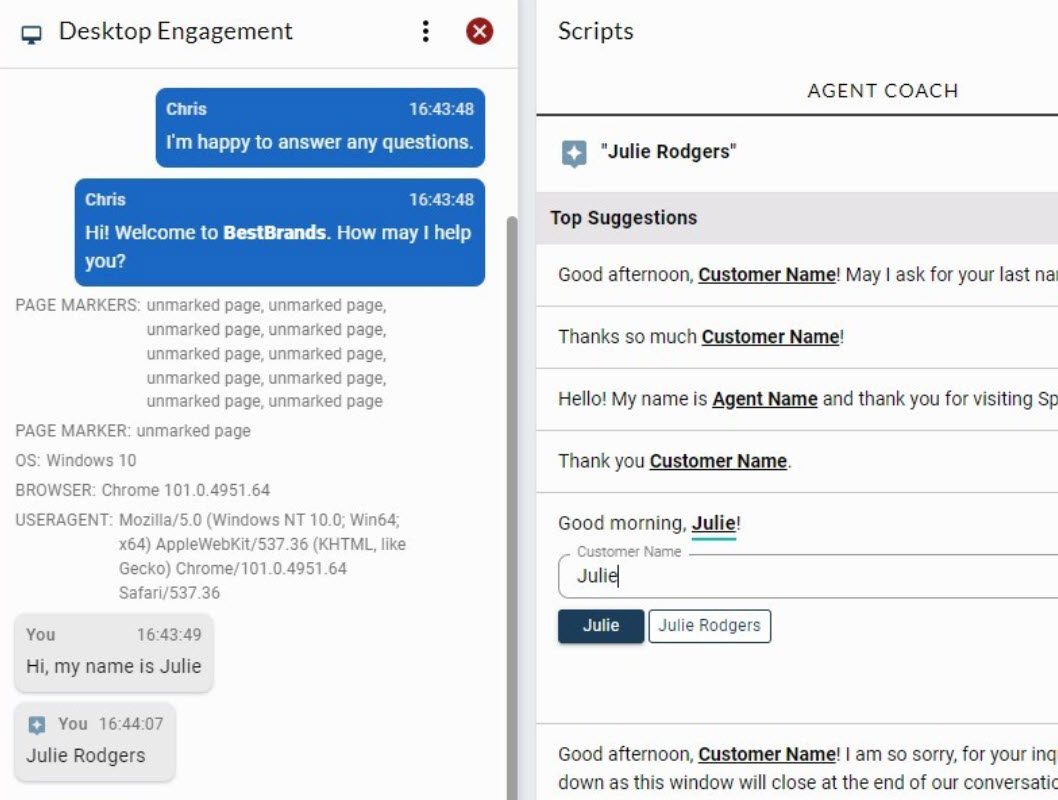
In certain cases, curation may involve standardizing the usage of identifiable named entities, like customer or agent names. Agent Coachcan automatically identify certain types of named entities and replace them with predefined placeholders. When presented to the live agent, a recommendation containing a named entity placeholder can be edited in real-time. Additionally, the system may suggest predefined values to fill the placeholder during runtime.
The following image demonstrates the advanced corrections feature in the Agent Desktop.
For example,
| Cluster ID | Agent Groups | Count | Verified | Original Recommendation | Replacement | Ops |
|---|---|---|---|---|---|---|
| 0 | AG_A | 9185 | GH_20220913 | Good morning! | Good morning, __person_customer__! | REPLACE |
| 0 | AG_B | 552 | GH_20220913 | Hello! How may I help you today? | Hello, __person_customer__! My name is __person_agent__, how may I help you today? | REPLACE |
Recommendation pruning
Agent Coach services have limited capabilities for automatically reducing semantic redundancy.
To reduce semantic redundancy, curators can use the Replacement column to set one or more identical replacement utterances for all the recommendations within a given cluster. During runtime, the system automatically ignores duplicate recommendations, presenting only one of these identical replacements. This approach gives the advantage of maintaining the breadth of conversation scenarios that the Agent Coach instance can handle while decluttering the list of recommendations presented to the agent.
For example, the table below provides details of the original recommendations and their replacements.
| Cluster ID | Agent Groups | Count | Verified | Original Recommendation | Replacement | Ops |
|---|---|---|---|---|---|---|
| 1 | AG_A | 4815 | GH_20220913 | Are we still connected? | KEEP | |
| 1 | AG_A | 4681 | GH_20220913 | Are we connected? | Are we still connected? | REPLACE |
| 1 | AG_A | 510 | GH_20220913 | Are you there? | Are you still there? | REPLACE |
| 1 | AG_A | 444 | GH_20220913 | Are you still with me? | Are you still there? | REPLACE |
| 1 | AG_A | 360 | GH_20220913 | Just to confirm, are we still connected? | Are we still connected? | REPLACE |
| 1 | AG_A | 297 | GH_20220913 | Are you still there? | KEEP | |
| 1 | AG_A | 210 | GH_20220913 | Just to confirm, are we connected? | Are we still connected? | REPLACE |
| 1 | AG_A | 131 | GH_20220913 | Hope we are still connected | Are we still connected? | REPLACE |
| 1 | AG_A | 8 | GH_20220913 | I thought I lost you. | Are you still there? | REPLACE |
| 1 | AG_A | 7 | GH_20220913 | Are you still connected? | Are we still connected? | REPLACE |
| 1 | AG_A | 5 | GH_20220913 | I hope I didn't lose you. Are we still connected? | Are we still connected? | REPLACE |
Note: To prevent duplicate recommendations, ensure identical strings and avoid introducing invisible or transformed characters, like quotation marks, during the replacement process.
Tip: By merging candidate recommendations through curation, the lower-runner candidates become more prominent at runtime for a given intent. Therefore, when batching the curation process, it is important to consider not only the frequency count of a recommendation candidate but also the entire semantic cluster to which it has been assigned.
Deleting recommendations
The Agent Coach curation API enables you to delete recommendations. However, this type of operation is not recommended, as it can limit the scenarios in which Agent Coach can offer meaningful suggestions to live agents. In most cases, using a replacement is preferred. The associated recommendation count can also assist the curator in determining whether deletion is truly necessary; recommendations with very low counts have a minimal chance of being presented to live agents.
In cases where a suitable replacement cannot be defined, you can delete a recommendation by marking it for deletion in the replacement field, using an X character.
For example,
| Cluster ID | Agent Groups | Count | Verified | Original Recommendation | Replacement |
Ops |
|---|---|---|---|---|---|---|
| 0 | AG_A | 95 | GH_20220913 | or?! | X | DELETE |
| 1 | AG_A | 52 | GH_20220913 | How dare you! | X | DELETE |
Marking recommendations
Improving the accuracy of a machine learning model and maintaining up-to-date data invariably results in routine re-training processes for the model. With each new training, the system uncovers a new set of recommendations, prompting the need for additional curation iterations. Therefore, it is important for curators to determine whether a recommendation has been reviewed. This significantly reduces the curation cycle time between iterations.
The curation file format includes a Verified column to meet this requirement. Customers can choose to utilize the Verified (by) field as they see fit.
Here are some sample suggestions below:
| Cluster ID | Agent Groups | Count | Verified | Original Recommendation | Replacement | Ops |
|---|---|---|---|---|---|---|
| 0 | AG_A | 4815 | Y | Are we still connected? | KEEP | |
| 0 | AG_A | 4681 | Greg | Are we connected? | Are we still connected? | REPLACE |
| 0 | AG_A | 510 | GH_20220913 | Are you there? | Are you still there? | REPLACE |
| 0 | AG_A | 444 | 20220913 | Are you still with me? | Are you still there? | REPLACE |
| 0 | AG_A | 360 | 2022/09/13 | Just to confirm, are we still connected? | Are we still connected? | REPLACE |
