Agent Desktop customer exit configurations
Settings in Nuance Portal allow clients to define the behavior of customer exit interactions in Agent Desktop. This is particularly useful for notifying agents when a customer exits a chat, because this action frees up a chat slot as soon as possible upon customer exit.
Portal settings
Check boxes for Enable Audible Alert on Customer Exit, Auto-Close Chat on Customer Exit, and Auto-Launch Disposition Window on Customer Exit are on the Settings tab of Workforce Management. By default, these boxes are unchecked. These settings can be configured at an Agent Group level or at the Business Unit level for customers who are not using Agent Groups.
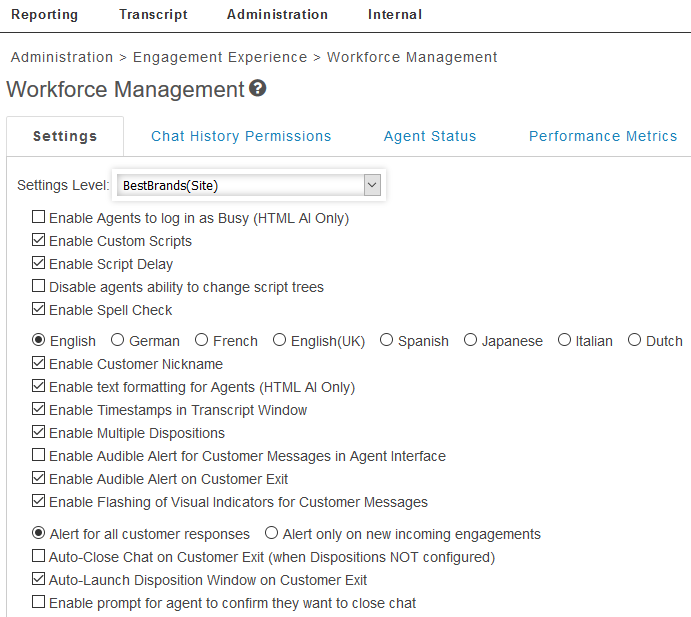
Enable Audible Alert on Customer Exit
If this box is checked, a "door-closing" sound will play when a customer exits a chat.
Auto-Close Chat on Customer Exit
If this box is checked and if dispositions are not configured for the engagement, the chat will automatically close when the customer exits the chat. This will free up an agent's chat slot and allow the agent to receive another chat immediately.
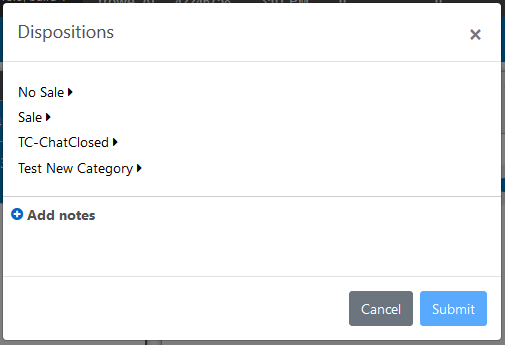
Auto-Launch Disposition window on Customer Exit
If this box is checked and if dispositions are configured for the engagement, the disposition window will auto-open once the customer exits the chat. This is the same window that would open if the agent clicks the X button on the top right of the Agent Desktop interface.