Initial Response Time alert
The Initial Response Time (IRT) is the time between the agent receiving a first engagement assignment and the agent sending a message in response to the customer. The IRT is a configurable number of seconds set in Portal on the Administration > Engagement Experience > Workforce Management page.
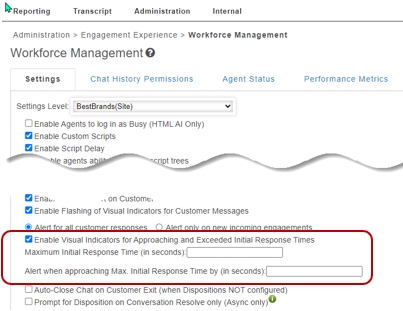
When enabled in Portal, Agent Desktop can be configured to display visual indicators to agents related to their response time. When the box is checked for the “Enable Visual Indicators” control, two settings display for the “Maximum Initial Response Time” and for the “Alert when approaching Max Initial Response Time. Both of these controls are time settings made in seconds.
Workflow
Before the IRT expires, a yellow alert displays to the agent on the engagement tab timer. This alert indicates that the time between the agent receiving an engagement assignment and the agent sending their first response is about to expire. The yellow alert displays when the IRT minus the “alert when approaching Max IRT” value is reached.
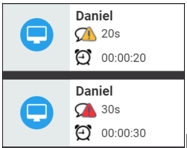
This value in seconds is called the “approaching max initial response time.” When the IRT elapses before the agent sends their first message, a red visual warning alert displays to the agent indicating that the IRT has been exceeded. This value is referred to as the “exceeded initial response time.”
- If the agent responds before the approaching max initial response time has expired, the visual alert will not display.
- If the agent responds after the first configured “approaching max initial response time” alert, the “exceeded initial response time” alert will not display.
- All alerts disappear when the agent responds to the engagement.
