Design how to engage
This component determines the required design factors to engage with customers. This example is for the design element and contact element in the user journey, focusing on:
-
a reactive C2C
 Click to chat, or click to call. button
 -
engagement window
-
overall content strategy
Reactive C2C button
This button has the following main elements:
-
button copy
-
button design
-
button placement

Engagement window
This window has the following elements:
-
close
-
minimize
-
font size
-
sound
-
email
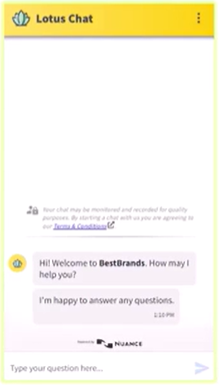
Content strategy and system messages
-
Agent name, can be determined by program preference, for example:
-
for the sales program, there can be rotating generic agent names, agent name or alias after the initial engagement
-
for the care program, the agent name can start with the brand name, and then display the actual name after the agent assignment
-
-
Auto opener (first line in conversation): first we need to know the agent name and what to ask the customer. This can be generic, or page specific:
-
Reactive chats perform best with an open-ended question, such as "Hi, what can I help you with today?"
-
Proactive chats perform best with a closed-ended question, such as: "Hi, can I help you?" or with more detail: "I see you're looking at the iPhone. What questions may I answer for you?"
-
-
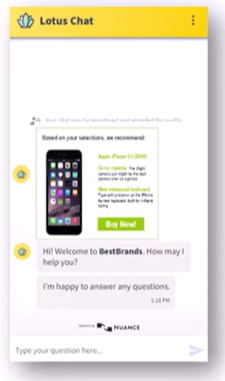
Personalization of the customer experience
-
button copies, which include images, iconography, verbiage, color schemes, and animations
-
window design, which includes avatars, logos, location, shape, and any details included in the header
-
-
Targeted offers, which include content and often images, selling a product, or alerting the customer to an important message. These offers can be displayed to customers via a rich-media link and an option to chat. Within the chat window, customers can engage with the widget and be directed to another page or feature.

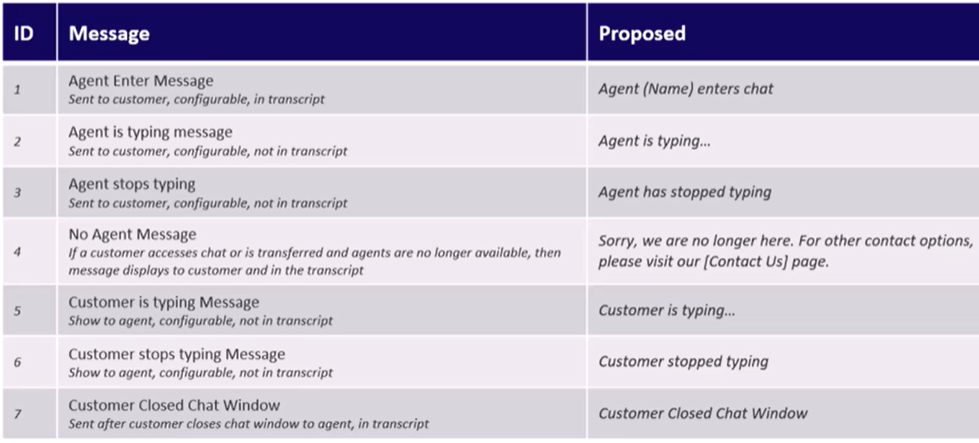
How status messages are displayed during the chat session
There are several key messages that are displayed to the customer and the agent during the engagement. In the following screen capture:
-
The Message column displays what the customer or agent sees, whether it is configurable, and whether it is included in the transcript.
-
The Proposed column displays the proposed text, which may be configurable.
Business-rule builder
In this example, suppose that the business rule uses multiple design elements, such as a reactive C2C button, an engagement window, and has overall content strategy.
The updated business-rule builder is:
| Who | new credit card inquiry customers |
| What | reactive live chat (C2C Click to chat, or click to call.) |
| When |
on page landing |
| Where | all credit-card inquiry marketing pages |
| How |
multiple design elements, such as:
|
| Why |
