Design when to engage
There are three aspects to designing when to engage:
-
Launch conditions provide the targeting conditions that define when to engage, and trigger a rule to execute an action.
-
Queue settings determine the queue conditions for offering live chat.
-
Hours of operations determine the days and times for offering live chat.
Launch conditions
A launch condition is a conditional statement that enables NDEP to target specific website visitor segments.
A launch condition is a logical statement that must be resolved as either true or false:
-
If the condition is true, then the business rule will be executed.
-
If the condition is false, then the business rule will not be executed.
Launch conditions require both the event and location logical elements. However, business rules may have additional logical elements.
Event—required logical element
All business rule conditions must be evaluated to either true or false. When a visitor navigates to a Nuance-supported web page, the software must evaluate the condition statements of every business rule for the program. However, the rules may not be evaluated while the web page loads. Therefore, the Event section of the business rule specifies when to evaluate the rule.
In web programming, an event is an action performed by or caused by the web page visitor. Examples include clicking a button, moving the cursor, navigating to a page, etc. The event specified in the Event section of the launch condition is both a criterion for the rule and a declaration of when to evaluate it.
For example, if a rule's event is "Click event on a web form's Reset button," then this click event is both:
-
the action that triggers evaluating whether the rule's launch conditions are true or false when this Click event happens
-
a criterion of the rule's conditions, such as the click must have occurred
Location—required logical element
The location statement is the part of the business rule that specifies the page (or group of pages) that the visitor must be viewing. For example, a proactive timer rule on the Shopping Cart page may specify "Shopping Cart" for the location statement of the rule's launch conditions.
There are two standard ways for the rules to reference the website location, a page marker or a content group:
-
A page marker refers to a single URL or to a group of nearly identical URLs.
-
A content group is a list of page markers, and therefore it is always a reference to multiple URLs.
Example with only the Event and Location required logical elements
Suppose that a reactive C2C business rule for the buy-flow (purchasing pages) has the following elements:
-
Event: the page load event (
onPageLanding). -
Location: the "buy-flow" content group, which is a reference to each page marker within the purchasing section of the website.
Variable values—optional logical element with example
Many business rules have an additional option element that evaluates the value of one or more variables. Usually, a rule references only one or two custom variables.
Suppose that a proactive rule launches after three page views on the Shopping Cart page. This type of page-view rule must reference a variable that stores the number of visits to the Shopping Cart page. Suppose this variable is called pcShoppingCart, where pc stands for "page counter." Therefore, a condition for this business rule is that the value of the pcShoppingCart variable must be greater than or equal to 3.
Usually when rules have conditional statements for evaluating variable values, there is at least one corresponding <rule>; element that assigns a value to the variables. In this example, there is a corresponding <rule>; whose purpose is updating the value of the pcShoppingCart variable, such as incrementing the value of that variable by +1 each time the Shopping Cart page is viewed.
Launch condition examples
Launch conditions can be:
-
as simple as displaying a landing page
-
as complex as targeting customers who meet all the following conditions:
-
land on a cart
-
scroll to the bottom of the page
-
backtrack three times
-
hover for more than 50 seconds
-
were on the site yesterday
-
Business rules can be as specific as necessary. To determine when to engage, review the variables that NDEP can capture or that the client can transfer to NDEP. This means understanding the website, including:
-
web analytics data (Adobe Analytics, Google Analytics, or similar)
-
site content
-
common navigation flows
-
website structure
-
common pitfalls for website visitors
Common targeting examples:
-
page landing
-
time on page
-
page view
-
error events
-
prior engagements
Adding a JavaScript tag to website pages can capture the following information about previous visitor engagements:
-
previous visitor engagement
-
previous visitor routing
-
previous visitor chatting
-
DOM (Document Object Model) events
For more information, see DOM events and elements.
| On-site visitor behavior | Engagement data | DOM (Document Object Model) events |
|---|---|---|
|
|
|
Queue settings
Queue thresholds enable checking availability of agent groups and queue depth to determine whether to offer a live-chat option.
These thresholds provide flexibility to determine rules, such as:
-
If agents are fully utilized, then live-chat is not offered to lower priority users.
-
Even if agents are fully utilized, then live-chat is offered to higher priority users, even if they have to wait in a queue
.For example:
-
A low priority rule has a high level of targeting with a low conversion rate.
-
A high priority rule has very specific targeting conditions with a high conversion rate.
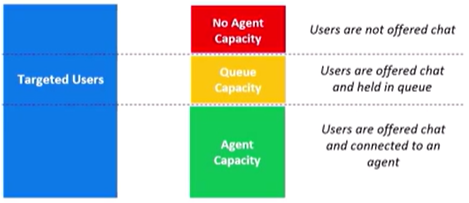
Business rule Q-threshold can be set at two points during an engagement:
-
displaying business rules
-
transferring between agent groups
Queue-threshold definitions
The queue threshold determines the ratio of available chat slots that can be filled, and whether queuing is allows. It supports any numerical value up to 999.
-
If the queue-threshold value is less that 1.0, an Available button will not be displayed even if some chat slots are empty.
-
If the queue-threshold value exceeds 1.0, an Available button can be displayed even if all chat slots are filled.
| Queue threshold (QT) sample value* | Definition | Example | Maximum chats | When to use |
|---|---|---|---|---|
| 0.8% | Do not allow queuing, and do not allow more than 80% of max-allowable slots to be filled. | If there are 10 agents in an agent group, and each agent is assigned to a maximum of 2 chats, then if the agent group is conducting 16 simultaneous chats, do not show an Available button, which would allow additional chats. |

|
Use this if there are multiple business rules in a site, and you want to prioritize some business rules over the others. This enables you to decide which business rules to fire when you have sufficient agent bandwidth. |
| 1.0% | Do not allow queuing, and do not allow more than 100% of max-allowable slots to be filled. | If there are 10 agents in an agent group, and each agent is assigned to a maximum of 2 chats, then do not show an Available button, which would allow additional chats. |

|
Use this if there is only one business rule in a site, and you do not want customers to wait in a queue. |
| 1.2% | Allow queuing until 120% of max-allowable slots are filled. If 120% of slots are filed, then do not allow additional customers into the queue. |
If there are 10 agents in an agent group, and each agent is assigned to a maximum of 2 chats, then show an Available button, which would allow additional queuing. |

|
Use this for a high-priority rule that is intentionally queuing customers, because the rule has a high conversion rate. |
Hours of operations
When agents are not available, then you can either:
-
display no button
-
display an offline button state
Sample business rules:
-
If agents are available, and the agent availability is below the Q-threshold, then display the available button.
-
If agents are busy, and if the threshold is above business rule queue, then either:
-
do not show a button
-
show the busy button
-
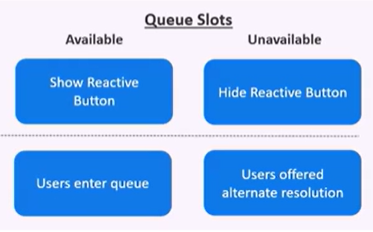
Queue thresholds are managed in the NDEP rules engine. You can modify the settings to allow prioritization and improve user experience.
For example, in NDEP deployments, proactive rules are generally not allowed to queue.
Business-rule builder
In this example, suppose that the business rule will launch when the customer lands on the credit-card inquiry page.
The updated business-rule builder is:
| Who | new credit card inquiry customers |
| What | reactive live chat (C2C Click to chat, or click to call.) Click to chat, or click to call.) |
| When |
on page landing |
| Where | |
| How | |
| Why |
