Proactive chat funnels
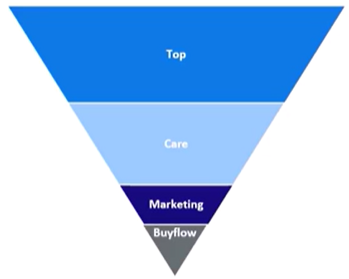
Proactive chats are bucketed within a funnel. Recommended funnels are:
| Funnel level | Funnel name | Description |
|---|---|---|
| 4 | Top funnel | Customers are usually just browsing. |
| 3 | Care funnel | Customers may be looking for assistance. |
| 2 | Sales marketing funnel | Customers are browsing sales and marketing pages. |
| 1 | Buy-flow funnel | Customers are in the buy-flow pages, which are the purchasing pages of a website. |
Once a proactive chat is assigned to different funnels, and the customer navigates down to different funnels, the customer sees a proactive chat window. The customer will not see another proactive chat window at a higher funnel level within the re-chat interval, which by default is 24 hours. This value is configurable. It can be set to a different value for a lower funnel level, or for re-engagement, such as 12, 8, or 6 hours.
You can also:
-
Configure the funnel levels that are set.
-
Select the Ignore funnel level check box to remove the funnel-level checker.
You specify both these settings in the General tab of the Create Rule or Edit Rule page. For detailed instructions, see Manage general settings for a business rule.
