Max Chat per Agent Group
Terms
Max chat count The maximum number of chat sessions that can be assigned to an agent under normal circumstances. The max forced value can override max chat count.: The maximum number of chat sessions that can be assigned to an agent under normal circumstances. The max forced value can override max chat count.
Max forced The number of chat sessions that can be assigned to an agent over and above the agent's max chat count value. chat: The total number of chats an agent can have including additional chats above their max chat count value. The Max Forced Chat value must be equal to or greater than the max chat setting.
For example, if Max Chat Count and Max Forced Chat are both set to 2, the agent will only get 2 chats assigned to them. If max chat is 2 and max forced chat is 3, the agent will get 2 chats assigned to them and, if needed, they will also get the 3rd one.
Configure Max Chat
Max Chat controls are located on the Agent Configuration tab of the Create/Edit User page in Portal. Navigate to Admin > Sites & Users > User Management > Create/Edit User.
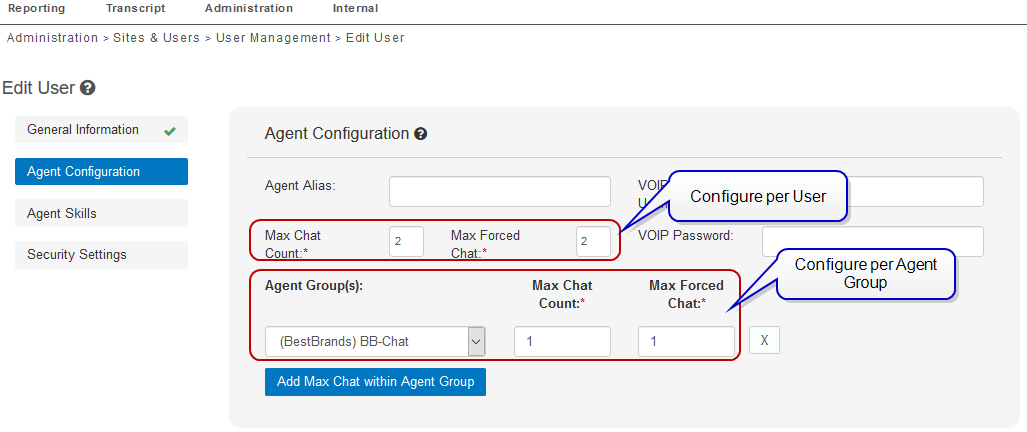
Max Chat per user
-
Set Max Chat Count and Max Forced values for an individual user account in the control fields under Agent Alias.
-
Click Save when you are done.
Max Chat per Agent Group
-
Select an Agent Group from the drop-down list.
-
Enter a value for max chat count and max forced chat count.
-
Repeat this process to set max chat values for multiple agent groups.
-
Click Save when you are done.
