Display customer name
When enabled, the Engagement tab displays the Customer Name, Customer Nickname, or Customer ID.
To view the information in bold at the top of the Engagement tab for incoming engagements, the agent needs to be associated with at least one Agent Group, Business Unit, or Site that has the display Customer Name (Nickname) in the Chat tab feature enabled.
If the Customer Name or Nickname is not available or set to You or Me, the last six digits of the Customer ID appears in the Engagement tab.
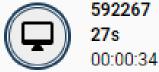
If the Customer Name is available and set at the start of an engagement, it appears on the Engagement tab. In case the Customer Name is set during the engagement, the Engagement tab automatically updates to show the Customer Name instead of the Customer ID.

Note: Please contact your Nuance representative for more information on enabling this feature.
