Session Usage
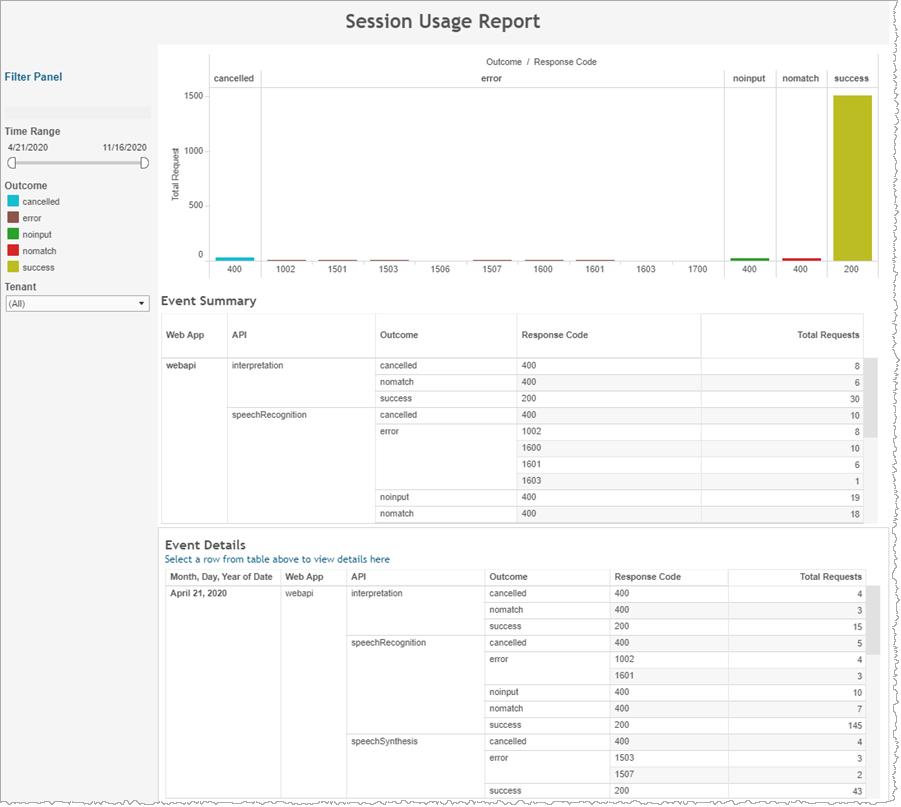
The Session Usage report displays raw Conversational AI request numbers for a selected time period grouped in various ways including by Conversational AI response code, outcome, and by session date.
In addition to the use of report filters, Nuance Insights allows you to manipulate displayed data through several other means in order to better visualize information. Select from the following to learn more:
Note: This report is applicable only for clients using the Conversational AI channel.
Sessions are normally terminated by the app, when it issues an endSession command. A session may also be terminated due to a dropped connection, or by the Nuance Insights service. The service terminates the session when any of the following events occur:
- An inactivity timer expires
- The max session duration limit is reached
| Column | Description |
|---|---|
| Web App | Web application |
| API | API command |
| Outcome | Result status indicator |
| Response Code | Code returned in the command response. For a successful request the code is 200. Codes above 1000 are API error codes. |
| Total Request | Total number of requests for this combination of dimensions |
Visualizations
The Outcome / Response Code histogram graphically represents the number of requests to start a session, broken out by outcome response codes that are graphically grouped through color-coding. The Summary table immediately following the histogram is a 1:1 tabular representation of the same data, grouping by outcome. The Details table at the bottom of the page draws from the same data set but groups the information by date stamp.
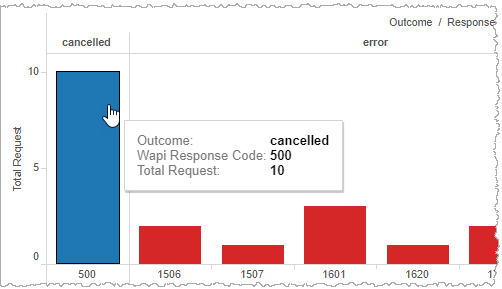
Mouse over any of the histogram bars to display a tool tip listing the underlying data for that particular response code.
Filters
Time Range
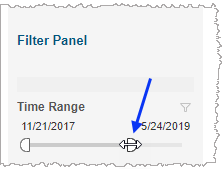
The Time Range slider allows you to narrow or expand the date range. The data displayed in all visualizations automatically reflect the subset of information falling within the selected range.
Tenant
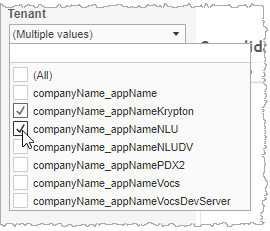
By choosing one or more tenants from the list, you refine your displayed data-set by including data from only those tenants matching the selection. The visualizations automatically reflect the information complying with the tenant selection.