Searching for conversations
You can search for conversations on the Conversation Set List page either by searching with an existing filtering profile (a conversation set) or by creating a new conversation set and searching with that.
Using a conversation set
-
In Conversation Set List, in the ACTIONS column, click the View Conversation Set icon (
 ) in the row corresponding to your desired conversation set.
Creating a conversation set
In order to see information about a particular conversation, you must first create a conversation set.
-
In Conversation Set List, click Add Conversation Set.
The Create Conversation window appears.
-
Enter a name for your new conversation set, then provide a meaningful description of your intended conversation set's filtering strategy.
-
If you would like all users to be able to update this conversation set after its creation, select Allow all users to update conversation set.
Note: If you do not select this checkbox, only you (because you created the conversation set) will be able to update this conversation set after its creation.
-
If you would like for this conversation set to display only those conversations that are complete, select Allow Completed Conversation Only.
Note: If you do not select this checkbox, this conversation set will display both completed and in-progress conversations.
-
If you would like for this conversation set to include sessions with missing events, select Include Sessions With Missing Events.
Note: If you clear this checkbox, this conversation set will exclude sessions having missing events.
-
Select a date range by doing one of the following:
-
Select a date range preset by
 clicking the preset list and selecting a range.
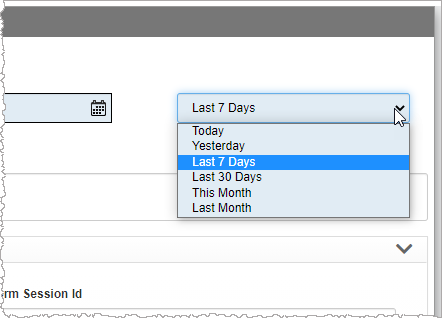
Or,
-
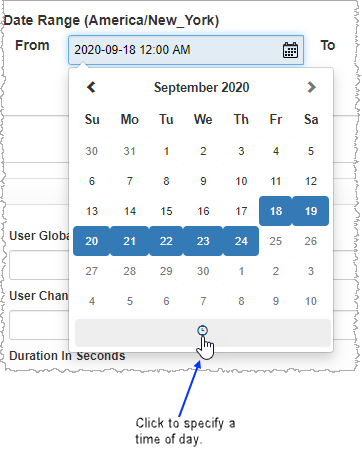
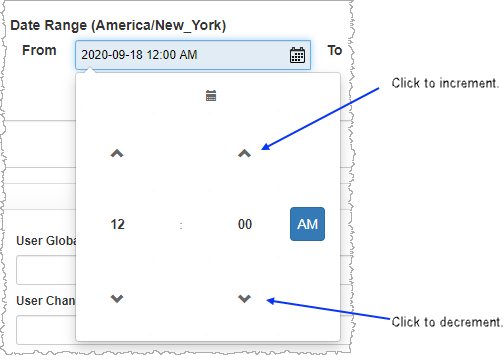
Select the starting and ending dates for your date range using the From and To date selectors.
After selecting both From and To dates, open each of the date selectors again tospecify a time of day.
The remainder of the Create Conversation window is comprised of several filters designed to remove unwanted conversations from the conversation list.
-
-
Configure your filters.
Notes:
- Before configuring your filters, Nuance strongly recommends you read about the underlying logical operators for Conversation Set filters.
- In fields requiring a typed entry (for example, Session ID), you may specify an exact value or you may make use of a wild card ( * ) either before or after the string value. Additionally, you may use the wild card both before and after a typed string.
- You may not place a wild card between two value strings in the Value column.
User Attributes
Attribute name Description Session ID
Each conversation has an application-generated ID that is unique to the conversation. An application using a session ID creates a conversation log whose file name includes the ID string. You can enter a single session ID to select a single conversation, or else you can enter a list of comma-separated session IDs. Additionally, you can use the * (asterisk) symbol to define wild cards. The wild card asterisk takes the place of missing characters and can be used both before and after entered characters.
User Global ID
The overarching unique IDof the customer, potentially from the CRM system. This ID could be Member ID (banking, healthcare), or SSN. A user will be identified by the same userGlobalID across all channels.
You can enter a single User Global ID to select a single user, or else you can enter a list of comma-separated User Global IDs. Additionally, you can use the * (asterisk) symbol to define wildcards. The wildcard asterisk takes the place of missing characters and can be used both before and after entered characters.
Platform Session ID
Engagement ID for NDEP and in VoiceXML session ID for IVR. You can enter a single platform session ID to select a platform session, or else you can enter a list of comma-separated platform session IDs. Additionally, you can use the * (asterisk) symbol to define wildcards. The Wildcard asterisk takes the place of missing characters and can be used both before and after entered characters.
Journey ID
Ties together multiple conversations over time, possibly across multiple channels. You can enter a single journey ID to select a journey, or else you can enter a list of comma-separated journey IDs. Additionally, you can use the * (asterisk) symbol to define wildcards. The wildcard asterisk takes the place of missing characters and can be used both before and after entered characters. User Channel ID
The ID of the customer in a given channel: ANI (IVR, SMS, Whatsapp), Facebook page for FBM, IP for webchat. You can enter a single user channel ID to select a user channel, or else you can enter a list of comma-separated user channel IDs. Additionally, you can use the * (asterisk) symbol to define wildcards. The wildcard asterisk takes the place of missing characters and can be used both before and after entered characters.
System ID
Identity of the system. You can enter a single system ID to select a single conversation, or else you can enter a list of comma-separated system IDs. Additionally, you can use the * (asterisk) symbol to define wildcards. The wildcard asterisk takes the place of missing characters and can be used both before and after entered characters.
User ID
Secondary ID, for example: member ID, device ID, console number, tracking number, auxiliary user ID. You can enter a single user ID to select a single conversation, or else you can enter a list of comma-separated user IDs. Additionally, you can use the * (asterisk) symbol to define wildcards. The wildcard asterisk takes the place of missing characters and can be used both before and after entered characters.
Duration in seconds
Specifying a conversation duration range effectively filters out all conversations outside the range. This filter allows you to specify up to two durations.
No Match Count
This is the number of Q&A nodes within a single conversation for which the outcome was No Match. Specifying a range for No Match Count effectively filters out all conversations outside the range. This filter allows you to specify up to two counts.
No Input Count
This is the number of Dialog Modules within a single conversation for which the outcome was No Input. Specifying a range for No Input Count effectively filters out all conversations outside the range. This filter allows you to specify up to two counts.
Collection Count
The collection count is the number of times the application attempted to recognize a core piece of information by asking a “collection” question such as “Which menu option do you want?” or “What is your birthdate?”. This filter includes attempts to recognize a core piece of information following retries such as in the case of no matches and no inputs. With this filter, you can select conversations that have more than, less than, equal to, less than or equal to, or more than or equal to a specific number of collections.
Confirmation Count
The confirmation count is the number of times the application asked a yes/no question to determine if the piece of information collected at the previous collection was correct. For example, “I think you said you want to hear your balance, is that correct?” With this filter, you can select conversations that have more than, less than, equal to, less than or equal to, or more than or equal to a specific number of confirmations.
Voice Count
The confirmation count is the number of times the application asked a yes/no question to determine if the piece of information collected at the previous collection was correct. For example, “I think you said you want to hear your balance, is that correct?” With this filter, you can select conversations that have more than, less than, equal to, less than or equal to, or more than or equal to a specific number of confirmations.
DTMF Count
This is the number of DTMF instances within a conversation. Specifying a range for DTMF Count effectively filters out all conversations outside the range. This filter allows you to specify up to two counts. Select Count
This is the number of Select input modes within a conversation. Specifying a range for Select Count effectively filters out all conversations outside the range. This filter allows you to specify up to two counts.
Text Count
This is the number of Text input modes within a conversation. Specifying a range for Text Count effectively filters out all conversations outside the range. This filter allows you to specify up to two counts.
Turn Count This is the number of Turn input modes within a conversation. Specifying a range for Turn Count effectively filters out all conversations outside the range. This filter allows you to specify up to two counts. Mix Answers Found Count This is the number of answers found by Mix within a conversation. Specifying a range for Mix Answers Found Count effectively filters out all conversations outside the range. This filter allows you to specify up to two counts. Mix Answers Not Found Count This is the number of answers not found by Mix within a conversation. Specifying a range for Mix Answers Not Found Count effectively filters out all conversations outside the range. This filter allows you to specify up to two counts. Language
This refers to the language spoken in the conversation. With this filter, you can select one or more languages in a drop-down list. Channel By choosing one or more channels from the list, you refine your displayed data-set by including data from only those channels matching the selection. Intent
Select one or more intents from the list of available intents. If you select more than one intent, the Intent Name field states the first selected intent in the list with the number of selected intents in parentheses. Mouse over the Intent Name field to see a list of selected intents.
Note: Only conversations containing ALL of the selected intents are included in the conversation list.
Filters
Up to ten customizable filters may be available. These filters depend upon data from AFO (after-the-fact-outcome) files.
In each filter, you can select one or more dimension values. Conversations containing at least one of the selected filter values are included in the conversation list (see Comma-separated values for more information about the aggregate filtering effect of multiple comma-separated values in a filter).
Note: Some or all of the ten filters may not be visible in the Conversation Set Filters page. For a filter to be visible, there must be agreement (with regards to that filter) between the AFO file and the log files.
Standard KPI
All KPI filters allow you to select one, some, or all possible filter values for each filter. Filters for which you configure more than one value display as comma-separated values. Only conversations containing at least one of the selected filter values are included in the conversation list (see Comma-separated values for more information about the aggregate filtering effect of multiple comma-separated values in a filter).
KPI name Description Conversation Outcome
The conversation outcome is any one of several possible categories defining how a conversation finishes. With this filter, you can select one, some, all, or none of the listed outcomes in the drop-down list.
Conversation Exit Reason
The exit reason for a conversation is the reason an outcome was reached. With this filter, you can select one, some, all, or none of the listed exit reasons in the drop-down list.
Contained
Contained conversations end within the application. Non-contained conversations are ones that transfer to an agent, regardless of the exit reason. With this filter, you can select conversations that were contained, transferred, or both.
Engaged
The Engaged filter allow you to select conversations based on the level of user interaction. With this filter, you can select one, some, all, or none of the listed values in the drop-down list.
Identified
The Engaged filter allow you to select conversations based on the level of user interaction. With this filter, you can select one, some, all, or none of the listed values in the drop-down list.
Authenticated
The Authenticated filter allow you to select conversations based on authentication. With this filter, you can select one, some, all, or none of the listed values in the drop-down list.
Intent Given
The Intent Given filter allows you to select conversations based on whether one or more specified intents were given. With this filter, you can select one, some, all, or none of the listed values in the drop-down list.
Self Service Started
This filter allows you to find conversations where the user did or did not begin a self-service task. The start conditions for self-service tasks are custom to each application. With this filter, you can select one, some, all, or none of the listed values in the drop-down list.
Self Service Completed
This filter allows you to find conversations where the user did or did not end a self-service task. The end conditions for self-service tasks are custom to each application. With this filter, you can select one, some, all, or none of the listed values in the drop-down list.
Other Metrics
There may be some metrics defined in the AFO that do not have their own filter section on the Create Conversation window. Use the Other Metrics filter to add further specificity by displaying only those conversations with the user-specified metric value for a user-specified metric listed in this filter.
You can apply the filter on more than one metric. Click Add Another State to add another metric filter. Within each row, select a single metric and value to include conversations in your conversation list meeting these criteria.
The implied logical operator between the rows is AND (see Multiple rows for more information about the aggregate filtering effect of multiple rows in a filter). For example, if there are two rows in the filter, only those data for which BOTH Other Metrics filter rows are true will be visible.
Mix Reporting Metrics Variable
With this filter, you can select one, some, all, or none of the listed metrics in the drop-down list. Only conversations containing ALL selected filter targets (represented as rows in the Mix Reporting Metrics Variable area) are included in the conversation list (see Multiple rows for more information about the aggregate filtering effect of multiple rows in a filter). Click Add Another Metric to add another filter. Within each row, select a single metric name and value to include conversations in your conversation list meeting these criteria. The implied logical operator between rows is AND.
Mix Reporting Integer Variable
Mix Integer metrics are metrics having an integer data type. With this filter, you can select one, some, all, or none of the listed metrics in the drop-down list. Only conversations containing ALL selected filter targets (represented as rows in the Mix Reporting Integer Variable area) are included in the conversation list (see Multiple rows for more information about the aggregate filtering effect of multiple rows in a filter). Click Add Another Metric to add another filter. Within each row, select a single metric name, operator, and value to include conversations in your conversation list meeting these criteria. The implied logical operator between rows is AND.
Mix Reporting Decimal Variable
Mix Decimal metrics are metrics having a floating point data type. With this filter, you can select one, some, all, or none of the listed metrics in the drop-down list. Only conversations containing ALL selected filter targets (represented as rows in the Mix Reporting Decimal Variable area) are included in the conversation list (see Multiple rows for more information about the aggregate filtering effect of multiple rows in a filter). Click Add Another Metric to add another filter. Within each row, select a single metric name, operator, and value to include conversations in your conversation list meeting these criteria. The implied logical operator between rows is AND.
Task
With this filter, you can select one, some, all, or none of the listed tasks in the drop-down list. Only conversations containing ALL selected task filter targets (represented as rows in the Task area) are included in the conversation list (see Multiple rows for more information about the aggregate filtering effect of multiple rows in a filter). Click Add Another Task to add another Task filter. Within each row, select a single task name, outcome, and detail to include conversations in your conversation list meeting these criteria. The implied logical operator between rows is AND.
The logical relationship of rows to one another is that of a Boolean AND operation. For example, if there are two rows in the filter, only those data for which BOTH task filter rows are true will be visible.
Q&A Node
With this filter, you can select one or more Q&A nodes. Only conversations containing selected Q&A nodes are included in the conversation list. This is a three-dimensional filter applied on a per Q&A node basis. You can apply the filter on more than one Q&A node, with distinct filter settings applied to each. Click Add Another State to add another Q&A node filter. Within each row, select a single Q&A node, a status, and a result to include conversations in your conversation list meeting these criteria. The implied logical operator between the rows is AND (see Multiple rows for more information about the aggregate filtering effect of multiple rows in a filter).
The logical relationship of rows to one another is that of a Boolean AND operation. For example, if there are two rows in the filter, only those data for which BOTH Q&A Node filter rows are true will be visible.
Message
With this filter, you can select one or more messages. Only conversations containing the selected messages are included in the conversation list.
Decision
With this filter, you can select one or more decision states. Only conversations containing the selected decision states are included in the conversation list. This is a two-dimensional filter in which, by selecting a subset of states and then specifying a result, you limit the conversation list exclusively to those conversations satisfying both criteria.
You can apply the filter on more than one decision state, with distinct filter settings applied to each. Click Add Another State to add another Decision filter. Within each row, select a single decision state and a result to include conversations in your conversation list meeting these criteria. The implied logical operator between the rows is AND (see Multiple rows for more information about the aggregate filtering effect of multiple rows in a filter).
Data Access
With this filter, you can select one or more Data Access nodes. Only conversations containing the selected nodes having the specified statuses and outputs are included in the conversation list.
You can apply the filter on more than one Data Access node, with distinct filter settings applied to each. Click Add Another State to add another Data Access filter. Within each row, select a single name, status, and an output to include conversations in your conversation list meeting these criteria. The implied logical operator between the rows is AND (see Multiple rows for more information about the aggregate filtering effect of multiple rows in a filter).
- Review your filter settings and then click Submit.
