Caching application resources
This section describes how Voice Platform, specifically the Voice Browser service, caches application resources. These resources can be VoiceXML documents, context files, data, and external ECMAScript files.
The Voice Browser service is capable of maintaining a cache, a repository for storing local copies of frequently or recently accessed data. By accessing a local copy instead of downloading the resource from an application server on each request, caching reduces the CPU required to process a downloaded page. It also reduces network bottlenecks, demand on servers, distance delays, and redundant data transfers.
The Voice Browser service accesses requested resources using http: or file: scheme URLs that describe their location. The caching strategy differs depending on the URL scheme.
Note: External grammar references are cached by the recognition service. The Speech Server also caches audio files. For example, you can control where audio files are cached, the total cache size, the maximum size of a cached entry, and so on. See the Speech Suite documentation for more information on grammar caching for the recognition service or fetching and caching files for Speech Server.
HTTP caching
HTTP caching applies to resources accessed using http: scheme URLs. The Voice Browser service is an HTTP/1.1-compliant web client and caches resources in an HTTP-compliant manner. Please see RFC 2616, Hypertext Transfer Protocol, section 13, “Caching in HTTP,” for more information about terms and concepts presented here.
HTTP caching relies on headers to determine if resources can be cached and if so, for how long. Headers provide additional information about the request and response messages exchanged between the client (Voice Browser service) and the server. For example, the Cache-Control:max-age header specifies how long a resource can be cached before it expires. The Expires header attaches an explicit expiration date to a cached resource.
Summary
HTTP cache processing in Voice Platform involves these basic steps:
- The Voice Browser service usually caches a resource when it downloads it from the server for the first time. The determining factor is the presence of certain headers in the response message from the server to the Voice Browser service.
The Voice Browser service caches a resource if the response contains a Last-Modified or ETag header, or an explicit expiration date indicated with an Expires or Cache-Control:max-age header. Typically, static resources are cached.
The Voice Browser service doesn’t cache a resource if:
- The response doesn’t contain these headers or it contains an Expires header whose date is in the past.
- The response contains a header which explicitly says “do not cache,” for example, Cache-Control:no-store. Typically, dynamically generated resources aren’t cached.
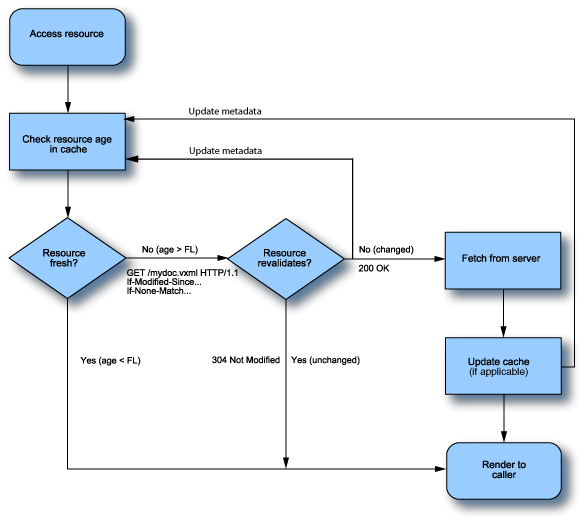
- Upon subsequent requests for the same resource, the Voice Browser service checks the cache for the age of the resource. The age is how long the resource has been stored in the cache since the Voice Browser service last checked with the server if it has changed.
- If the resource is fresh, the Voice Browser service uses the resource from its cache. It determines freshness by comparing the resource’s age with its freshness lifetime, the amount of time the resource can be reused from the cache without checking with the server if it has changed.
- If age < freshness lifetime, the resource is fresh.
- If age > freshness lifetime, the resource is stale. Note that being stale doesn’t mean the resource has changed. It just means it’s time to check.
- Once a resource is stale, the Voice Browser service asks the server—by sending a revalidation request—if its copy is still unchanged or valid. This is called validating or revalidating a resource.
If it hasn’t changed, the server responds that the resource is valid by sending back a 304 Not Modified message, and the Voice Browser service uses the local copy. If the resource has changed, the server responds that it’s invalid by sending a 200 OK message with the modified resource. The Voice Browser service updates its cache and uses the newer version.
Whenever the Voice Browser service revalidates a resource with the server, it resets the freshness of the local copy. This is true whether the local copy is still valid or is updated with a new version from the server.
This flowchart gives a graphical overview of Voice Platform’s cache processing. It assumes that the requested resource is already stored in the cache. FL stands for freshness lifetime.
Headers
Caching headers fall into these categories:
- General: Can appear in either request or response messages, for example, Cache-Control or Date.
- Request: Appear in request messages from the Voice Browser service to the server, for example, If-Modified-Since or If-None-Match. These headers provide information about the request and the Voice Browser service to the server.
- Response: Appear in response messages from the server to the Voice Browser service, for example, ETag. These headers provide information about the server and about further access to the resource identified in the request.
- Entity: Can appear in request or response messages, for example, Last-Modified or Expires. Entity headers provide additional information about the entity (resource) being cached, or, if no entity is present, about the resource identified by the request.
This table summarizes the relevant caching headers used in Voice Platform:
|
Header |
Type |
Definition |
|---|---|---|
|
Cache-Control |
General |
Passes caching directives along with the message. Voice Platform observes these directives:
|
|
Date |
General |
Date and time the response originated from the server. |
|
Pragma |
General |
Legacy header from HTTP 1.0, deprecated in favor of Cache-Control. Only directive observed is no-cache, equivalent to Cache-Control:no-cache. |
|
If-Modified-Since |
Request |
Gets resource from server if it’s been modified since the specified date and time. |
|
If-None-Match |
Request |
Gets resource from server if entity tag values (ETag) on cached and server copies don’t match. |
|
Age |
Response |
An estimate of how long a resource has been stored in the cache since its last revalidation with the server. |
|
ETag |
Response |
Entity tag (version identifier) of a resource. If ETag values on cache and server copies don’t match, the Voice Browser service updates its cache with the server version. |
|
Expires |
Entity |
Date and time cached resource expires and is considered stale. |
|
Last-Modified |
Entity |
Date and time resource on server was last modified. |
Overriding HTTP headers
If necessary, you can override HTTP headers and specify your own. For example, you may want to override a caching response by specifying another directive in your application, or attach a specific header to all responses sent by a particular server. You can override HTTP headers in these ways:
- Modify the server’s configuration to send specific headers. For example, you can use the mod_expires.c module to configure Apache to send the Expires header in all responses.
- Insert response headers in JSP applications. For example:
<%response.addHeader("Cache-Control","no-cache"),%>
- Use the <meta> element in your VoiceXML application. Specify the header name using the http-equiv attribute and the directive using content attribute. For example:
<meta http-equiv="Cache-Control" content="no-cache"/>
Interpreting status codes
The status code, included as part of a response message, describes how the server has handled the request and provides further instruction on the action to be taken by the Voice Browser service. For example, a 200 OK status code tells the Voice Browser service that it has attached a resource in the response. The Voice Browser service may cache this resource unless the response message includes a caching directive not to, for example, a Cache-Control:no-store (or Cache-Control:no-cache) header.
Determining freshness
When accessing a cached resource, the Voice Browser service uses the freshness lifetime to determine if it can be served from the cache without revalidating it with the server. It calculates this value in a number of ways, depending on the headers specified. If the response specifies a must-revalidate caching directive, then the Voice Browser service ignores the freshness lifetime and always revalidates the resource with the server.
- If the response specifies the Cache-Control:max-age header, the Voice Browser service uses max-age_value as the freshness lifetime. For example, if max-age=3600, the Voice Browser service can serve the resource from its cache without revalidation for one hour.
- If the response specifies Date and Expires headers, the freshness lifetime is Expires_value - Date_value.
- If the response specifies Date and Last-Modified headers, the freshness lifetime is Date_value - Last-Modified_value multiplied by a fraction of that interval (.10 by default), with a maximum set at 24 hours. This fraction is called the freshness fraction.
Note: If there’s no Date header, then the download date is used.
For example, say the Voice Browser service downloaded and cached a VoiceXML document that was last modified 12 days before. Using the freshness fraction, the freshness lifetime would be 1.2 days (12 x 0.10). Since that figure is greater than the default maximum, the Voice Browser service will revalidate the document with the server after one day (24 hours).
If you are making frequent changes to a resource for development or debugging purposes and want to see the change immediately, set browser.loading.resource_type.freshnessFraction to 0 on the Advanced tab for the Voice Browser service. The Voice Browser service will revalidate the resource upon each request. To modify the maximum, set browser.loading.resource_type.maxFreshnessLifetime to the desired value on the Advanced tab for the Voice Browser service.
- If you’ve specified the maxstale attribute in your application, then how long the resource stays fresh is its freshness lifetime as calculated with HTTP headers plus maxstale_value. This value is the amount of time a stale resource can remain in the cache before the Voice Browser service revalidates it with the server.
- If you’ve specified the maxage attribute in your application, the resource is fresh for that amount of time and overrides the freshness lifetime calculated with HTTP headers. Once the resource has been in the cache longer than maxage_value, the Voice Browser service revalidates it with the server.
Revalidating a resource
Whenever the Voice Browser service accesses a cached resource that is no longer fresh, it revalidates it with the server by specifying If-Modified-Since or If-None-Match request headers as appropriate. Which revalidation request the Voice Browser service sends depends on the response the server sent when the resource was cached for the first time.
This table shows the original response and subsequent request header combinations:
|
Original response header was... |
Revalidation request header is... |
|---|---|
|
Last-Modified |
If-Modified-Since |
|
ETag |
If-None-Match |
|
Last-Modified and ETag |
If-Modified-Since and If-None-Match |
If the resource revalidates, the server responds with a 304 Not Modified message. If the resource doesn’t revalidate, the server responds with a 200 OK message that includes the modified resource.
 Scenario 1: ETags
The ETag is a unique identifier calculated by the server for resources it stores. The server recalculates this value whenever the resource has changed. If a cached resource is stale, the Voice Browser service sends an If-None-Match request header containing the ETag value of the local copy. This value is compared with that on the server to see if they match.
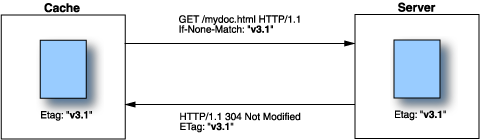
In this illustration, the ETag values on the server and cache versions match and the server responds with a 304 Not Modified message. The Voice Browser service reuses the cached copy and resets the freshness.
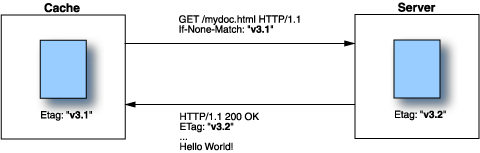
In this illustration, the ETag values don’t match indicating the resource has been modified since it was first downloaded and stored in the cache. The server responds with a 200 OK message and the modified resource. The Voice Browser service uses the new copy and resets the freshness of the updated copy in its cache.
Scenario 2: If-Modified-Since
The If-Modified-Since header says to get the resource from the server if it has changed since the specified date. The server returns 304 Not Modified if unchanged or 200 OK with the new resource if changed. The response message indicates the modification date with the Last-Modified or Date/Expires headers. In either case, the Voice Browser service resets the freshness of the cached copy.
File caching
File caching applies to static resources accessed using file: scheme URLs. Caching these files avoid the cost of processing an unchanged resource a second time. The Voice Browser service uses the modification time to determine if the cached copy has changed and needs an update.
Pre-loading documents
When you have a large set of static VoiceXML documents to run at startup, you can configure the Voice Browser service to preload them by setting the browser.preloadURI.document_name=URL service property on the Advanced tab for the Voice Browser service.
Pre-loading means that the Voice Browser service downloads, processes, and stores a resource in its cache before encountering it in a phone call. Dynamic documents aren’t preloaded because they are usually never cached. The only dynamic documents that get cached are the ones where you’ve taken care to code in response headers in your application to cache them.
The document_name is a unique name for the document and URL is the URL of the document. You can preload as many documents as you like, specifying different name/URL combinations (one per service property setting).
The Voice Browser service also loads context and script files referenced by the preloaded document. So, if you wanted to preload only script files for example, just create a dummy VoiceXML document that references them:
<form>
<block>
<script src="script1.js"/>
<script src="script2.js"/>
<script src="script3.js"/>
<block>
<form>
Then set browser.preloadURI.document_name=URL to the dummy document.
Emptying the cache
Every time the Voice Browser service stores a resource in the cache, it checks if there is enough space. Once the cache is full, it starts removing the least recently used entries to keep the cache size within configured limits.
Each resource type has a default maximum cache size, which you can change by setting the browser.caching.resource_type.maxCacheSize service property on the Advanced tab for the Voice Browser service. The default cache size limits per resource type are:
|
Resource type |
Default cache size |
|---|---|
|
Documents |
2,000,000 bytes |
|
Context files |
1,000,000 bytes |
|
Data |
1,000,000 bytes |
|
ECMAScript files |
1,000,000 bytes |
Removing cookies from the cache
During each session, certain cookies are stored in the Voice Browser service cache. You can force the creation of a new cookie for each call by specifying the browser.removeCachedCookies service property. This service property lists the names of cookies that are to be removed from the cache on each new attempt to read them. This forces the creation of a unique cookie for each instance, even during high-traffic periods.
CPU and system load
As an application developer, you need to remember that developing a voice application to run on Voice Platform is different from the usual web application. One key differentiation is the cacheability of the documents. This is usually not an issue with usual web applications where the client is an isolated web browser. In the Voice Platform environment, where several clients (Voice Browser service instances) need to run concurrently to process phone calls, machine resources needed to render fresh VoiceXML documents can really add up. Use static VoiceXML documents for the most and the biggest interactions and resort to dynamic documents for short interactions and only when necessary.
The amount of system resources required on the browser host—that is, a host configured with the Voice Browser service and Telephony Session service—depends on several factors. These include the number of concurrent channels executing, the cache-hit success rate, and the extra computational work performed by the application itself.
The number of concurrent channels must be provisioned for the busiest time of the day. In terms of caching, if the cache hit-rate is low, then the Voice Browser service must fetch all documents from external sources, thus increasing the amount of CPU load needed to execute the document. Obviously, a high cache- hit rate results in better CPU utilization and system load.
Finally, you must estimate the additional work done by the application when trying to determine the number of concurrent channels possible on a given piece of hardware. Applications that perform database operations can consume CPU, especially on a server running multiple concurrent channels.
