Deployment options
Before installing Voice Platform, decide how you want to deploy the Voice Platform services (Telephony Session service, Voice Browser service, and Application Container service) and integrate them with your Speech Suite environment. You can then determine the number of hosts you need and which Voice Platform components to run on each host.
In a production environment, your application servers generate VoiceXML to control the Nuance system. Nuance recommends installing application servers on different physical hardware than the Voice Platform hosts. These application servers do not run the Application Container service, which is not intended for production environments.
Consider these deployment options:
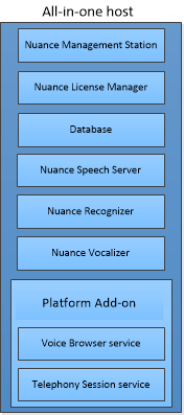
 All-in-one deployment
For development, testing, or very small deployments (< 46 ports), you can install all Voice Platform services on a host running all Speech Suite components, including Management Station, the Management Station database, and License Manager.
This deployment is not recommended for production environments since Nuance recommends using a single Management Station instance for simplified, centralized management of your entire production environment.
Note: Dragon Voice services, not shown in this example, have specific memory and CPU requirements. See the hardware requirements in the Speech Suite documentation.
Distributed host deployment
Most production environments install Voice Platform on two or more hosts, which enables running components on separate hosts. For example, Management Station, Voice Platform, Nuance speech software, and License Manager can run on separate hosts. This is the recommended deployment for production environments as it allows for centralized, simplified management of your entire production environment from a single Management Station.
This example shows two dedicated hosts running Voice Platform and Nuance speech software. License Manager and Management Station are on the same host, but could be on separate hosts. The Management Station database is on a separate host.
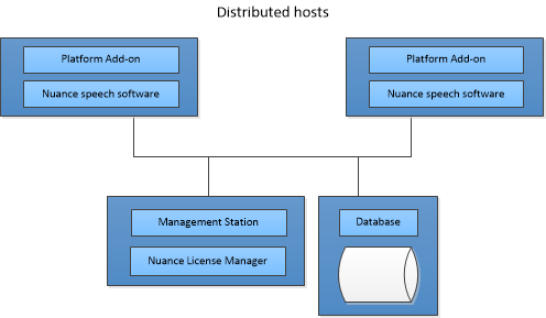
The Voice Platform installer installs the Telephony Session service, Voice Browser service, and Application Container service. The other components are installed with Speech Suite. Use Management Station to start all services or only specific services. The Application Container service, for example, is for sample applications only and is not intended for use in production environments.
When installing Voice Platform, you specify the Management Station host(s). After installing Voice Platform, you use Management Station to assign the appropriate role(s) with the Voice Platform services and Nuance speech software services. If the Voice Browser service and Speech Server are on the same host, the Voice Browser service automatically connects to the Speech Server during the installation.
You could also install Voice Platform onto a host running only the Voice Platform services and no Nuance speech software. When installing Voice Platform, you specify the Management Station host(s). After installing Voice Platform, you use Management Station to assign the appropriate role(s) with only the Voice Platform services, and then manually connect the Voice Browser service to a Speech Server host. The installation procedures explain each of these tasks.
For more information on distributed host deployments, see Clusters.
