Managing ports for incoming calls and transfers
The Telephony Session service determines which telephony ports to use for incoming calls and transfers. By default, it uses different ports for each but you can configure the Telephony Session service to use the same ports for both.
The relevant service properties are:
- audio.nms.Lines—Specifies what ports to use for incoming calls.
- audio.nms.SecondaryDevice—Specifies what ports to use for bridged or consultation transfers.
- audio.nms.CommonSecondaryDevices—Specifies to use the same ports for incoming calls and transfers (default is FALSE).
Using different ports
By default, the Telephony Session service uses different ports for incoming calls and transfers. This limits the number of incoming calls that can be handled since other ports must be reserved for transfers. This table describes the port specifications in the provided role files. The roles assume you’re using ISDN on T1, which has 23 ports per trunk on the NMS board.
|
Role |
Trunk:Port (incoming) |
Trunk:Port (transfers) |
|---|---|---|
|
1 TSS, 1 VBS, 1 ACS, 1 NSS, 1 NRS, 1 NVS, 1 NLPS, 1 KRYPTON, 1 NLE, 1 NTpE, 1 NAA, 1 NRM, SC (4 ports) |
1:1-4 |
1:5-8 |
|
1 TSS, 1 VBS, 1 ACS, 1 NSS, 1 NRS, 1 NVS, SC (4 ports) |
||
|
1 TSS, 1 VBS, 1 NSS, 1 NRS, 1 NVS, 1 NLPS, 1 KRYPTON, 1 NLE, 1 NTpE, 1 NAA, 1 NRM, SC (4 ports) |
||
|
1 TSS, 1 VBS, 1 NSS, 1 NRS, 1 NVS, SC (4 ports) |
||
|
1 TSS, 1 VBS, 1 ACS, 1 NSS, 1 NRS, 1 NVS, 1 NLPS, 6 KRYPTON, 1 NLE, 1 NTpE, 1 NAA, 1 NRM, SC (23 ports) |
1:1-23 |
2:25-47 |
|
1 TSS, 1 VBS, 1 ACS, 1 NSS, 1 NRS, 1 NVS, SC (23 ports) |
||
|
2 TSS, 2 VBS (46 ports), SIP |
1: 1-23 2: 25-47 |
4:73-95 |
|
2 TSS, 2 VBS, 1 NSS, 1 NRS, 1 NVS, 1 NLPS, 12 KRYPTON, 1 NLE, 1 NTpE, 1 NAA, 1 NRM, SC (46 ports), NMS or SIP |
||
|
2 TSS, 2 VBS, 1 NSS, 1 NRS, 1 NVS, SC (46 ports), NMS or SIP |
||
|
2 TSS, 4 VBS, 2 NSS, 2 NRS, 2 NVS, 1 NLPS, 12 KRYPTON, 1 NLE, 1 NTpE, 1 NAA, 1 NRM, 2 SC (46 ports), NMS or SIP |
If you’re using a custom number of ports not covered by the existing roles, you need to modify audio.nms.Lines and audio.nms.SecondaryDevice accordingly.
Configuring ports for incoming calls
Set audio.nms.Lines to the range of ports to be monitored for incoming calls. The syntax is:
audio.nms.Lines=port_range[,port_range]
The port_range value can be a single port or a range of ports separated by a hyphen. You can also specify multiple ranges separated by commas. The range expressions cannot include spaces or tabs. For example:
|
Service property setting |
Corresponding ports |
|---|---|
|
audio.nms.Lines=1 |
Uses only port 1 |
|
audio.nms.Lines=1-24 |
Uses ports 1 through 24 (OPS) |
|
audio.nms.Lines=1,4,5,9 |
Uses ports 1, 4, 5, and 9 |
Configuring ports for transfers
Unless you’re using blind transfers on OPS, other ports are required to transfer calls. Set audio.nms.SecondaryDevice to the range of ports to be used for call transfers. The syntax is:
audio.nms.SecondaryDevice=port_range[,port_range]
The port_range value can be a single port or a range of ports separated by a hyphen. You can also specify multiple ranges separated by commas. The range expressions cannot include spaces or tabs. For example:
|
Service property setting |
Corresponding ports |
|---|---|
|
audio.nms.SecondaryDevice=25 |
Uses only port 25 |
|
audio.nms.SecondaryDevice=25-27 |
Uses ports 25 through 27 |
|
audio.nms.SecondaryDevice=25-27,29 |
Uses ports 25, 26, 27, and 29 |
Other considerations
When changing the number of ports, you need to:
- Set the number of browser instances to the number of ports in audio.nms.Lines. The browser.instances are found in the <command> section on each Voice Browser service instance in the role file. A browser instance is a logical port that handles a call.
- Set ts.APNumberOfChannels equal to number of ports in audio.nms.Lines.
- Make sure your license specifies the correct number of ports. Typically, you purchase a license that matches the number of incoming ports. All these numbers should be equal: License count = browser.instances = audio.nms.Lines.
- Verify you have correctly configured the license ports for Nuance Speech Server. See the Speech Suite documentation for information configuring hosts for license ports, which involves setting parameters on different components for the number of ports you are running.
Use case
For example, say you were using OPS, which uses 24 ports per trunk, and not 23 as in ISDN. The port allocation per trunk on the NMS board is
- Trunk 1: 1-24
- Trunk 2: 25-48
- Trunk 3: 49-72
- Trunk 4: 73-96
You want to modify this role to run 48 ports: 2 TSS, 2 VBS, 1 NSS, 1 NRS, 1 NVS, SC (46 ports), SIP.
- If you haven’t already done so, set audio.Provider to nms since sip is the default. You can do that at the global scope in Management Station.
- Copy the role file from %MSTATION_HOME%/mserver/webapps/mserver/config/roles to %NUANCE_DATA_DIR%/system/customRoles.
- Rename it appropriately, for example, ConvServer_All Services48.xml.
- Open the file in a text editor. Change the name of the role to reflect the number of port, for example, <name>2 TSS, 2 VBS, 1 NSS, 1 NRS, 1 NVS, SC (48 ports), SIP</name>.
- Modify each Voice Browser service and Telephony Session service instance as follows:
|
Service instance # |
Name/Property |
|---|---|
|
VBS #1 |
Voice Browser 1 (Ports 1-24)/browser.instances=1-24 |
|
VBS #2 |
Voice Browser 2 (Ports 25-48)/browser.instances=25-48 |
|
TSS #1 |
Telephony Session Service 1 (Ports 1-24) audio.nms.Lines=1-24 audio.nms.SecondaryDevice=73-96 ts.APNumberOfChannels=24 |
|
TSS #2 |
Telephony Session Service 2 (Ports 25-48) audio.nms.Lines=25-48 audio.nms.SecondaryDevice=73-96 ts.APNumberOfChannels=24 |
- Save and close the file.
- Assign the new role.
 Ports on NMS boards
On the NMS boards, ports are numbered with a 0-base notation, meaning that the first port is numbered 0, the second one is numbered 1, and so on. However, the NMS service properties follow the 1-base notation (the first port is numbered 1, the second is numbered 2, and so on). Therefore, the NMS audio provider removes 1 from the port value that you specify in these audio.nms.xxxx service properties.
Using the same ports
You can configure the Telephony Session service to use the same ports for incoming calls and transfers. Your system can take more calls since it is no longer necessary to dedicate ports or, in the case of roles with larger number of ports, an entire trunk for transfers. The transfer port is dynamically allocated.
To enable, on each Telephony Session service instance, set:
- audio.nms.SecondaryDevice to blank
- audio.nms.CommonSecondaryDevices to TRUE
- Set audio.nms.Lines appropriately if you’re using a custom number of ports not covered by the existing roles
When changing the number of ports, you need to modify other values. See Other considerations for more information.
Limitations
A call transfer might fail due to no port available or to a glare condition. A glare condition occurs when a call transfer has been initiated but an incoming call arrives on the outbound port before the Telephony Session service has time to establish the transfer. The Telephony Session service favors the incoming call so the transfer fails.
Use case
With this feature, you can now use this role, for example, for bridged or consultation transfers: 2 TSS, 4 VBS, 2 NSS, 2 NRS, 2 NVS, 1 NLPS, 12 KRYPTON, 1 NLE, 1 NTpE, 1 NAA, 1 NRM, 2 SC (46 ports), NMS.
By default, it only handles incoming calls and blind transfers on OPS. This role runs two Telephony Session service instances.
- Display the Advanced tab for the Telephony Session services group.
- Add audio.nms.CommonSecondaryDevices and set it to TRUE.
- Click OK. The value is set at a higher scope, so all Telephony Session service instances inherit this setting.
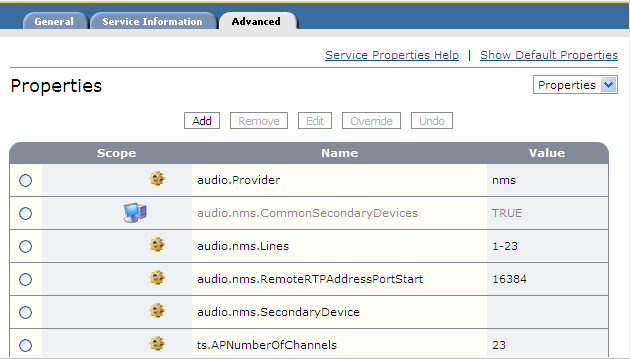
Since audio.nms.SecondaryDevice was not set in this role file, there is nothing else to do. This role can now handle bridged and consultation transfers on ISDN and OPS.
