Routing Allocation
Attributes are used to route chats to Agent Groups using predefined criteria such as skill sets, languages, or location.
The Routing Allocation Specs feature allows multiple attribute values to be defined into a spec that can route chats on either a percentage or a ranking basis. Routing allocation specs are implemented by mapping them to the business rules.
Use case
Objective
The client has two call centers. Call Center A is more cost-effective than Call Center B. The client wants to allocate a larger percentage of its total call volume to Call Center A.
Solution
First, the client creates an Attribute named CallCenters with two values: CallCenterA and CallCenterB.
Next, the client creates a Routing Allocation Spec named Call Center Volume Allocation. The Attribute to Allocate is set to CallCenters. The allocation for value CallCenterA is set to 75% and the allocation for value CallCenterB is set to 25%.
Once implemented, the new Routing Allocation Spec feature will send 75% of the calls to Call Center A and 25% of the calls to Call Center B.
Implement Routing Allocations
Here are the steps a Client Services Manager takes to enable Routing Allocations for a client.
-
Ask the Implementation team to Enable Routing Allocations.
-
Define attributes to be routed on a percentage basis.
-
Route by Percentage on the Routing Allocation Specs page.
Define attributes
Agent Attributes are defined in Portal on the Administration > Program Management > Engagement Skills page.
Engagement Skills
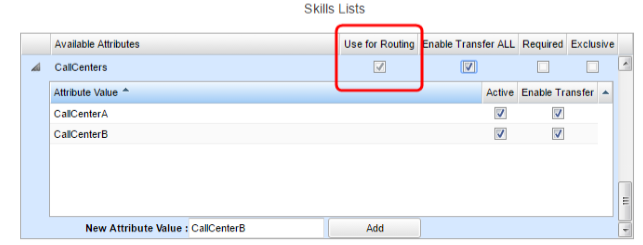
This view shows the CallCenters attribute with two values: CallCenterA and CallCenterB.
Note: The Use for Routing setting must be activated for each attribute that will be used in a Routing Allocation Spec.
Allocate attributes
Navigate to Administration > Program Management > Routing Allocation Specs list page.
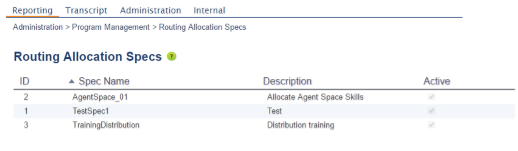
Click New to create a new Routing Allocation Spec.
Allocate attributes by ranking
-
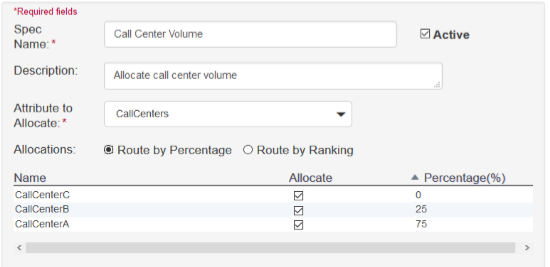
Enter a unique name for the Routing Allocation Spec.
-
Check the Active box to activate.
-
Enter a description for the spec.
-
Select the attribute you want to allocate from the drop-down list. Attribute choices will populate automatically from attributes enabled on the Defining Attributes page.
Route by Percentage
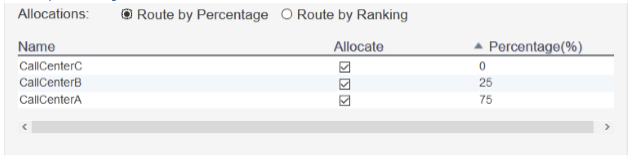
Select the Route by Percentage radio button. Check the boxes in the table to select the attributes you want to allocate. Then indicate the percentage value for each attribute. Percentage values must total 100.
Note: Actual percentages will fluctuate with chat volume. Percentage values will stabilize over time.
Route by Ranking
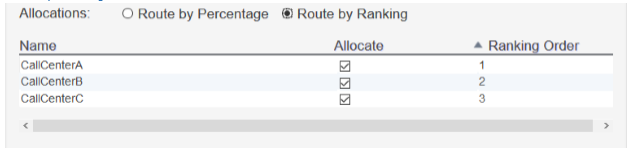
Select the Route by Ranking radio button. Check the boxes to select the attributes you want to allocate. Then indicate the order in which the attributes will be used for routing.
Note: Chats are assigned to the attributes in the order you specify here. When the first attribute is full, chats will overflow to the second attribute and so on.
Troubleshooting
Attributes must have the Use for Routing box checked on the Engagement Skills page in order to qualify for a Routing Allocation Spec. If an attribute is used in a Routing Allocation Spec and later on the Use for Routing box is unchecked, the software will automatically deactivate the Routing Allocation Spec. (A warning message will display when the box is unchecked.)
