Searching for calls
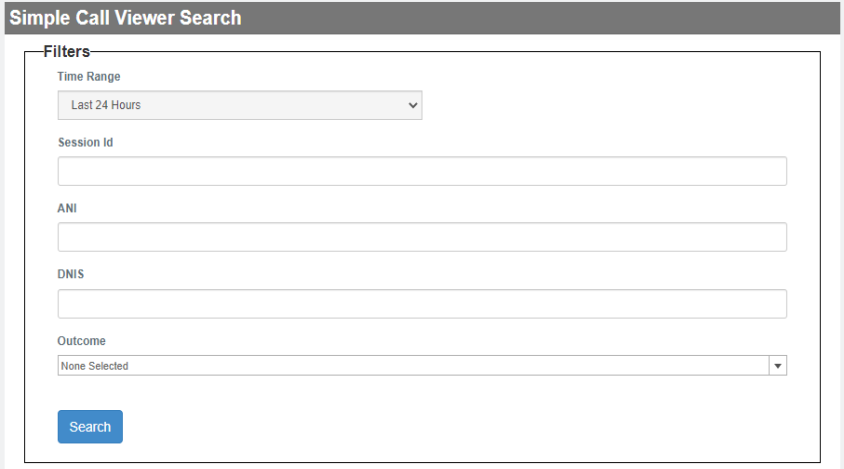
You can search for calls on the Simple Call Viewer Search page by specifying a time range and then filtering for session ID, ANI, DNIS, outcome or exit reason.
 .
.
-
Select a time range preset.
-
If desired, narrow the scope of the data by specifying one or more values for call parameters.
Only those data having these parameter values are included in the displayed list of calls.
-
Session Id - Each call has an application-generated ID that is unique to the call. An application using a Session ID creates a call log whose file name includes the ID string. You can enter a single Session ID to select a single call, or else you can enter a list of comma-separated Session IDs. Additionally, you can use the * (asterisk) symbol to define wildcards. The Wildcard asterisk takes the place of missing characters and can be used both before and after entered characters.
-
ANI - This is the phone number of the caller. In this filter, you can enter a single ANI to select calls only from that ANI, or else you can enter a list of comma-separated ANIs. Additionally, you can use the * (asterisk) symbol to define wildcards. The Wildcard asterisk takes the place of missing characters and can be used both before and after entered characters.
-
DNIS - This is the phone number that the caller dialed. In this filter, you can enter a single DNIS to select calls only to that number, or else you can enter a list of comma-separated DNIS. Additionally, you can use the * (asterisk) symbol to define wildcards. The Wildcard asterisk takes the place of missing characters and can be used both before and after entered characters.
-
Outcome - The call outcome is any one of several possible categories defining how a call finishes. With this filter, you can select one, some, all, or none of the listed outcomes in the drop-down list.
-
-
Click Search.
The system generates a call list based on the configured filtering.
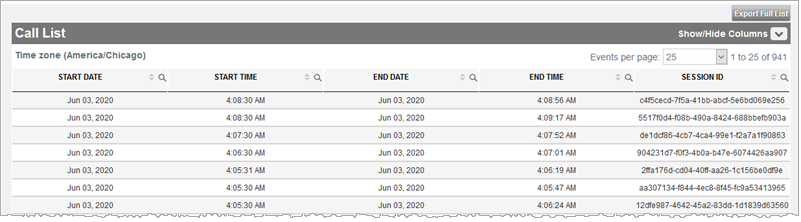
Note: The displayed time zone (top-left) of Call List represents the time zone of the listed start and end times.
