ASR Details
The ASR Details report displays ASR Conversion of spoken words to interpretable text.-related metrics that underlie the visualizations in the ASR Dashboard. The intended users of this report are business sponsors and business owners.
Table
Use the filters and sliders to display the desired data in the table. Mouse over any cell in the table for a tooltip with relevant information.
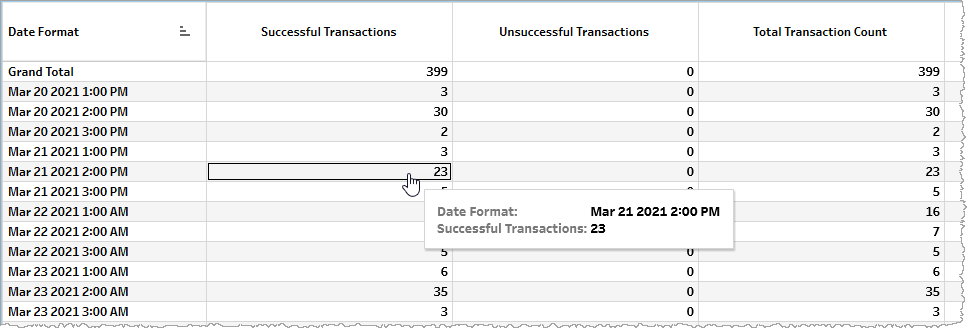
The table displays metrics either as raw counts (for example, Total Transaction Count) or calculated metrics (for example, Avg. Total Transaction Duration (Seconds)).
| Name | Description |
|---|---|
| Successful Transactions |
Total number of successful ASR transactions, each beginning with a transaction request at an API endpoint of the Hosted Service and ending with the successful completion of the request and a resulting transaction result code. |
| Unsuccessful Transactions |
Total number of failed ASR transactions, each beginning with a transaction request at an API endpoint of the Hosted Service but failing to end with the successful completion of the request and a resulting transaction result code. |
| Total Transaction Count |
Total number of ASR transaction requests regardless of success or failure. |
| No Result |
Total number of ASR transaction requests in which recognition completed without producing a result. |
| No Speech |
Total number of ASR transaction requests in which no utterance was detected in the audio stream. This may occur if the audio does not contain anything resembling speech. |
| No Input Timeout |
Total number of ASR transaction requests in which the configured max for user silence time (the time before user input) was exceeded. |
| Other Client Errors | Total number of ASR transaction requests in which recognition failed due to other client errors. |
| Server Error |
Total number of server errors. |
| No Match | Total number of ASR transaction requests in which there is a result but it is marked as rejected. This completion cause is returned for extremely noisy and/or unintelligible audio, or when the audio is not compatible with the declared audio format. |
| Avg. Successful Transaction Duration (Seconds) |
Average duration in seconds for successful ASR transactions. |
| Avg. No Result Duration (Seconds) | Average duration in seconds of ASR transaction requests ending in a NoResult error. |
| Avg. No Speech Duration (Seconds) | Average duration in seconds of ASR transaction requests ending in a NoSpeech error. |
| Avg. NoInputTimeout Duration (Seconds) | Average duration in seconds of ASR transaction requests ending in a NoInputTimeout error. |
| Avg. Other Client Errors Duration (Seconds) | Average duration in seconds of ASR transaction requests ending in a OtherClientErrors error. |
| Avg. Server Error Duration (Seconds) |
Average duration in seconds for a server error. |
| Avg. No Match Duration (Seconds) | Average duration in seconds of ASR transaction requests ending in a NoMatch error. |
| Average Audio Duration (Seconds) | Average duration in seconds of streaming and real-time audio in ASR transactions. |
| Average Latency (Seconds) |
Average latency in seconds. |
Filtering
The filters in this section allow you to reduce the volume of displayed data on the report.
Date
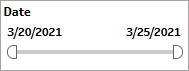
The Date filter is a slider with two moveable sides. By narrowing the date range, you display only data falling within the range.
Date Granularity
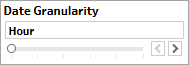
The Date Granularity filter allows you to adjust the reported data granularity described by the trend lines. Drag the slider horizontally to adjust the granularity of reported data. Alternatively, you can use the left  and right
  arrow buttons to move the slider incrementally.
Appid
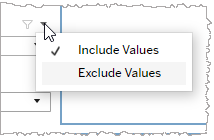
This filter selectively reduces the volume of data displayed based on application ID. The filter reduces data by including or excluding one or several applications. Specify one or more applications from the list as required.
Click Include values to display only those data possessing the selected values. All other data are hidden from the visualization.
Click Exclude values to display only those data that do not possess the selected values.
Language
This filter selectively reduces the volume of data displayed based on language. The filter reduces data by including or excluding one or several languages.
Specify one or more languages from the list as required.
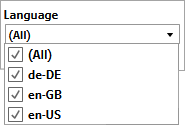
Click Include values to display only those data possessing the selected values. All other data are hidden from the visualization.
Click Exclude values to display only those data that do not possess the selected values.
Voice
This filter selectively reduces the volume of data displayed based on selected voice. The filter reduces data by including or excluding one or several voices.
Specify one or more voices from the list as required.
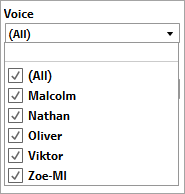
Click Include values to display only those data possessing the selected values. All other data are hidden from the visualization.
Click Exclude values to display only those data that do not possess the selected values.
Org ID
This filter selectively reduces the volume of data displayed based on org ID. The filter reduces data by including or excluding one or several IDs.
Specify one or more org IDs from the list as required.
Click Include values to display only those data possessing the selected values. All other data are hidden from the visualization.
Click Exclude values to display only those data that do not possess the selected values.
