Sorting Conversations within List
Note: Nuance Insights supports navigating and performing operations with a variety of methods, including a combination of keyboard and mouse, keyboard only, having elements on the screen being audibly described (requires 3rd party software like JAWS), and having voice input interpreted (requires Nuance Dragon). See Accessibility for more information.
-
In Conversation List, make sure the column with which you would like to sort the list is being displayed.
-
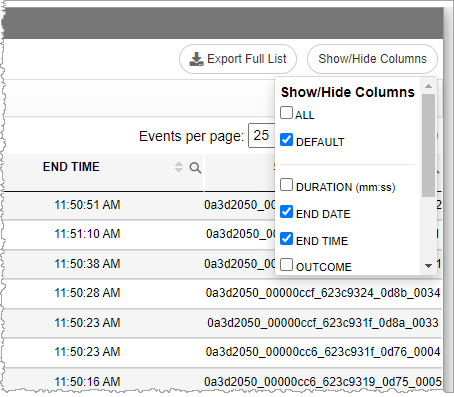
Click the Show / Hide Columns button on the far right side of the title bar.

-
In the Show/Hide columns list, select ALL to show all columns, DEFAULT to show only the default columns, or individually select columns.
-
-
Click once in the column header's sorting arrows to sort the list of conversations according to the natural sequencing of the data in that column.
-
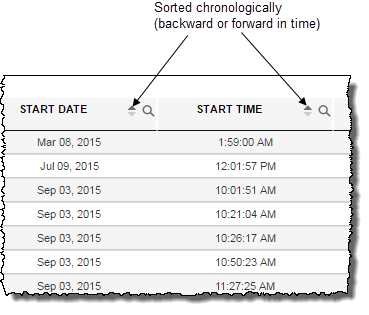
Columns whose data indicates a
 point in time (for example, dates, starting and ending times) follow a chronological sequence when sorted.
-
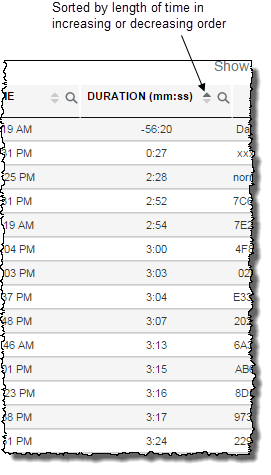
Columns whose data indicatelength of time (for example, duration) follow a forward sequence from smallest duration to largest duration when sorted.
-
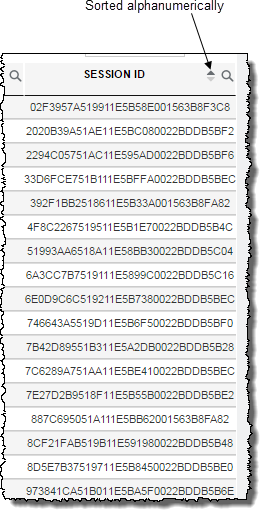
Columns whose data types arealphanumeric strings (for example, session IDs) are sorted alphanumerically.
Note: The START DATE and START TIME columns each have a sort function. However, clicking either one has exactly the same behaviour which is a sorting by overall chronology rather than simply on time-of-day, for example. END DATE and END TIME are also a locked pair.
-
- Click a second time in the same column header to reverse the order of the sequencing, again, according to the natural sequencing of the data type.
