Top Phrases by Final Intent Detail
This report lists the daily top constituent user phrases that make up final intents, broken out by channel.
Note: This report visualizes data broken out on a per day basis. To visualize this data in the aggregate for the date range specified, consult the Top Phrases by Final Intent report.
The Count column lists the raw number of instances of top phrases of a given intent within the day specified.
In addition to the use of report filters, Nuance Insights allows you to manipulate displayed data through several other means in order to better visualize information. Select from the following to learn more:
Visualization
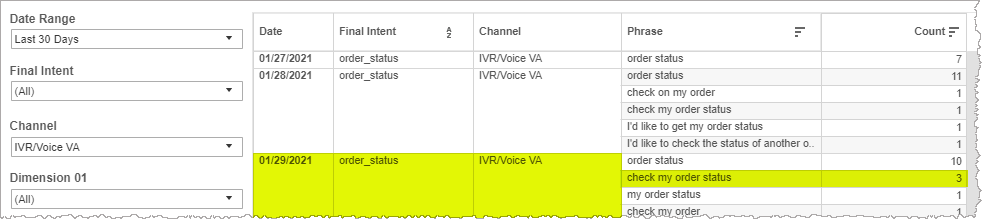
On a per day basis, the table lists the raw counts of recognized phrases broken out by intent and channel. In the example below, the recognized phrase check my order status matched with the intent order_status in the channel IVR/Voice VA three (3) times on January 29th, 2021.
Filters
Increase the specificity of your view's reporting by applying filters to the data.
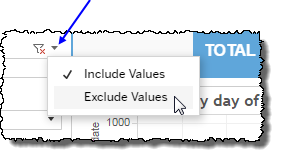
 includes data containing specified filter values or else excludes this subset of data.
Clicking Include values displays only those data possessing the selected values. All other data are hidden from the visualization.
By contrast, clicking Exclude values displays only those data that do not possess the selected values.
Date Range
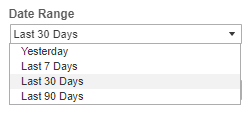
The Date Range filter is a list of preset date ranges to choose from. Each range ends at midnight at the end of the day before the current date (that is, yesterday). In the case of the Yesterday selection, the range begins at 00:00 yesterday, and ends at 23:59 yesterday.
Final Intent
The Final Intent filter allows you to narrow the displayed data in the tables by including (or excluding) only those intents bearing the selected intent name.
Channel
By choosing one or more channels from the list, you refine your displayed data-set by including data from only those channels matching the selection.
- Select all available values by selecting All.
- Select only one value by first clearing the All checkbox, and then selecting the value whose data you would like to see visualized.
-
Select several values by doing one of the following:
- Clear the All checkbox, and then select the values whose data you would like to see visualized.
- Select the All checkbox and then clear values whose data you would NOT like to see visualized.
Custom filters
This report accommodates customizable filters.
Customizable filters narrow the scope of the reported dataset by including or excluding data with identifiable attributes. These attributes may be about the conversation itself or about an event that may have happened during the conversation.
For more information about how to add customized filters to your view, contact your Nuance Professional Services representative.
Note: If you would like to modify this or any report, Nuance Communications, Inc. recommends you contact Nuance Professional Services.
