Planning the installation
To help with planning your Voice Platform deployment, this topic describes how the Voice Platform components integrate with the Speech Suite components, your application servers, and your telephony servers. For Voice Platform deployment options and examples, see Deployment options.
A Nuance Speech Suite deployment includes Nuance speech software, available through the Nuance Speech Suite installer, as well as customer application servers and the voice platform.
- Application servers: Application servers provide files, including VoiceXML documents, prompts, wordsets, grammar files, and models, to Nuance speech products. Speech Suite fetches files from those servers on behalf of voice applications and caches them to ensure fast retrieval when applications need them. See Application servers.
- Voice platform: Speech applications rely on voice platforms for communicating with Nuance products and for services that Nuance does not provide. Voice applications use VoiceXML elements, properties, and attributes to identify data to be fetched. The voice platform converts those parameters into MRCP messages and forwards them to Nuance Speech Server, which passes the requests to the respective speech products. See Voice platform.
- Speech Suite: Speech Suite provides speech resources for applications, which make recognition, semantic interpretation, and/or text-to-speech requests via the voice browser. See the Speech Suite documentation for detailed information about each component.
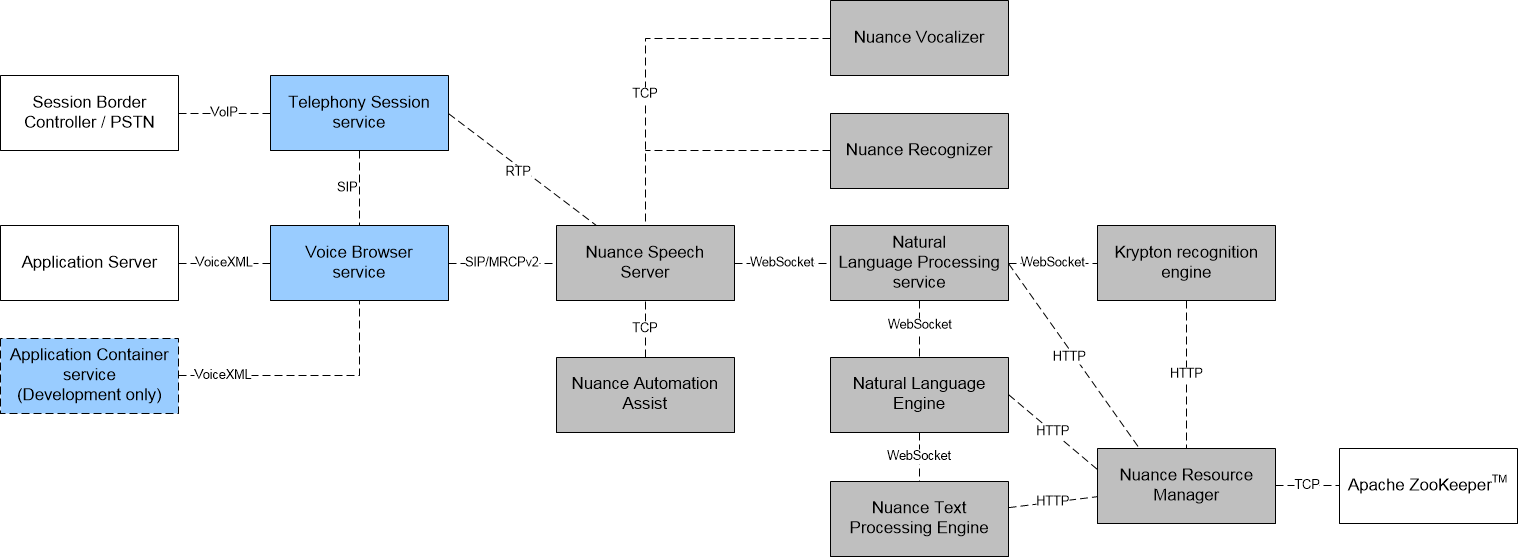
In the following diagram, the standard Nuance speech products, including Dragon Voice engines and supporting components, such as the Natural Language Processing service and Nuance Resource Manager, are gray. The Voice Platform components are blue. See the Speech Suite documentation for detailed information about each component.
Note: The diagram demonstrates a production environment using a customer application server. You must not use the Application Container service provided with Voice Platform in a production environment.
Application servers
A typical Nuance deployment includes application (or web) servers, which provide the application logic and may also include interfaces to an external database or a back-end system.
To choose web servers and their installation locations, anticipate their usage and load:
- Application web services can be co-located with Nuance speech services or run on separate servers.
- There can be one server for all requests, or multiple servers for different request types.
Speech applications provide the URIs for the application servers in their requests for resources.Nuance speech products generally do not need to configure the location of the application servers.
Nuance speech products perform the fetch operations and store fetched items in their caches, which improves response times when accessing items repeatedly. See the Speech Suite documentation for information on fetching and caching.
Voice platform
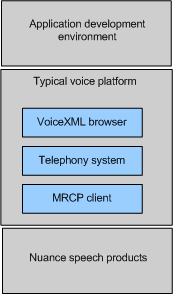
A voice platform consists of several sub-components and the architecture can vary from one platform to another. Here is an overview of the architecture:
Distinguishing features of a typical platform:
- Development environment: Builds, tests, and deploys VoiceXML applications. The VoiceXML application controls speech processing as described in the VoiceXML specification.
This documentation set contains advice for configuring and controlling features in the Nuance speech products, but otherwise does not specify requirements or workflows for the application development environment. Separately, Nuance offers products and documentation for application development.
- Telephony system: Receives and transfers calls. The telephony system controls signaling and RTP audio channels. Calls can arrive through the Public Switched Telephone Network (PSTN) or through the Internet as Voice over IP (VoIP).
- Voice browser: Interprets the application’s VoiceXML documents. The voice browser connects incoming telephone calls to their corresponding applications. Just as a web browser presents an HTML document to a web server, a voice browser presents a VoiceXML document to a caller. The voice browser interprets VoiceXML documents, acquires resources from web servers, delivers requests to the MRCP client, and returns responses to the application (typically as ECMAScript objects).
- MRCP client: Communicates with Nuance Speech Server and other speech products. It manages speech sessions through Speech Server, receives application requests from the browser, translates requests into standard MRCP messages, and returns results to the application through the voice browser. Nuance provides a sample MRCP client, and the voice platform must provide a working instance.
Nuance speech products support industry standards and run on Linux and Windows hosts. When running multiple applications, administrators can configure each application and owner separately—Nuance products separate output data for each tenant company. By separating data, Nuance products protect confidential information and simplify the use of call logs for tuning, troubleshooting, and billing purposes.
You can host applications in any situation:
- On-premises deployment: Install Nuance products on your own hardware in your own facilities. You have complete operational control over the system as you deliver telephone calls to your applications.
- Call center hosting: Nuance products are fully tested and reliable for large call centers running multiple applications on behalf of numerous tenants. The system keeps application and log data separate to protect confidentiality and simplify tuning and troubleshooting.
- Nuance hosting: Nuance On Demand is a cloud-based voice platform for hosting and continually improving contact center applications. This end-to-end service of entirely Nuance technology and expertise is delivered with 100% availability and benefits immediately from new updates and releases.
Nuance provides full support for applications and installations through its technical support and professional services organizations.
