Sending outbound calls using SIP
If you have an outbound client application, you can use Voice Platform to initiate outbound calls. To do so, you must configure the Telephony Session service to permit outbound calls, and set up your outbound client to send a SIP INVITE request that includes headers defining how the outbound call is to be conducted.
Inbound calls
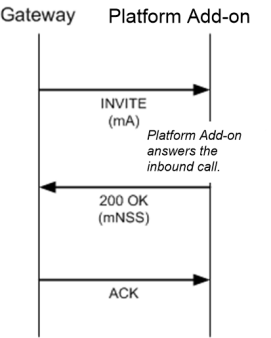
In an inbound call, Voice Platform receives an INVITE from the PTSN gateway:

The call flow proceeds like this:
Outbound calls
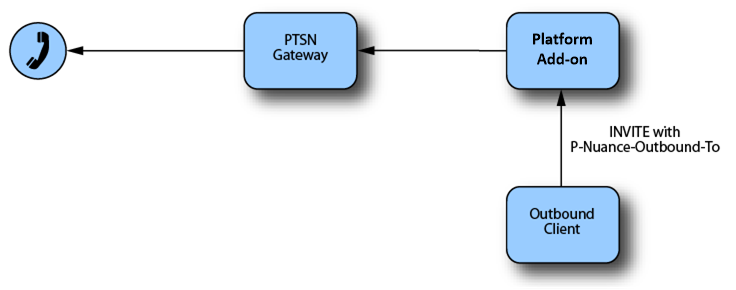
When you initiate an outbound call, your outbound client first sends an INVITE request to Voice Platform. This request includes a special P-Nuance-Outbound-To header that specifies the recipient of the call:
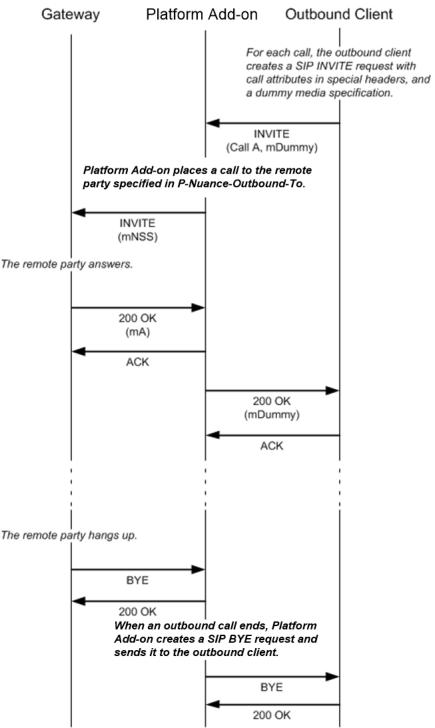
In this case, the call flow for a successful call between the client, Voice Platform, and the gateway looks like this:
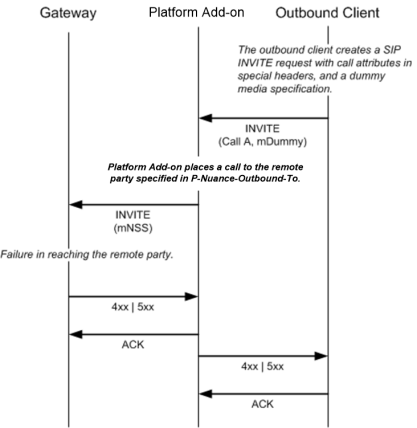
If the call is not able to connect to the desired recipient, the call flow looks like this:
Configuring the Telephony Session service for outbound calls
To enable outbound calls in Voice Platform, you must configure three parameters on the Telephony Session service:
- ts.AllowOutbound must be set to TRUE to enable Voice Platform's outbound calling feature.
- Related topics must be set to list the IP address of your outbound client. You can list multiple clients in a comma-separated list.
- ts.OutboundConnectTimeout optionally, you can set a timeout for outbound call attempts. If the recipient does not accept the call within this time frame, the attempt is abandoned.
See the parameter descriptions for more information.
To set these parameters, specify them on the Telephony Session service in the Management Station. You must then restart the Telephony Session service in order for the new parameter values to take effect.
Headers to include in an outbound call request
When your outbound client sends an INVITE request to Voice Platform, the request must include the following mandatory headers:
- To: A SIP URL with the address of the Voice Platform server.
- From: Either a SIP URL indicating the local party (that is, the outbound client), or an anonymous URL.
- P-Nuance-Call-Type: Must be outbound.
- P-Nuance-Outbound-To: The URL of the intended recipient for the call (that is, the remote party for Voice Platform to call).
- P-Nuance-Initial-URL: The URL of the initial VoiceXML page to be loaded once the connection has been established.
In addition, the request may include the following optional headers:
- P-Nuance-Session-XML-URL: The URL of the Ifile to be loaded for the P-Nuance-Initial-URL page.
- P-Nuance-AAI: This optional header may include an application-to-application string that will be forwarded by the Telephony Session service in the INVITE it sends to the remote gateway. The actual header sent by the Telephony Session service will be called either User-to-User or Aai, depending on the value specified in the audio.sip.AaiBasedOn parameter.
Example
An example of a request appears below:
INVITE sip:8887640272@10.14.51.50:5060 SIP/2.0
Via: SIP/2.0/UDP 10.14.51.62:5060;branch=z9hG4bK-2803-1-0
Max-Forwards: 70
Contact:
To: sip:8887640272@10.14.51.62:5060
From: sip:5149047800@10.14.51.62:5061;tag=1
Call-ID: 1-2803@10.14.51.62
CSeq: 1 INVITE
P-Nuance-Call-Type: outbound
P-Nuance-Outbound-To: sip:995149047800@mtl-gate1.nuance.com
P-Nuance-Initial-URL: http://mt-zeno.nuance.com/vxml/nvp5_features.vxml
P-Nuance-Session-XML-URL: http://mt-zeno.nuance.com/vxml/session.xml
P-Nuance-AAI: 6754356643267654
Content-Type: application/sdp
Content-Length: 175
v=0
o=TS 0 0 IN IP4 10.14.51.62
s=TS session
c=IN IP4 0.0.0.0
t=0 0
m=audio 4444 RTP/AVP 0 101
a=rtpmap:0 PCMU/8000
a=rtpmap:101 telephone-event/8000
a=fmtp:101 0-15
Call establishment responses
Normal SIP responses are used by Voice Platform to report progress, call connection or failure:
- Call progress: Voice Platform forwards 1xx responses, such as 100 Trying or 180 Ringing, from the remote party to the client application.
- Call connection: Once the call is fully established (Voice Platform has loaded the required resources and the remote party has answered), Voice Platform sends a 200 OK response to the client application.
- Failure: If a problem occurs while the outbound call is being established, Voice Platform sends a failure response to the client application.
Some common SIP responses appear in the table below:
| SIP code | Condition |
|---|---|
| 200 |
The remote party answered the call. |
| 404 | The destination phone number or URL is invalid, or does not exist. |
| 408 | The remote party did not answer before the timeout expired. |
| 486 | The remote party was busy. |
| 503 | No circuit was available, or all channels are already in use, or there was a problem loading Voice Platform resources. |
| 606 | The client is not allowed to place outbound calls through this instance of Voice Platform. |
Call termination
A call may be terminated on the remote end when the recipient hangs up, when the application finishes, or when the outbound client terminates the call.
- When a connected outbound call ends because the remote party hung-up or because the Voice Platform application ended, Voice Platform sends a BYE request to the outbound client. The outbound client then sends a 200 OK response to Voice Platform to acknowledge the BYE.
- The client application may send a BYE to Voice Platform. Voice Platform responds to the BYE with a 200 OK message.
Note: A BYE from the client application does not cause Voice Platform to end the outbound call. It only ends the dialog between the client application and Voice Platform. The dialog between Voice Platform and the remote party continues.
