View Language Misses reports
Note: This feature is available to healthcare clients only.
A language miss is failed attempt by a project to retrieve a translation for a department name or information field. A project is typically designed to handle missing translations in a seamless way by using the default language (en_us). If you see language misses in a project, it could mean that you need to configure additional translations for it.
To generate a Language Misses report:
- Open Composer and click REPORTS on the top menu bar.
- On the left nav bar, find the environment you want (RUNTIME or CONFIGURATION ).
- Under Language Misses, click the report you want to see: Today or Advanced Search.
- If you click Today, a report showing resource misses for today's date is displayed. The report includes misses for both Name, and Info fields.
- If you click Advanced Search, a query form appears. Enter values for Date Range and select the field you want to query (Name, Info, or All). Then click SEARCH.
- The report will display. Use the Previous and Next buttons to page through the results. Type into the Search box to filter the results.
Here is an example of a Language Misses report. Each row shows the number of misses for a department and language.
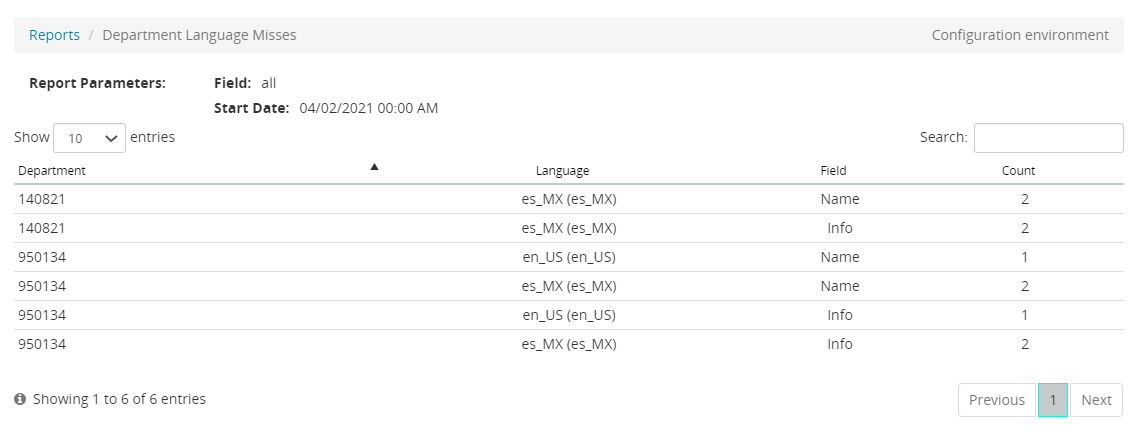
From this page, you can:
- Click Reports to return to the query page.
