Performance vital signs
You can configure the Management Station to periodically collect vital signs about the performance of each managed host and Nuance services running on those hosts. The Management Station polls this information and stores it in the database.
Schema overview
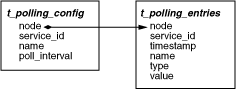
This figure shows the tables that store information about vital signs:
t_polling_config
The t_polling_config table stores information about how the Management Station is configured to collect vital signs information. You specify this configuration through the Vital Signs Collection Configuration page under the Management Station Data Management tab.
|
Field name |
Description |
Type |
Constraints |
|---|---|---|---|
|
node (Primary keys: node, service_id, name) |
Name of the host to poll for vital signs information. |
varchar(100) |
NOT NULL |
|
service_id (Primary keys: node, service_id, name) |
Service ID for the service to poll for vital signs information. |
varchar(36) |
NOT NULL |
|
name (Primary keys: node, service_id, name) |
Name of the vital sign performance counter to be polled. |
varchar(255) |
NOT NULL |
|
poll_interval |
Interval controlling how often to poll for vital sign information. |
int(11) |
t_polling_entries
The t_polling_entries table stores vital signs information for a particular service. This is typically the information that is useful for generating performance-related reports.
|
Field name |
Description |
Type |
Constraints |
|---|---|---|---|
|
node (Primary keys: node, service_id, timestamp, name) |
Name of the host to poll for vital signs information. |
varchar(100) |
NOT NULL |
|
service_id (Primary keys: node, service_id, timestamp, name) |
Service ID for the service to poll for vital signs information. |
varchar(36) |
NOT NULL |
|
timestamp (Primary keys: node, service_id, timestamp, name) |
Time at which the database was updated with this vital signs information. |
datetime |
NOT NULL |
|
name (Primary keys: node, service_id, timestamp, name) |
Name of the vital sign that was collected. |
varchar(255) |
NOT NULL |
|
type |
Data type of this vital sign. |
varchar(32) |
NOT NULL |
|
value |
Value of this vital sign. |
varchar(64) |
Sample query
This query shows how to return specified performance counters and their values, collected during a specific time period, using the t_polling_entries table:
SELECT timestamp, name, value
FROM t_polling_entries p
WHERE p.node = 'jupiter-host'
AND p.timestamp between
'2010-07-15 13:07:17' AND '2010-07-15 14:07:17'
AND p.service_id = 'watcher-daemon'
ORDER BY p.timestamp;
