Product overview
Neural text-to-speech offers human-like voice quality to Nuance Cloud IVR applications. It’s an alternative to the default Vocalizer TTS engine provided with Speech Suite.
Neural TTS is available for these architectures:
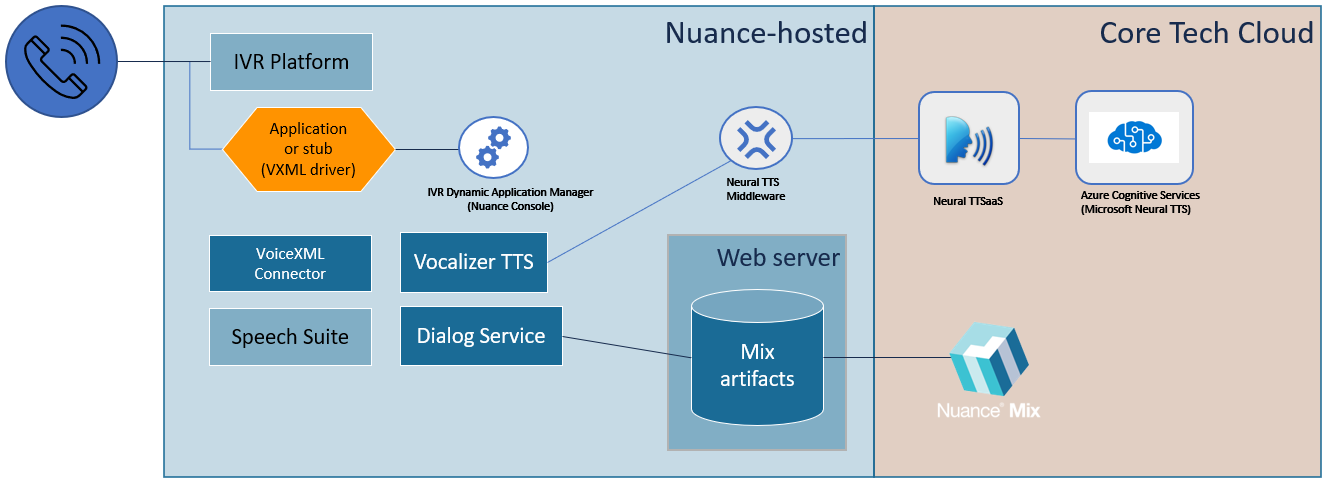
- Neural TTS configured in Mix dialogs deployed to the Nuance-hosted, Azure environment
- Standalone Neural TTS configuration for your NDF (Nuance development VXML Framework) or VXML applications
Neural TTS highlights
- High quality voices with multiple speaking styles
- Easy to change voices in real-time
- No need for prerecorded static prompts
- Avoids a disjointed mixture static and dynamic prompts during playback
- DIY capability using the IVR Dynamic Application Manager (Nuance Console) for configuration
Design and configuration
The neural TTS solution is made possible by Neural text-to-speech middleware (NTM) which connects Speech Suite IVR applications to Neural TTS as a Service. Nuance deploys and manages NTM on your behalf. Reach out to Nuance Professional Services to begin using and configure your deployment.
Neural TTS configured in Mix dialogs:
Standalone Neural TTS configured by your IVR application:
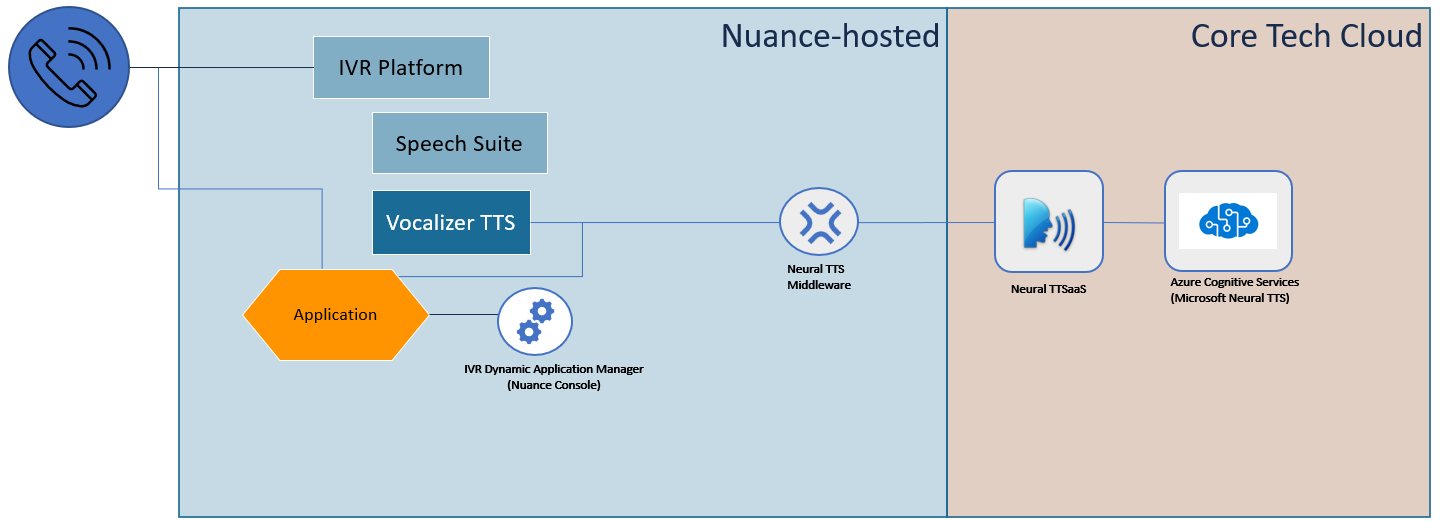
Neural TTS is hosted outside of the Speech Suite platform. If neural TTS engines are out of service for any reason, your Speech Suite applications automatically use Vocalizer as a fallback.
At runtime, the first requests for neural TTS prompts might exhibit short delays before playback begins. Expect the latency to disappear after the first few prompts. To avoid the latency, create a script to exercise the neural TTS engine and run the script at a 24-hour interval.
Workflow for Mix dialogs
Microsoft neural TTS services are only available in Nuance-hosted environments.
To use the solution:
-
Complete a sales agreement for Nuance Cloud IVR in Azure using Mix with neural TTS. (Give attention to needed capacity and rate limits during this review.) This sets into motion all needed components and configurations.
-
Use Mix to design dialogs using neural TTS. For details see Integrating with Speech Suite in the Nuance Mix documentation. This includes:
- In Project Settings, click TTS settings and configure a neural voice model, language, gender, and voice.
- Use the Mix.dashboard Manage tab to enable authorization.
- For each prompt, specify the TTS input text. Optionally, use SSML markup to control tone, prosody, etc.
- Required. Specify a Mix engine pack 2.3 or above.
-
Write a stub to start VoiceXML Connector sessions. The stub invokes Mix dialog models using <subdialog>. The stub is also known as the client application or VXML driver. Make a thorough review of the available configurations: you configure the stub and session start requests, Nuance configures the Helm charts, and additional configurations are available in the Nuance Console. For details, see the VoiceXML Connector documentation . (Search the documentation for “neural TTS” to find topics and configuration specifically for the neural TTS solution.)
-
Test the IVR application, and deploy to production.
Workflow for NDF/VXML application
General workflow:
- At the conclusion of a sales agreement, Nuance provides you with the NTM service address, client ID, and secret.
- Configure the audio reference filter (see below).
- Your application posts a start request. NTM authorizes and returns success.
- The application sends requests for TTS prompts. It provides the voice name, language, and the TTS input text.
- NTM returns audio to the IVR platform, which plays it.
- If an error occurs, NTM returns an exception. If the application specified a fallback prompt, the IVR uses Vocalizer to play it.
Configure audio reference filter within your application
For NTM for NDF/VXML applications, you must add the NTM audio reference filter to your project. The NTM filter is a pair of Java files that associate the values in NDF or VXML applications with Neural TTS values.
To apply the filter:
- Download filter.zip. It contains the NTMfilter.java file, which has the filter class, and CaptureWrapper.java, which supports NTMfilter.java.
- Unzip and copy the Java files into your project.
- In your project’s web.xml, add a reference to the filter’s Java class.
You can configure these parameters in web.xml:
ntm_prompt_url: Fully-escaped URL to the ttsPrompt endpoint.ntm_client_id: Fully-escaped client ID.ntm_languages: Comma-separated list of languages supported by the application.ntm_voices: Comma-separated list of voices. Order should matchntm_languages.
API for Standalone NTM
Your application posts requests to the NTM service.
| API | Description |
|---|---|
| /start | Begins a connection to NTM. |
| /ttsPrompt | Synthesizes audio. For each request, the service returns neural TTS audio for the input text in ulaw format. Any number of requests are allowed. |
API request formats
To start a session:
ntm-server/ntm/start?clientId=providedID&secret=providedSecret
To synthesize audio:
  ntm-server/ntm/ttsPrompt?clientId=providedID&
       voice=voiceName&
       language=langcode&
       ttsText=textString&
       platformSessionId=textString
Descriptions:
| Parameter | Description |
|---|---|
| ntmServer | Required. IP address of the NTM service. Provided by Nuance. (The examples below show a dummy value: 00.00.00.000:1234) |
| clientID | Required. Authorization string. Provided by Nuance. |
| secret | Required. Authorization string. Provided by Nuance. |
| voice | Optional. Name of any neural TTS voice available to your application per the sales agreement. Default: en-US-JennyNeural |
| language | Optional. Any language code available to your application per the sales agreement. Default: en-us |
| mask | Optional. Boolean value. If true, the service hides the input text in log files when your application sets the switts.secure_context property (to ensure confidentiality of the data). Default: false |
| ttsText | Required. Input text to be synthesized. Syntax must conform to VXML specifications. SSML is allowed with any syntax allowed by the neural TTS engine. |
| platformSessionId | Optional. A unique session identifier that enables tracing sessions from start to end in log files. Helpful for log alignment. Any value is allowed, but typically the platformSessionID is the same as session.connection.sessionid described in the NVP platform add-on documentation. |
Examples
Start request. This request populates variables, and posts to the NTM server:
  <var name="clientId" expr="'appID:string-provided-by-nuance'"/>
  <var name="secret" expr="'add_secret_here'"/>
  <data src="http://00.00.00.000:1234/ntm/start" namelist="clientId secret"/>
TTS request #1. This request posts all needed information in a single line of code:
<audio src="http://00.00.00.000:1234/ntm/ttsPrompt?clientId=appID:string-provided-by-nuance&
voice=en-US-JacobNeural&
language=en-US&
ttsText=Welcome+to+TTS+test+application&
platformSessionId=UniqueID">plain</audio>
TTS request #2. This request populates and concatenates variables, and posts in a simple audio request:
<!-- way-2 to use NTM /ttsPrompt-->
<var name="voice" expr="'en-US-JacobNeural'"/>
<var name="language" expr="'en-US'"/>
<var name="ttsText" expr="'This is the submitted tts prompt request'"/>
<var name="platformSessionId" expr="'UniqueID'"/>
<var name="audioUrl" expr="''"/>
<assign name="audioUrl" expr="'http://00.00.00.000:1234/ntm/ttsPrompt?clientId='
+ encodeURIComponent(clientId)
+ '&voice=' + encodeURIComponent(voice)
+ '&language=' + encodeURIComponent(language)
+ '&ttsText=' + encodeURIComponent(ttsText)"
+ '&platformSessionId=' + encodeURIComponent(platformSessionId)"/>
<audio expr="audioUrl">test generated audio url</audio>
Duplicate example. For added clarity, here is a complete VXML example with the required header:
<?xml version="1.0" encoding="UTF-8"?>
<!DOCTYPE vxml PUBLIC "-//W3C//DTD VOICEXML 2.1//EN" "http://www.w3.org/TR/voicexml21/vxml.dtd">
<vxml version="2.1" xmlns="http://www.w3.org/2001/vxml" xml:lang="en-US">
<form id="generic_form">
<block>
<!--/start api to register credentials-->
<var name="clientId" expr="'appID:string-provided-by-nuance'"/>
<var name="secret" expr="'add_secret_here'"/>
<data src="http://00.00.00.000:1234/ntm/start" namelist="clientId secret"/>
<!-- way-1 to use NTM /ttsPrompt-->
<audio src="http://00.00.00.000:1234/ntm/ttsPrompt?clientId=appID:string-provided-by-nuance;
voice=en-US-JacobNeural&
language=en-US&
ttsText=Welcome+to+TTS+test+application&
platformSessionId=UniqueID">plain</audio>
<!-- way-2 to use NTM /ttsPrompt-->
<var name="voice" expr="'en-US-JacobNeural'"/>
<var name="language" expr="'en-US'"/>
<var name="ttsText" expr="'This is the submitted tts prompt request'"/>
<var name="platformSessionId" expr="'UniqueID'"/>
<var name="audioUrl" expr="''"/>
<assign name="audioUrl" expr="'http://00.00.00.000:1234/ntm/ttsPrompt?clientId='
+ encodeURIComponent(clientId)
+ '&voice=' + encodeURIComponent(voice)
+ '&language='
+ encodeURIComponent(language)
+ '&ttsText='
+ encodeURIComponent(ttsText)
+ '&platformSessionId='
+ encodeURIComponent(platformSessionId)"/>
<audio expr="audioUrl">test generated audio url</audio>
</block>
</form>
</vxml>