Call Set Filter behaviors
When creating a new call set, you must provide filter parameters in order to reduce the resulting volume of listed calls. The filter parameters you set, and how you set them, allows you to do this with specificity, such that your call list reflects only those calls matching your criteria.
The Basic callset creation method allows you to quickly configure a callset but relies upon several non-editable filtering behaviors. Before using the Basic callset creation method, it's important to understand the aggregate filtering effect of having multiple filtering elements, in particular the underlying logical operations at play when two or more filters or filter conditions are configured.
Note: The callset filter behaviors described on this page only apply to the Basic callset creation method and not the Advanced callset creation method.
 Basic callset creation page (called Call Set Filters) is a collection of configurable filters. They are grouped into areas according to what they generally represent (example: KPI filters, Call Attributes). Some filters ask for more than one filter value either to allow for range specificity or drill-down specificity. Some filters also allow you to input more than one value as a grouping mechanism, to restrict reported data to only those calls for which ALL filter targets in the filter group are present.

Between filters
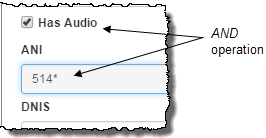
When you configure a callset with two or more distinct filters, the relationship among them is characterized by logical AND operators. That is, data must meet the filtering criteria of all configured filters to be reported.
An example of this is the Has Audio check box and the ANI filter being configured. Both filter statements must be true in order for data to be reported.
Multi-value filters
Several filters in the Basic callset creation method allow you to specify more than one value. How these multiple values interact with one another and what their aggregate effect is on the callset's filtering depends on which filter it is and what the meaning is of having multiple values in that filter. The reasons for having multiple values in a single filter can be divided into four categories: Drill-down specificity, range specificity, allowing for several true filter states (logical OR), and the grouping of filter values.
Drill-down filtering
There are several filters having multiple values meant to allow further specificity, in particular the Task filter and most of the State filters. Filters of this type typically have two or three columns. The left-most condition for one of these filters is typically the name of the state or task. The conditions to the right of this progressively add specificity to the filter. The filtering effect of the drill-down components in a single row is a restrictive one and the components relate to one another with a logical AND operator.

Range filtering
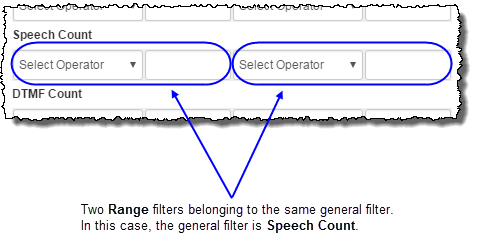
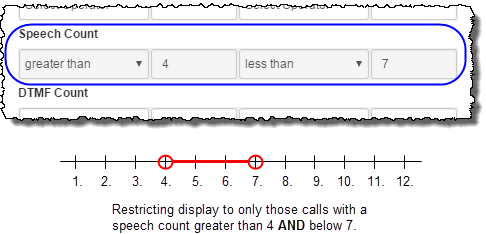
There are several filters within the Call Set Filter page that allow you to reduce the reported call data by restricting calls outside of a specified range. They are all in the Call Attributes area of the interface and include Duration in seconds, Speech Count, DTMF Count, No Match Count, No Input Count, Collection Count, and Confirmation Count. Each of these general filters includes two filters to allow you to specify beginnings and ends of the ranges you would like to see listed. When used in this way, one would typically select a greater than operator to go with the lowest limit of the range and a less than operator to go with the upper limit, thereby excluding all calls below and above the bracketed range. In this case, the relationship between the filter specifying the lower limit and the filter specifying the upper limit is characterized by an AND operator.
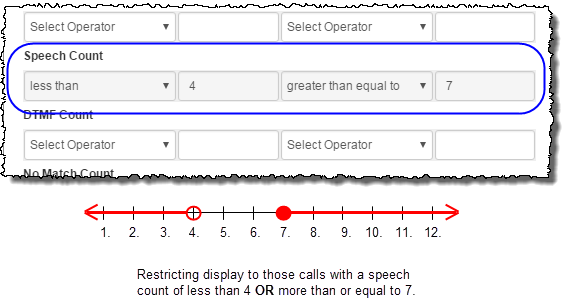
You may decide, instead, to EXCLUDE all calls between the lower and above the upper limits, but INCLUDE all calls below the lower limit and above the upper limit. In this case the relationship between the two filters is characterized by an OR operator.
Comma-separated values
Several filters allow you to configure multiple values as comma-separated entries within a single filter field. Filters that fall into this category are:
-
Any that allow a typed entry (for example, Session Id, DNIS) with the exception of the Result field in any of the State filters.
Note: The Result field in the State filters allow only one value. Comma-separated values are not supported in this field.
-
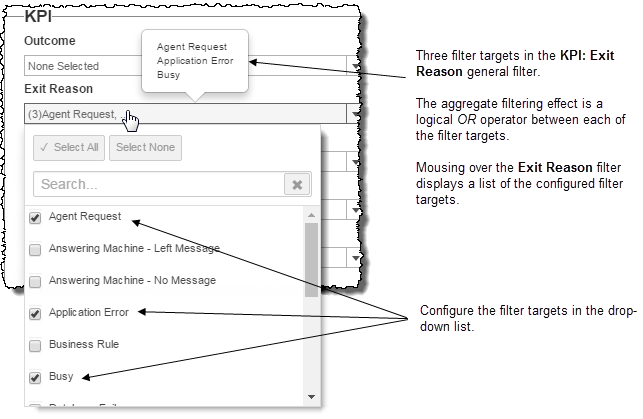
Any with a drop-down list of multiply selectable values (for example, KPI: Exit Reason, dimension filters, Play State)
Note: In the case of the drop-down list, mousing over the field displays a tooltip listing the multiple entries.
In all cases except the Play State filter, comma-separated values in the same filter field relate to one another with a logical OR operator. That is, a session's data will be reported if any of the configured filter values is true. By contrast, comma-separated values in the Play State filter relate to one another with a logical AND operator.


Multiple rows
The Task filter and the State filters - not including the Play State filter - allow you to configure multiple filter targets by adding rows. The filter targets from multiple rows become an aggregate grouping and are filtered as a single block. That is, a logical AND operator separates filter targets represented as rows such that only calls for whom all of the filtering targets are true will be reported.
For example, in the Task filter, if there are two filter targets (two rows), only sessions in which both configured name-category-detailTask filter targets occur (along with the configured filter values) will be reported in the callset.

