Resources panel Query Design pane
The Query Design pane contains the Filter and Query (field container) areas. It is displayed below the Data Pane, except when selected in Query Design View, which expands the size of the Query Design pane then displays in the Results Panel.
Query Field containers
Reports
Reports and charts have different field containers.
For all reports, the Query field containers in the Query Design Pane include Sum, By, and Across.
Use the Sum  field container to aggregate or display numeric measurement fields. Right-click menu options:
- Sum - default
- Print - displays individual values of the measures in the report.
- Count - displays total number of individual values for each measure (based on values of the By columns, if any).
- List - Displays individual values of measurements in the report and precedes each value with a consecutive, running number. The number resets to 1 when the value of the first By column changes.
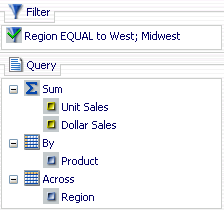
Use the By field container to produce row labels in the output so dimension fields are sorted vertically. Dimension fields are normally non-numeric or date fields.
Use the Across field container to produce column labels in the output so dimension (non-numeric or date) fields are sorted horizontally.
Charts
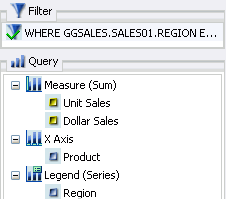
For most charts, Query field containers in the Query Design pane include Measure (Sum), X Axis, Legend (Series), and Coordinated. More complex charts that require additional data dimensions have alternative field containers.
- Measure (Sum) - aggregate or display numeric measure field values.
- X Axis - sort dimension (non-numeric or date) fields in the chart output.
- Legend (Series) - display dimension (non-numeric or date) fields as color-coded values (lines, bars, areas, scatter plots) that match the color-coded dimension values displayed in the legend below the chart. Legend (Series) provides functionality that is similar to an Across field in a report.
- Coordinated (Compound documents only) - collectively sort and collate by a common sort group.
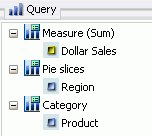
For pie charts, the Query field containers in the Query Design pane include Measure (Sum), Pie slices, Category, and Coordinated.
- Measure (Sum) - aggregate or display numeric measure field values in the pie.
- Pie slices - display dimension (non-numeric or date) fields as color-coded pie slices that match the color-coded dimension values. They are displayed in the legend below the chart. The Pie slices field container is the equivalent of the Legend (Series) field container used for other chart types.
- Category - sort dimension (non-numeric or date) fields in the chart output. Category is the equivalent of the X Axis field container used for other chart types.
- Coordinated (Compound documents only) - collectively sort and collate by a common sort group .
Query Design right-click options
In the Query Design pane, right-click any field and select from a list of available options.
The options vary depending on the field's Query field container and whether you are creating report or chart templates.
Reports
Field right-click behaviors for reports
Charts
Field right-click behaviors for charts
|
Measure field (Sum) |
X Axis or Legend field (Series) |
Coordinated field (compound documents only) |
|---|---|---|
|
Filter Values Visibility Change Title More Delete Select More to access Aggregation Functions and Traffic Light Conditions. |
Filter Values Sort Visibility Change Title Delete |
Displays all options except Change Title |
The right-click behavior for a field is based on the container in which the field is located. All right-click options available in the Query Design pane are also available in The Field Tab.
Right-click options in Query design for a selected field
