Barge-in settings
Some elements used in voice messages expose a Barge-in setting. This setting determines whether or not a consumer can interrupt the message. By default, barge-in is prevented for all voice message items. By specifying the barge-in behavior for certain message items, you can control where and how consumers can interrupt the message. For example, if your welcome message starts with a long greeting, you could enable selective barge-in so that consumers can jump to the menu system by pressing any key on their phone. Alternatively, to ensure that consumers listen to a legal notice, you should prevent barge-in for that message element.
The barge-in setting is available from selected elements in the Message Editor toolbar and the Audio dialog box:
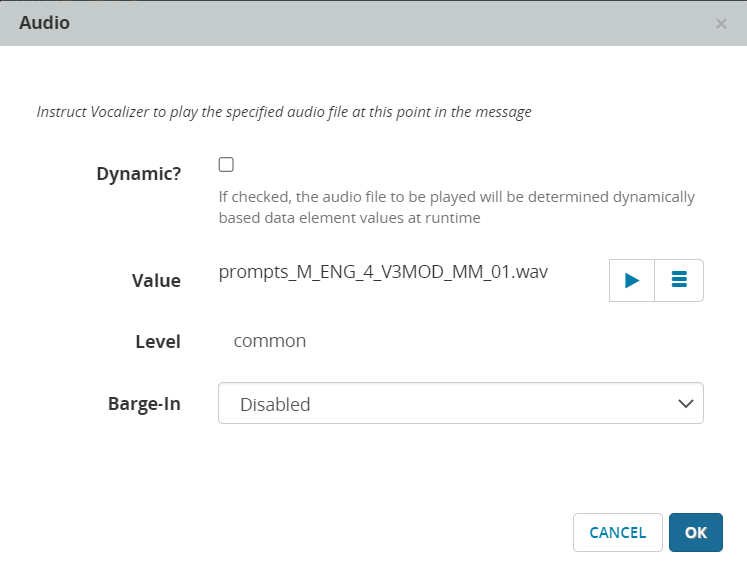
You can specify one of the following barge-in settings:
| Barge-in setting | Description |
|---|---|
| None | Consumer responses cannot interrupt the message item. This is the default setting. |
| Selective |
The utterance or DTMF (Dual Tone Multi Frequency, also called Touch Tones) must match an active grammar to interrupt the message item. The grammar must be loaded and active in the NVP Recognizer. Use this when you want only pre-defined responses to interrupt the message. For example, if you select Enable ASR in the module, and you define utterances for "previous", "next", and "main menu", Selective barge-in interrupts the message only if the consumer says one of the commands. |
| Speech |
Any utterance or DTMF Use this to allow any sound to interrupt the message. |
| Disabled | Consumer responses cannot interrupt the message item. |

The barge-in setting is available on the following elements in the Message Editor:
