Using Vocalizer with Speech Server
When using Vocalizer with Speech Server, Speech Server provides access to recognition and TTS services. The application uses VoiceXML to communicate with a voice browser, and the browser uses an MRCP client to communicate with Speech Server.
Vocalizer, MRCP, and Speech Server
The system supports text-to-speech features of the VoiceXML 2.0, MRCP version 1, and MRCP version 2 specifications. For details, see Integrating into VoiceXML platforms.
Speech Server can reside on any machine on the network, and can serve clients running on any operating system. A single Speech Server process can handle TTS requests for all the Vocalizer languages and voices installed on the host. There is no hard limit on the number of languages and voices.
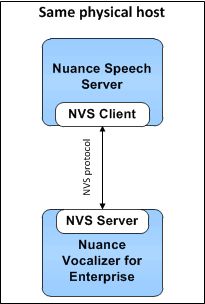
In the simplest configuration, the Vocalizer client incorporated in the Speech Server communicates directly with Vocalizer via the NVS protocol. Vocalizer then communicates to Nuance Vocalizer for Enterprise to perform the request, and sends back the results.
Speech Server and Vocalizer can run on the same host:
However, they may instead be installed on separate hosts:
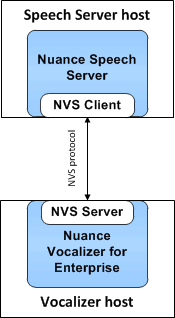
When Vocalizer is installed on a different host, you must supply its IP address in the NSS configuration file, so the Speech Server is able to direct its requests.
Speech processing call flow
Here is a simplified speech processing call flow, with an emphasis on the roles of Speech Server, Vocalizer, and the speech application. The process may vary depending on the telephony features implemented in actual deployment.
- The voice browser receives a call and starts the session. Use the session.xml file to configure the session defaults for all components.
- The voice browser parses the application’s VoiceXML pages, and queues prompts internally. The application indicates the initial language, accent, and voice to use for the TTS request, and it can make changes at any time.
- When the application requests recognition or makes another major call transition (such as initiating a call transfer or a prolonged database lookup), the browser asks Speech Server to play the queued prompts (MRCP SPEAK request), then asks Speech Server to start the recognition (MRCP RECOGNIZE request).
- Speech Server sends the prompt text to be synthesized (and/or the recording list to be played) to Vocalizer and sends the recognition request to the recognizer.
- Vocalizer delivers an audio stream to Speech Server, which then delivers the audio over an RTP stream to the voice browser. Alternatively, Speech Server can deliver the audio inside SPEECHDATA messages as described in Delivering prompts via MRCP.
- The browser plays the audio over the telephony interface to the caller.
- If the caller interrupts a prompt (barge-in), Speech Server signals Vocalizer to stop audio playback.
- Speech Server sends recognition results to the voice browser, which in turn formats the result for the application.
- The application responds appropriately; for example, by making a database lookup, or requesting that Speech Server play another prompt to the user.
More detail is provided below.
 Establish a session
If there is no current active session, the browser must establish one. In an active session, the INVITE is not required.
- The browser uses the SIP INVITE method to establish a session with Speech Server. You can establish one or more sessions on this connection by sending an INVITE message for each new session (telephone call).
Before processing calls, the browser must first open a port on the host using a TCP, TLS, or UDP connection. (The SIP default is UDP. The following example shows TCP port 5060.) The connection is to a port defined by one of the following Speech Server parameters:
- server.mrcp2.sip.transport.tcp.port
- server.mrcp2.sip.transport.udp.port
- server.mrcp2.sip.transport.tls.port
In the INVITE message, specify the attribute resource attribute name "speechsynth", as in the following example: This requests the server to create a synthesizer resource control channel to generate speech, and to add a media pipe to send the generated speech. In the following requests, the client asks to use the existing connection.
Client->Server:
 INVITE sip:mresources@server.example.com:5060 SIP/2.0
 Via: SIP/2.0/TCP mrcpclient.nuance.com:2000;branch=z9hG4bK007ecb513
 Max-Forwards:6
 To:MediaServer <sip:mresources@example.com:5060<;tag=3D62784
 From:client_user <sip:client_ user@example.com:2000<;tag=3D1928301774
 Call-ID:a84b4c76e66710
 CSeq:314161 INVITE
 Contact:<sip:client_user@client.example.com:2000>
 Content-Type:application/sdp
 Content-Length:446

 v=3D0
 o=3Dsarvi 2890844526 2890842808 IN IP4 192.0.2.4
 s=3DSet up MRCPv2 control and audio
 i=3DAdd TCP channel, synthesizer and one-way audio
 c=3DIN IP4 192.0.2.12
 m=3Dapplication 9  TCP/MRCPv2 1
 a=3Dsetup:active
 a=3Dconnection:new
 a=3Dresource:speechsynth
 a=3Dcmid:1
 m=3Daudio 49170 RTP/AVP 0 96
 a=3Drtpmap:0 pcmu/8000
 a=3Drecvonly
 a=3Dmid:1
- The OK response to the SIP INVITE contains a great deal of information on what requested resources are actually provided, the RTP ports where the application expects to receive the audio data, and the port (TCP, UDP, or TLS) where the client connects for MRCPv2 messages.
Server->Client:
 SIP/2.0 200 OK
 To:MediaServer <sip:mresources@example.com<;tag=3D62784
 From:sarvi <sip:sarvi@example.com<;tag=3D1928301774
 Call-ID:a84b4c76e66710
 CSeq:314161 INVITE
 Contact:<sip:mresources@server.example.com>
 Content-Type:application/sdp
 Content-Length:...

 v=3D0
 o=3Dsarvi 2890844526 2890842808 IN IP4 192.0.2.4
 s=3DSet up MRCPv2 control and audio
 i=3DAdd TCP channel, synthesizer and one-way audio
 c=3DIN IP4 192.0.2.11
 m=3Dapplication 32416  TCP/MRCPv2 1
 a=3Dsetup:passive
 a=3Dconnection:new
 a=3Dchannel:32AECB23433801@speechsynth
 a=3Dcmid:1
 m=3Daudio 48260 RTP/AVP 0
 a=3Drtpmap:0 pcmu/8000
 a=3Dsendonly
 a=3Dmid:1
- When the client receives the OK, it returns a SIP ACK to Speech Server to confirm that it received the information and established the session.
The client can open multiple connections and establish multiple sessions over each connection. Each session is subject to session timeout rules as defined by the Speech Server configuration. If the Speech Server receives no traffic for longer than the configured session timeout period (server.mrcp2.transport.timeout), it deletes the session and responds to further MRCP messages for that session with the Session Not Found error message. Each session is subject to session timeout rules as defined by the Speech Server configuration (for example, 20 seconds).
C->S:
 ACK sip:mresources@server.example.com SIP/2.0
 Max-Forwards:6
 To:MediaServer <sip:mresources@example.com<;tag=3D62784
 From:Sarvi <sip:sarvi@example.com<;tag=3D1928301774
 Call-ID:a84b4c76e66710
 CSeq:314162 ACK
 Content-Length:...
Set appropriate parameters
The browser can set TTS parameters using the SPEAK or SET-PARAMS method.
Voice qualities
The application tells Speech Server which initial language, accent, and/or voice to use for the TTS request. Note that the input text for the TTS request can also contain markup to switch the language and/or voice.
Vocalizer supports several MRCP headers that control characteristics of the speech to be synthesized.
- Speech-Language
- Voice Name
- Voice-Gender
Load special dictionaries
In MRCPv2 you can load special dictionaries using the MRCP DEFINE-LEXICON method. You can control dictionary loading with the following Nuance vendor-specific parameters:
- switts.ssftrs_dict_load
- switts.ssftrs_dict_unload
- switts.ssftrs_dict_enable
- switts.ssftrs_dict_disable
The DEFINE-LEXICON request can only be used to load Vocalizer dictionaries. To load Vocalizer ActivePrompt databases and rulesets, use the SSML <lexicon> or the Vocalizer <default_rulesets> XML configuration (ttsshclient.xml).
Protect confidential data
Use the vendor-specific parameters switts.secure_context or switts.mute_wcr to determine whether the result of the text-to-speech synthesis is included in the saved waveform. See Security levels to protect confidential data.
Generate speech
The browser issues an MRCP SPEAK request to the synthesizer to generate the audio (prompt).
Prompts are queued for playback, and are not played until input is needed from the caller. At this point, the prompts are played, and the system waits for user input (speech or DTMF) to send for recognition.
Client->Server:
MRCP/2.0 386 SPEAK 543257
Channel-Identifier:32AECB23433801@speechsynth
Kill-On-Barge-In:false
Voice-gender:neutral
Voice-age:25
Prosody-volume:medium
Content-Type:application/ssml+xml
Content-Length:...
<?xml version="1.0"?>
<speak version="1.0"
xmlns="http://www.w3.org/2001/10/synthesis"
xmlns:xsi="http://www.w3.org/2001/XMLSchema-instance"
=xsi:schemaLocation="http://www.w3.org/2001/10/synthesis
http://www.w3.org/TR/speech-synthesis/synthesis.xsd"
xml:lang="en-US">
<p>
<s>You have 4 new messages.</s>
<s>The first is from Stephanie Williams
<mark name="Stephanie"/>
and arrived at <break/>
<say-as interpret-as="vxml:time">0345p</say-as>.</s>
<s>The subject is <prosody rate="-20%"<ski trip</prosody></s>
</p>
</speak>
S->C:
MRCP/2.0 49 543257 200 IN-PROGRESS
Channel-Identifier:32AECB23433801@speechsynth
Speech-Marker:timestamp=3D857205015059
The synthesizer reads the special marker in the message (<mark> element) and informs the client of the event.
S->C:
MRCP/2.0 46 SPEECH-MARKER 543257 IN-PROGRESS
Channel-Identifier:32AECB23433801@speechsynth
Speech-Marker:timestamp=3D857206027059;Stephanie
The synthesizer finishes with the SPEAK request.
S->C:
MRCP/2.0 48 SPEAK-COMPLETE 543257 COMPLETE
Channel-Identifier:32AECB23433801@speechsynth
Speech-Marker:timestamp=3D857207685213;Stephanie
Return audio
For most browsers, Speech Server sends prompts (output audio) over the Real-Time Protocol (RTP), using the socket established at the beginning of the session. This allows applications to play the audio output for the initial blocks of text to callers while the TTS engine is still processing the blocks of text that follow, minimizing caller-perceived latency. The application can specify the desired audio format (A-law, ì-law, 16-bit linear).
