Building Call Duration reports
The Call Duration report displays histograms showing the distribution of alert calls by their duration in minutes. You can select from the standard query fields, including date range, the alert type, and report type. You can also specify the length of each interval and exclude calls that exceed a specified time.
Use Call Duration reports to track how long notifications play on average. You can compare durations for live calls, answering machine calls, and alert retrieval calls. You can select data for alerts sent or alerts received.
Call duration is defined as the number of seconds that a consumer was connected during a voice alert. It is measured from the moment the consumer's phone goes off-hook to the moment the consumer is successfully transferred to the client's call center or the consumer hangs up. Time spent dialing the call center and time spent waiting on hold to connect to the call center are included in this value.
See also:
To build the report:
- In the header, click REPORTS.
- In the left nav bar, click ANALYSIS > CALL DURATION. You should see the Call Duration Report query screen.
- Under Date Range, select Alerts Sent Between or Alerts Received Between.
- Enter a Date Range. Data is available for up to the past 13 months, but report query spans must be 31 days or less.
- Select a Reporting Domain. The options are defined by your application.
- Select the Alert Type to report on. Select ALL to report on all alert types. The other types are defined by your application.
- Select the Report Type. The options are Latest Attempt or All Attempts.
- Select # seconds per interval. For example, if you select "10 seconds", calls from 1 to 10 seconds will be put into the first category, calls from 11 to 20 seconds will be put into the second category, and so on. The options are:
- 10 seconds
- 15 seconds
- 30 seconds
- 1 minute
- Select Maximum minutes per call. Calls that are longer than the specified time will be excluded from the report. The options are:
- 5 minutes
- 10 minutes
- 15 minutes
- 20 minutes
- Select the Type of Data. The options are Production Data or Test Data.
- Click Run Report.
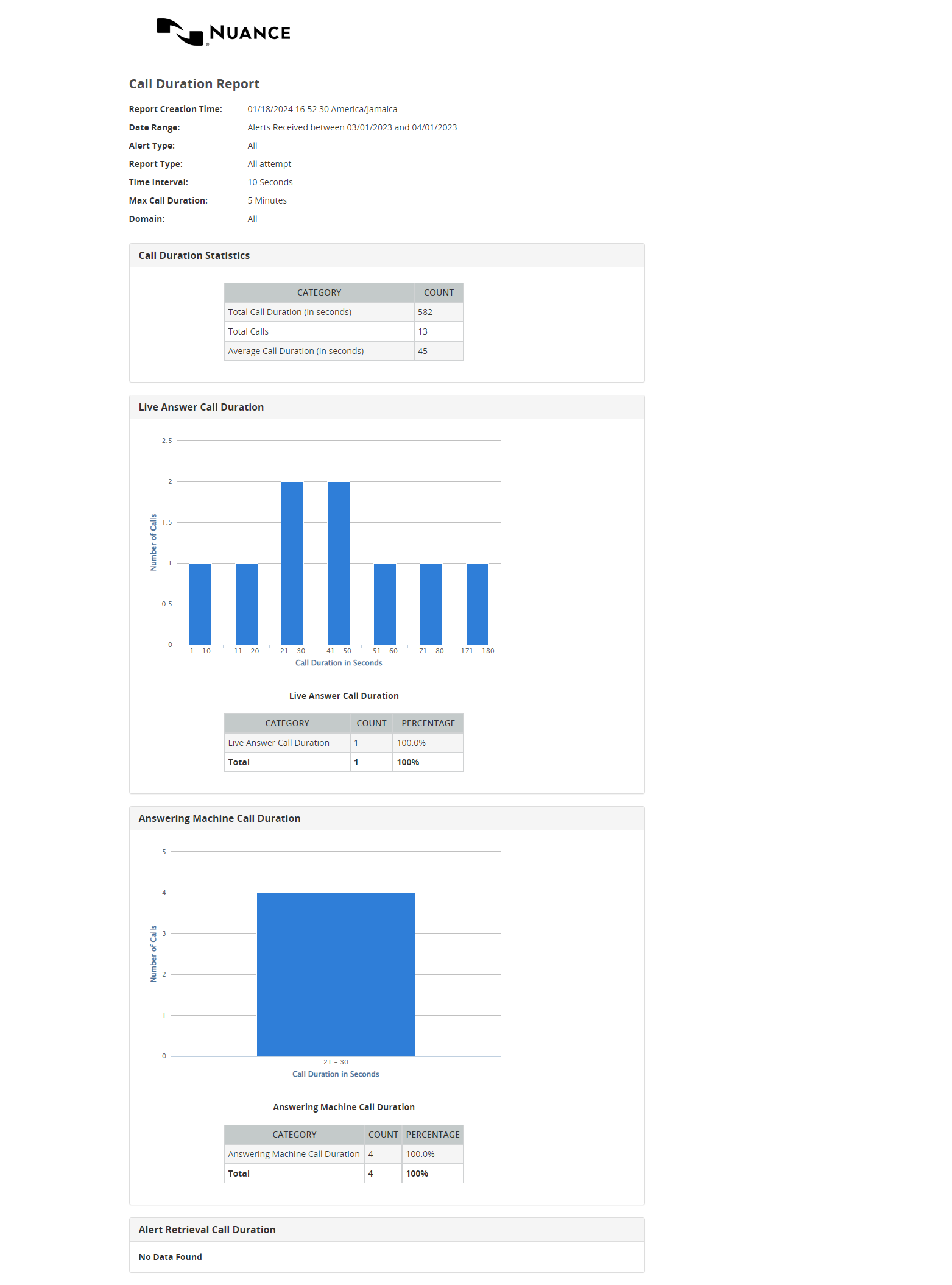
Below is an example of a Call Duration report. It contains four sections:
- A summary of call duration for all categories of calls (live answer, answering machine, and alert retrievals)
- Call duration for live answer calls
- Call duration for answering machine calls
- Call duration for alert retrieval calls