Open a project for editing (MOD projects only)
Before you can create messages, Nuance Professional Services creates the base project where your messages will reside. Professional Services customizes this project for you, for example, it customizes email templates for your enterprise branding.
Note: You can create and modify message content in MOD projects only. In standard projects, Nuance creates the message content according to the requirements of the client. To make changes to standard projects, contact your Nuance representative.
Your messages exist within a project that you must open (or launch) to edit.
- To view a list of available projects, click the Projects tab on the header bar.
The following example shows two projects, MOD Tutorial 1 and MOD Tutorial 3.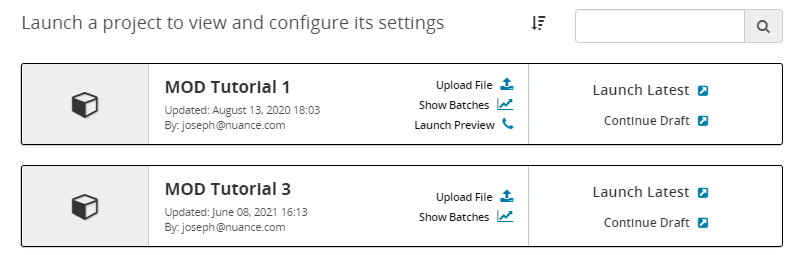
- Do one of the following to open a project for editing:
-
To edit the project, click Launch Latest.
-
To edit a previously saved draft version of the project, click Continue Draft.
-
After a few seconds, the Project Editor page opens, for example:


Note: If you open the project for editing and do not see a button for Messages as shown here, then the project is not an MOD Project and is not editable. If you want to make changes to the messages in the project, you should contact your Nuance representative.
This page has the following options:
| Option | Description | For details, see... |
|---|---|---|
| Messages | Displays the message tree so you can work with messages. | Manage messages (MOD projects only) |
| Preview | Tests the project with sample data. | Preview a message with sample data |
| Publish changes | Publishes the current draft so it will be available for use. Draft versions are not available for use. | Publish a draft project (MOD projects only) |
| Keep as draft |
Saves the current draft for future use, without publishing it. Tip: Use this when you aren't ready to use the draft, and you want to save it. |
n/a |
| Discard this draft and return to Projects |
Exits this draft and discards all changes. Tip: Use this when you don't want to save your draft, for example, if something went wrong, and you want to return to the last good version. |
n/a |
