Nuance Recognizer call flow
Nuance Recognizer accepts spoken or written speech and returns literal and semantic results. A recognition includes the following steps between the browser, Speech Server, and Nuance Recognizer:
- Preload grammars and acoustic models. Preload common or large grammars and the associated acoustic models at system initialization, so that they are available quickly for any session.
- Establish a session. Use SIP INVITE method to open a communications port. Determine available codecs.
- Prepare for recognition. Load any additional context-specific grammars and configure the Recognizer. This phase and the following phase are often both accomplished with a single RECOGNIZE request.
- Perform recognition. Send audio through Speech Server to the Recognizer, which starts the recognition.
- End recognition. End the recognition and get the results. Return the results to the application.
- Perform additional recognitions. Perform as many recognitions as needed within the active session.
- End the session.
This figure shows the series of calls that happen during the recognition process. The figure does not include any prompts, which would normally precede a recognition. For a simplified call flow that includes prompts, see Speech processing call flow.
- This diagram illustrates MRCPv2 signaling.
- The numbering of particular calls corresponds to the descriptions in the sections that follow the diagram.
- Click an area on the diagram to go directly to the description.
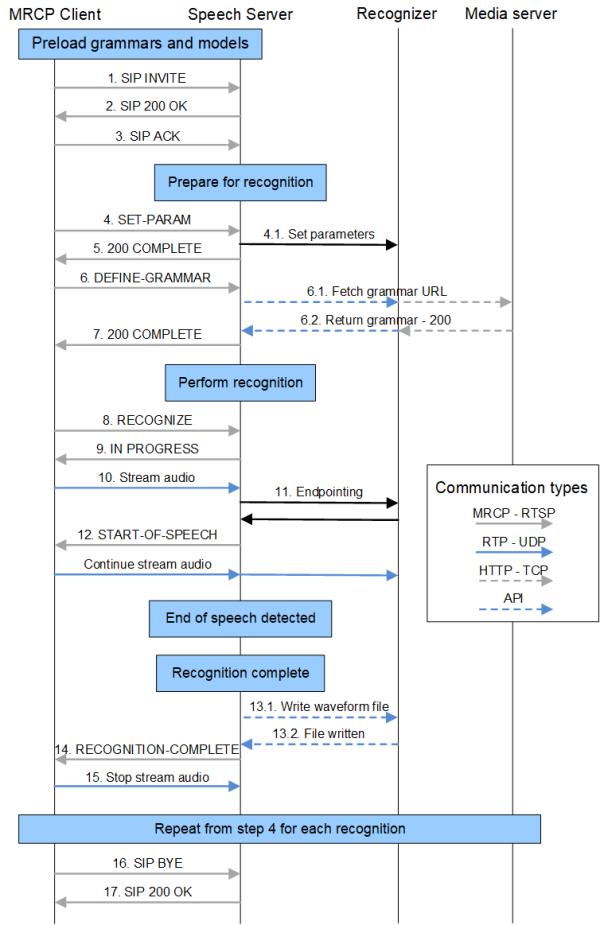
 Preload grammars and acoustic models
To avoid delays during processing of a call, you can load grammars at system initialization. By pre-loading a grammar, the voice platform reduces load on the CPU once the system begins receiving telephone calls. Large grammars and grammars that are frequently needed are candidates for pre-loading. When determining which grammars to preload, you must balance the benefit of a nearly instantaneously available grammar with the size of the grammar once compiled and the chance that the grammar will not be used.
If a grammar is not compiled, loading the grammar automatically compiles it. You can also compile grammars offline using the sgc tool.
Preload grammars
You can preload grammars as follows:
- Grammar preload file (SWIgrmPreload.xml)—To use a file that lists the grammars to be preloaded. For a brief description, see the configuration parameter swirec_preload_file.
- MRCP DEFINE-GRAMMAR method—To use an isolated DEFINE-GRAMMAR method to load a grammar prior to needing it for a specific recognition. Nuance Recognizer automatically stores source grammars (but not string grammars) in its disk and memory caches. Because the caches are shared across all sessions, a cached grammar is available to all active sessions until the grammar is removed from the cache.
In the following example, the client tells the server to load a built-in grammar and give it the session scope name of testgrammar@nuance.com.
Client->Server:
MRCP/2.0 nn DEFINE-GRAMMAR 101
Content-Length: nn
Channel-Identifier: 1@speechrecog
Content-Type:text/uri-list
Content-Id: testgrammar@nuance.com
builtin:grammar/digits?language=en-us
Server->Client:
MRCP/2.0 nn 101 200 COMPLETE
Channel-Identifier: 1@speechrecog
Voice platform integrators may want to exercise control of the Nuance Recognizer caching mechanisms. For example, you can preload grammars and determine how long grammars remain in the caches.
A useful feature is this regard is Dynamic-Link grammars. By designing modular grammars that are bound at runtime, applications can isolate static portions of grammars that are good candidates for pre-loading and leave the smaller, dynamic portions to be loaded as needed. The voice platform can detect dynamic grammars by the distinctive URI syntax used by the application. For a discussion, see Understanding grammar caching.
Preload acoustic models
Since loading each set of acoustic models takes a relatively long time, do this during initialization to optimize performance during the first telephone calls to the application.
You can preload acoustic models using a "provisioning" INVITE that includes a session.xml file specifying the models to load (swirec_model_name or swirec_secondpass_model_name parameters). See Configuring sessions (session.xml).
Note: When a grammar is loaded, Nuance Recognizer also loads any needed acoustic and language models for that grammar. Nuance recommends that the platform preload at least one grammar (any grammar) for each language recognized by the system (or application), so that the acoustic models for those languages will also be loaded.
Establish a session
If there is no current active session, the browser must establish one. In an active session, the INVITE is not required.
- SIP INVITE. The browser uses the SIP INVITE method to establish a session with Speech Server. You can establish one or more sessions on this connection by sending an INVITE message for each new session (telephone call).
Before processing calls, the browser must first open connection to a port on the server. Use the appropriate port as defined for your transport mechanism, one of the following:
Mechanism
Port definition parameter
TCP
UDP
TLS
server.mrcp2.sip.transport.tls.port The browser can re-use a connection with a server for multiple phone calls. This is useful, for example, to gain more control over the grammar lifetimes on the server. To do this, the client issues a RECOGNIZE command with a New-Audio-Channel header. This command resets the internal acoustic state for the recognizer and places it back in a state ready to receive new calls. Do not use this header during a single call because it decreases accuracy.
The following example connects to a UDP port. In the INVITE message, specify the attribute resource name "speechrecog" or "speechsynth", or both (as shown):
Client->Server:
INVITE sip:mresources@mrcpserver:5060 SIP/2.0
Via: SIP/2.0/UDP mrcpclient.nuance.com:2000;branch=z9hG4bK007ee8bd267cb513
Contact: <sip:clien_user@mrcpclient.nuance.com>
Max-Forwards: 6
To: MediaServer <sip:mresources@mrcpserver:5060>
From: clien_user <sip:clien_user@mrcpclient:2000>;tag=8fb047fa
Call-Id: 39d3eaee5fa945da
Cseq: 1769940104 INVITE
Content-Type: application/sdp
Content-Length: 446
v=0
o=client_user 2890844526 2890842808 IN IP4 mrcpclient.nuance.com
s=SomeSIPsession
m=application 9 TCP/MRCPv2 1
c=IN IP4 10.3.20.14
a=resource:speechrecog
a=setup:active
a=connection:new
a=cmid:1
m=application 9 TCP/MRCPv2 1
c=IN IP4 10.3.20.14
a=setup:active
a=connection:existing
a=resource:speechsynth
a=cmid:1
m=audio 37774 RTP/AVP 0 96
c=IN IP4 10.3.20.14
a=rtpmap:0 pcmu/8000
a=rtpmap:96 l16/8000
a=sendrecv
a=mid:1
- SIP 200 OK. The OK response describes the provided resources including the RTP ports (for the application to send the audio data), and the port (either TCP, UDP, TLS) where the browser connects for MRCPv2 messages. The RTP port is always an even number (per the RTP standard), and the next higher number is used for the RTCP port.
Note: In certain situations, the browser can send and receive audio through MRCP SPEECHDATA messages instead of using RTP. For details, see Sending speech requests over TCP (for input audio) and Delivering prompts via MRCP (for output audio).
- SIP ACK. When the client receives the OK message, it returns a SIP ACK message to Speech Server to confirm that it has received the information and established the session.
The client can open multiple connections and establish multiple sessions over each connection. Each session is subject to session timeout rules as defined by server.mrcp2.transport.timeout in the Speech Server configuration. If the server receives no traffic for longer than the timeout parameter, it deletes the session and responds to further MRCP messages for that session with the Session Not Found error message.
Determine available codecs
To get a list of supported codecs in the response, the MRCPv2 client can send a SIP OPTIONS message to the server. Speech Server supports only G.711 for audio and DTMF using RFC 2833. Future releases may support additional codecs.
Prepare for recognition
After establishing a connection, the client identifies the MRCPv2 session in all subsequent messages by including the MRCPv2 Channel-Identifier header.
Before performing an actual recognition, the client prepares the Recognizer on behalf of the application. Generally, the client performs these tasks for each recognition, but it also set them at a more global scope depending on how frequently they need to be changed.
- Specify grammars needed: The client must specify at least one grammar to define the recognition context. The client can set make a grammar to be available for all recognitions (for example, a global command grammar), and make grammars available for a single recognition events (for the specific context needed).
- Set appropriate parameters: The client sets parameters before each recognition. This enables application to tune individual recognition events.
- Set bargein/hotword mode: The client can allow or disallow bargein for each recognition event. This enables applications to force the playback of an entire prompt, and to tune recognitions after detecting accidental bargein.
- Set whole-call recording security: The client can prevent writing confidential data to any audio waveforms saved during the session.
- SET-PARAM. Before recognition of each utterance, set the appropriate recognition parameters. These include timers, settings for logging or saving waveforms, and so on. See Controlling speech recognition and TTS.
- 200 COMPLETE. Speech Server sends a COMPLETE message to the client to confirm that the requested parameters are set.
Before a recognition, the VoiceXML application uses the <grammar> element to specify the needed grammars. Applications can specify any application-defined grammar, any of the built-in grammar URIs defined in the VoiceXML specification, and any of the additional built-in grammar URIs provided with Nuance Recognizer. For an overview of all built-in grammars, see Grammar documents. For details on their return codes and configuration, see the appropriate Nuance Recognizer Language Supplement.
The MRCP specification allows weights to favor a grammar in relation to other activated grammars. The Recognizer accepts weight values as integers in range of 1 to 32767. The default value is 1, which exerts no preference for the grammar.
- DEFINE-GRAMMAR. In response to the <grammar> element, the browser requests the grammars using the MRCP RECOGNIZE or DEFINE-GRAMMAR method. Once defined, grammars are available to the client (on this particular server) for the duration of the session.
- Use DEFINE-GRAMMAR to preload grammars. This is not required (because you can send grammar requests with RECOGNIZE), but is important for avoiding delays when using large grammars or when provisioning grammar. For details, see Preload grammars and acoustic models.
- Use RECOGNIZE to load grammars and perform the recognition with a single method. These can be special-purpose, personalized, or context-dependent grammars that were not identified in advance for pre-loading. The client can refer to grammars a grammar URI or a Content-Id header. Alternatively, the client can pass actual grammars in the RECOGNIZE message (these are known as inline grammars).
- 200 COMPLETE. Speech Server returns a COMPLETE message to confirm that the requested grammars are loaded.
The client must set the barge-in mode for each recognition. There are two settings:
- Whether bargein is permitted or not (bargein)
- If bargein is permitted, whether it uses hotword (bargeintype). This is not common for most applications. For details, see Selective barge-in and magic word (MRCPv1 & MRCPv2).
Set whole-call recording security
To determine whether confidential information is allowed in any saved waveforms, use the vendor-specific parameters swirec.secure_context or swirec.mute_wcr. For details, see Security levels to protect confidential data.
Perform recognition
When the prompt playback is complete, and the application is waiting for speech from the user, the client uses the START-INPUT-TIMERS method to tell the server to start the input timer.
- Prior to receiving the message, the server assumes that the audio being received may contain additional speech from an outgoing prompt.
- After receiving the START-INPUT-TIMERS, the server increases the sensitivity of the speech detector. This behavior improves barge-in accuracy.
- RECOGNIZE. When the application is ready to perform a recognition, the client sends a RECOGNIZE message to start the recognition.
- IN-PROGRESS. Speech Server returns an IN-PROGRESS response. To ensure proper recognition, Nuance recommends waiting for the response before sending the audio to be recognized.
In the following example, the browser/client tells the server which grammars to use for recognition. (It uses the grammar session scope name that was defined in a previous DEFINE-GRAMMAR message. For an example, see Preload grammars and acoustic models.)
Client->Server:
MRCP/2.0 nn RECOGNIZE 102
Content-Length:nn
Content-Type:text/uri-list
Channel-Identifier: 1@speechrecog
session:testgrammar@nuance.com
Server->Client:
MRCP/2.0 nn 102 200 IN-PROGRESS
Channel-Identifier: 1@speechrecog
Send audio
- Stream audio. After starting the recognition, the client streams audio to the server until the recognition is complete. Typically, the client uses an RTP connection to send the audio. Alternatively, frame the audio in SPEECHDATA messages (see Sending speech requests over TCP).
- Endpointing. In most cases, the client sends all of the audio received to the server and allows the Recognizer to perform speech detection. (The Recognizer automatically finds the start and end of speech in the audio stream.)
Alternatively, the client can provide its own mechanism for endpointing, and then deliver the already-endpointed audio. In this scenario, the Recognizer’s endpointer must be turned off. (If the gateway uses Voice Activity Detection, then enable the endpointer.)
- START-OF-SPEECH. Speech Server receives the audio, delivers audio samples to the Recognizer, and monitors the Recognizer’s status. When the Recognizer detects speech, Speech Server sends a START-OF-SPEECH message to the client (except when using the selective_barge_in or magic_word modes).
After recognition, the Speech Server writes the waveform to the local file system.
- RECOGNITION-COMPLETE. Speech Server sends a RECOGNITION-COMPLETE message to the client and performs the following:
- Read NLSML-format recognition results.
- If the speaker’s spoken utterance is needed, send pointer to waveform to browser.
- If DTMF was pressed and the voice platform would like to use the Recognizer to process the DTMF sequence based on a DTMF grammar, start DTMF recognition.
- The browser stops streaming audio.
Receive a result
The system returns recognition results using the Natural Language Semantic Markup Language (NLSML) as specified by the W3C. See the VoiceXML and MRCP standards documentation for details. For information on result mediatypes and encoding, see Configuring recognition resources.
Perform additional recognitions
The browser can repeat the sequence of defining grammars, configuring the Recognizer, and performing recognitions as often as needed during a call. In subsequent recognitions, the SET-PARAM and DEFINE-GRAMMAR calls are not required (assuming the necessary information is contained in an earlier SET-PARAM or DEFINE-GRAMMAR message).
During a telephone call, the browser can move the session to a different recognition server while preserving the Recognizer state. This is useful when a call needs to use a large grammar preloaded on a different recognizer. To accomplish this, the client uses the GET-PARAMS method with the Recognizer-Context-Block header. In response, the server returns a Recognizer-Context-Block containing the state of the Recognizer for that session, which the client can forward to a new server using SET-PARAMS.
End the session
- SIP BYE. When the browser wants to terminate the connection to the server, it issues a SIP BYE message. This removes the session from the server and destroys all resources allocated for the session. To remove a resource from a session, send a SIP RE-INVITE with a control m-line of port 0.
- SIP 200 OK. Speech Server confirms that the session is over with an OK message.
A note about DTMF processing
Speech Server can parse and recognize DTMF signals delivered via IETF RFC 2833 in the RTP stream using a configurable RTP packet type. DTMF results are handled the same as speech recognition.
The W3C grammar format defines DTMF grammars in the same way as speech grammars. The grammar format defines valid DTMF sequences and semantic computations that can be applied to the recognized DTMF sequence before returning a result.
To use the recognition server for DTMF processing, the browser loads DTMF grammars and then deliver DTMF over RTP. Because the server can process both DTMF and speech in the same way, the browser is not required to determine beforehand if it is expecting DTMF or speech for a particular grammar. However, this is required for parallel grammars in VoiceXML that register both a DTMF grammar and a speech grammar.
In a system that accepts both voice and DTMF input, you can report DTMF barge-in to the browser by setting the parameter server.mrcp2.osrspeechrecog.startOfInputOnDTMF or server.mrcp1.osrspeechrecog.startOfSpeechOnDTMF. This sends a START-OF-INPUT event when DTMF input is detected.
Saving audio files
Speech Server can save the incoming audio stream used for recognition, and provide a URI of the resulting file to the browser. To control the feature, the waveform-logging parameters identify the location of the web server, the location for writing files, and the amount of data that can be written. See Saving audio files.
This Speech Server feature is unrelated to whole call recording (WCR), and to the Recognizer’s logging of audio waveforms. You control these features separately, and they result in different waveforms saved to different locations. (For troubleshooting purposes, you can compare pairs of files created by the mechanisms in search of unexpected differences.)
